Searchable PDF text layer
External User Guide Registration of A Manufacturer of Medical Products Emirates Drug Establishment, Abu Dhabi, United Arab Emirates | اﻹمارات الع ة المتحدة، أبوظ،مﺆﺳﺴﺔ اﻹمارات للدواء www.ede.gov.ae
Currentness under review. Whether this instrument remains applicable is under review. Consult the later instruments and source context below before relying on it.
Original page images are authoritative. Searchable text is the PDF text layer and may omit image text or contain extraction artifacts. Quote and verify against the page images.
Link directly to a passage with its anchor — for example #pdf-page-1 — to open it highlighted. This reference version is generated from the authority’s publication and does not replace it. Language: English.
External User Guide Registration of A Manufacturer of Medical Products Emirates Drug Establishment, Abu Dhabi, United Arab Emirates | اﻹمارات الع ة المتحدة، أبوظ،مﺆﺳﺴﺔ اﻹمارات للدواء www.ede.gov.ae
Registration of A Manufacturer of Medical Products– External User Guide Table of Contents 1. Brief Overview ........................................................................................................... 3 2. Apply for Service ....................................................................................................... 4 2.1 Create a New Application ..................................................................................... 5 2.2 Complete Application ........................................................................................... 6 2.2.1 Site Registration ........................................................................................... 7 2.2.2 Site Renewal .............................................................................................. 23 2.2.3 Site Minor Variation ..................................................................................... 24 2.3 Review Application ............................................................................................ 25 2.4 Checkout .......................................................................................................... 26 2.4.1 Site Registration ......................................................................................... 27 2.4.2 Site Renewal .............................................................................................. 27 2.4.3 Site Minor Variation ..................................................................................... 28 3. Take Required Actions................................................................................................ 28 3.1 Application Correction ........................................................................................ 29 4. Rejected Applications ............................................................................................... 30 5. Printouts ................................................................................................................. 31 6. Appendix ................................................................................................................ 32 Emirates Drug Establishment, Abu Dhabi, United Arab Emirates | اﻹمارات العربية المتحدة، أبوظبي،مﺆﺳﺴﺔ اﻹمارات للدواء www.ede.gov.ae Page | 2
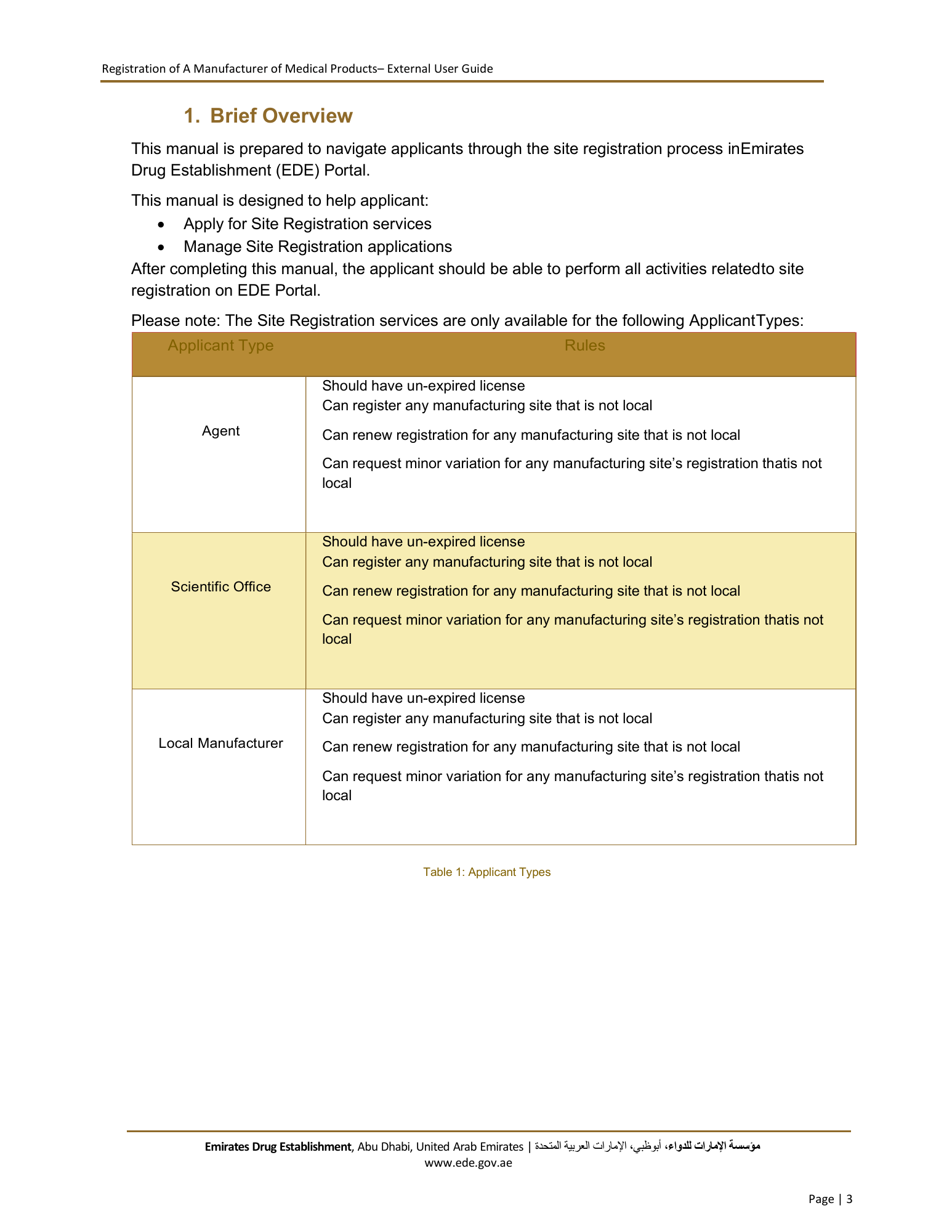
Registration of A Manufacturer of Medical Products– External User Guide 1. Brief Overview This manual is prepared to navigate applicants through the site registration process in Emirates Drug Establishment (EDE) Portal. This manual is designed to help applicant: Apply for Site Registration services Manage Site Registration applications After completing this manual, the applicant should be able to perform all activities related to site registration on EDE Portal. Please note: The Site Registration services are only available for the following Applicant Types: Applicant Type Rules Should have un-expired license Can register any manufacturing site that is not local Agent Can renew registration for any manufacturing site that is not local Can request minor variation for any manufacturing site’s registration thatis not local Should have un-expired license Can register any manufacturing site that is not local Scientific Office Can renew registration for any manufacturing site that is not local Can request minor variation for any manufacturing site’s registration thatis not local Should have un-expired license Can register any manufacturing site that is not local Local Manufacturer Can renew registration for any manufacturing site that is not local Can request minor variation for any manufacturing site’s registration thatis not local Table 1: Applicant Types Emirates Drug Establishment, Abu Dhabi, United Arab Emirates | اﻹمارات العربية المتحدة، أبوظبي،مﺆﺳﺴﺔ اﻹمارات للدواء www.ede.gov.ae Page | 3
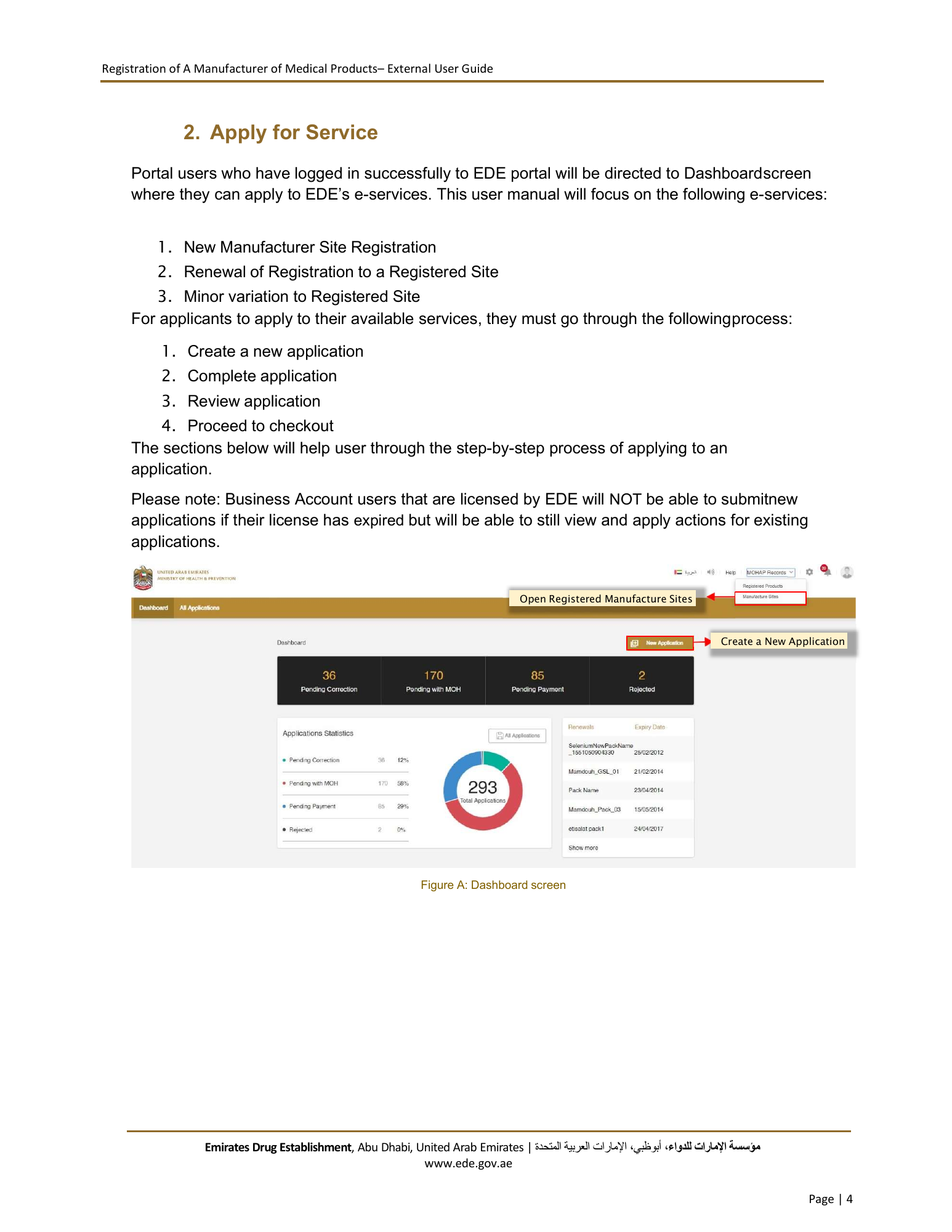
Registration of A Manufacturer of Medical Products– External User Guide 2. Apply for Service Portal users who have logged in successfully to EDE portal will be directed to Dashboard screen where they can apply to EDE’s e-services. This user manual will focus on the following e-services: 1. New Manufacturer Site Registration 2. Renewal of Registration to a Registered Site 3. Minor variation to Registered Site For applicants to apply to their available services, they must go through the following process: 1. Create a new application 2. Complete application 3. Review application 4. Proceed to checkout The sections below will help user through the step-by-step process of applying to an application. Please note: Business Account users that are licensed by EDE will NOT be able to submitnew applications if their license has expired but will be able to still view and apply actions for existing applications. Open Registered Manufacture Sites Create a New Application Figure A: Dashboard screen Emirates Drug Establishment, Abu Dhabi, United Arab Emirates | اﻹمارات العربية المتحدة، أبوظبي،مﺆﺳﺴﺔ اﻹمارات للدواء www.ede.gov.ae Page | 4
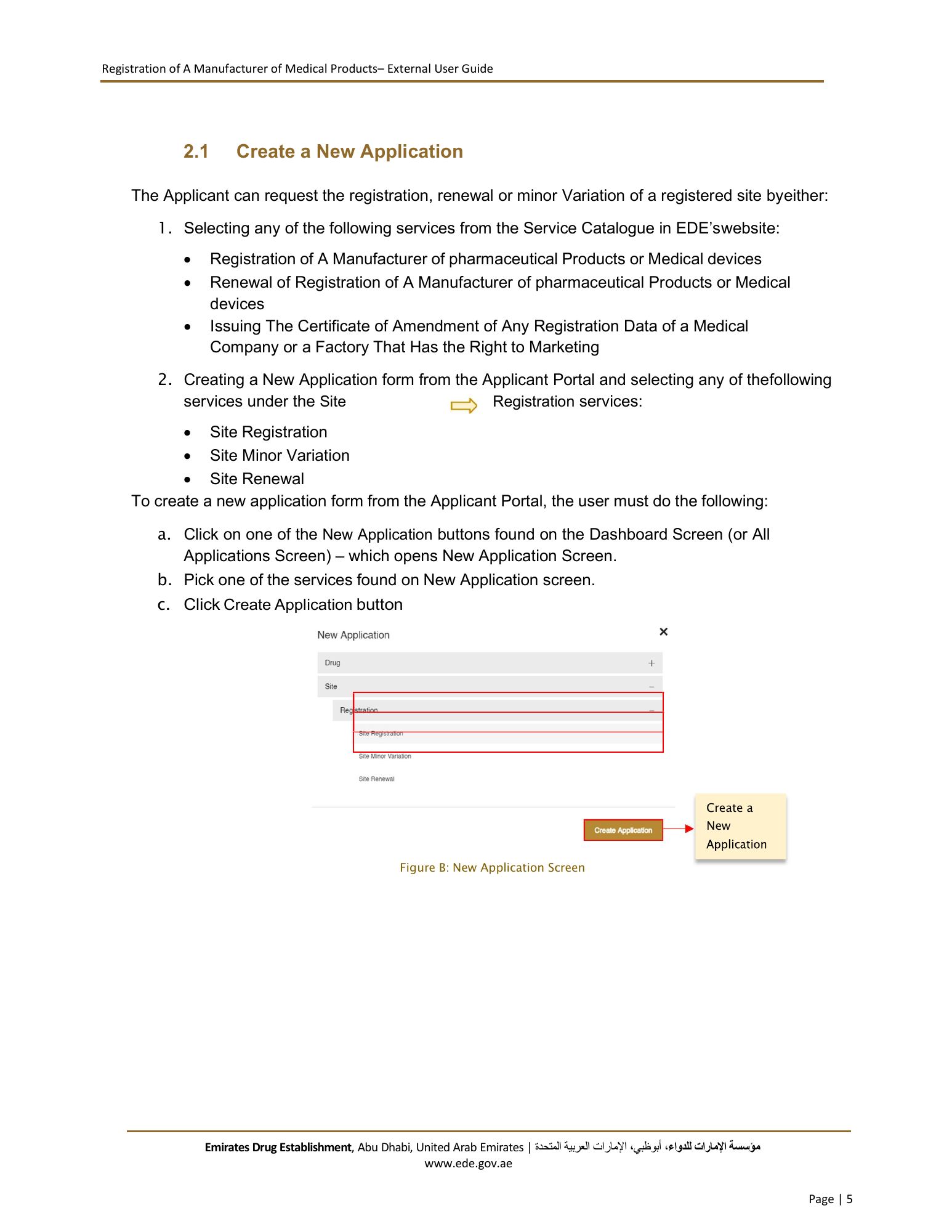
Registration of A Manufacturer of Medical Products– External User Guide 2.1 Create a New Application The Applicant can request the registration, renewal or minor Variation of a registered site byeither: 1. Selecting any of the following services from the Service Catalogue in EDE’s website: Registration of A Manufacturer of pharmaceutical Products or Medical devices Renewal of Registration of A Manufacturer of pharmaceutical Products or Medical devices Issuing The Certificate of Amendment of Any Registration Data of a Medical Company or a Factory That Has the Right to Marketing 2. Creating a New Application form from the Applicant Portal and selecting any of thefollowing services under the Site Registration services: Site Registration Site Minor Variation Site Renewal To create a new application form from the Applicant Portal, the user must do the following: a. Click on one of the New Application buttons found on the Dashboard Screen (or All Applications Screen) – which opens New Application Screen. b. Pick one of the services found on New Application screen. c. Click Create Application button Create a New Figure B: New Application Screen Emirates Drug Establishment, Abu Dhabi, United Arab Emirates | اﻹمارات العربية المتحدة، أبوظبي،مﺆﺳﺴﺔ اﻹمارات للدواء www.ede.gov.ae Page | 5
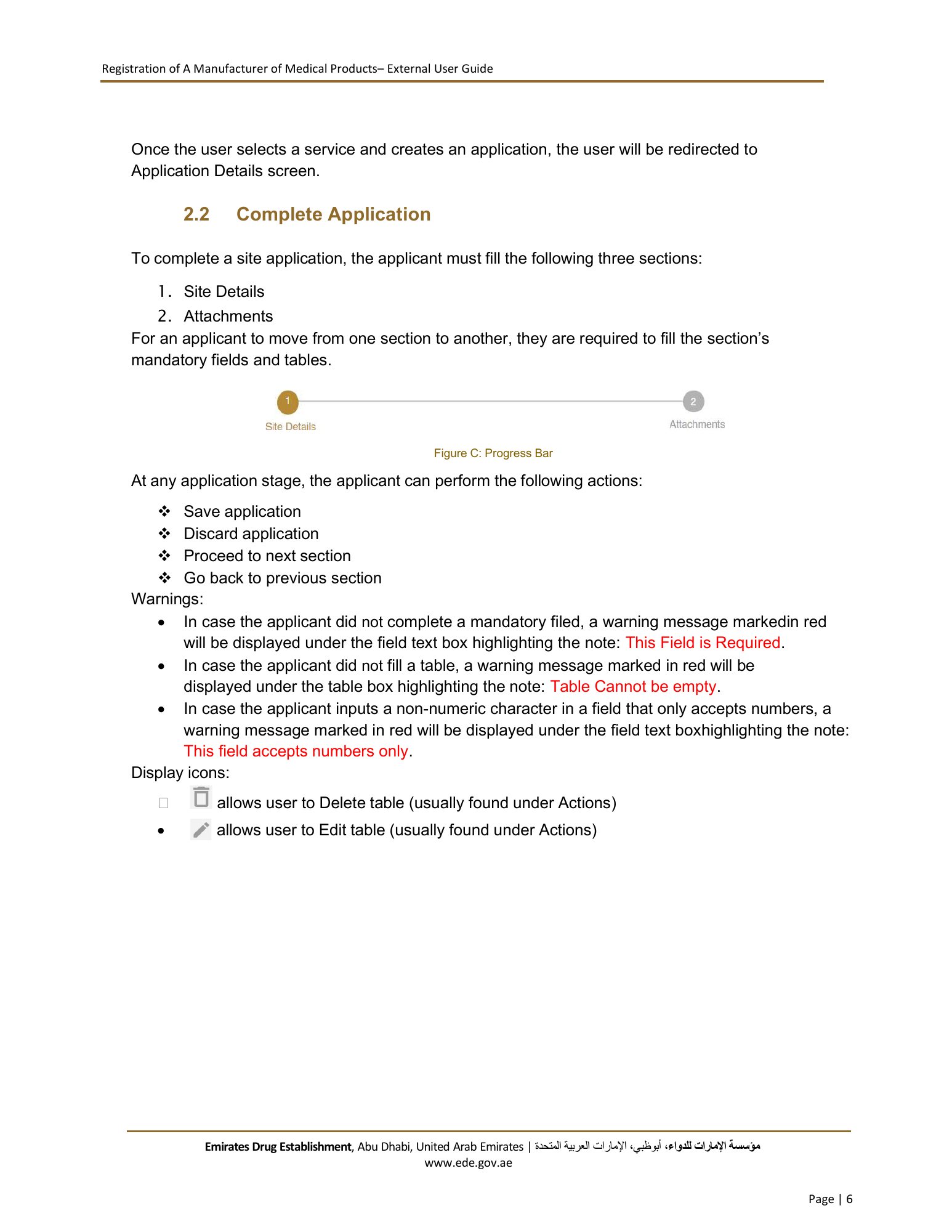
Registration of A Manufacturer of Medical Products– External User Guide Once the user selects a service and creates an application, the user will be redirected to Application Details screen. 2.2 Complete Application To complete a site application, the applicant must fill the following three sections: 1. Site Details 2. Attachments For an applicant to move from one section to another, they are required to fill the section’s mandatory fields and tables. Figure C: Progress Bar At any application stage, the applicant can perform the following actions: Save application Discard application Proceed to next section Go back to previous section Warnings: In case the applicant did not complete a mandatory filed, a warning message markedin red will be displayed under the field text box highlighting the note: This Field is Required. In case the applicant did not fill a table, a warning message marked in red will be displayed under the table box highlighting the note: Table Cannot be empty. In case the applicant inputs a non-numeric character in a field that only accepts numbers, a warning message marked in red will be displayed under the field text boxhighlighting the note: This field accepts numbers only. Display icons: allows user to Delete table (usually found under Actions) allows user to Edit table (usually found under Actions) Emirates Drug Establishment, Abu Dhabi, United Arab Emirates | اﻹمارات العربية المتحدة، أبوظبي،مﺆﺳﺴﺔ اﻹمارات للدواء www.ede.gov.ae Page | 6
Registration of A Manufacturer of Medical Products– External User Guide allows user to Add table allows the user to Save application allows user to Insert attachment allows user to Insert photo Tips: Each application section will contain a progress bar that shows the input progress of the application data 2.2.1 Site Registration This service allows the applicant to register a new manufacturer site. Once the applicant selects Site Registration as a service, they will be redirected to Site Registration - Site Details screen. 2.2.1.1 Site Details Screen In Site Details screen, the applicant is required to fill the following sections: a. Site Details b. Product Classes c. Site Contact Person d. Market Authorization Holder e. Manufacturer Site License f. GMP Certifications* g. Activities Carried Out h. Manufacturing Lines i. Product Categories j. Quality Certifications k. Other Manufacturing Sites (Optional) l. Quality Management System (Optional) m. Countries Where Devices Are Approved and Sold (Optional) n. Documentation Procedures (Optional) Rule: *Mandatory if the Drug Product Class is either: Conventional or Conventional Veterinary Emirates Drug Establishment, Abu Dhabi, United Arab Emirates | اﻹمارات العربية المتحدة، أبوظبي،مﺆﺳﺴﺔ اﻹمارات للدواء www.ede.gov.ae Page | 7
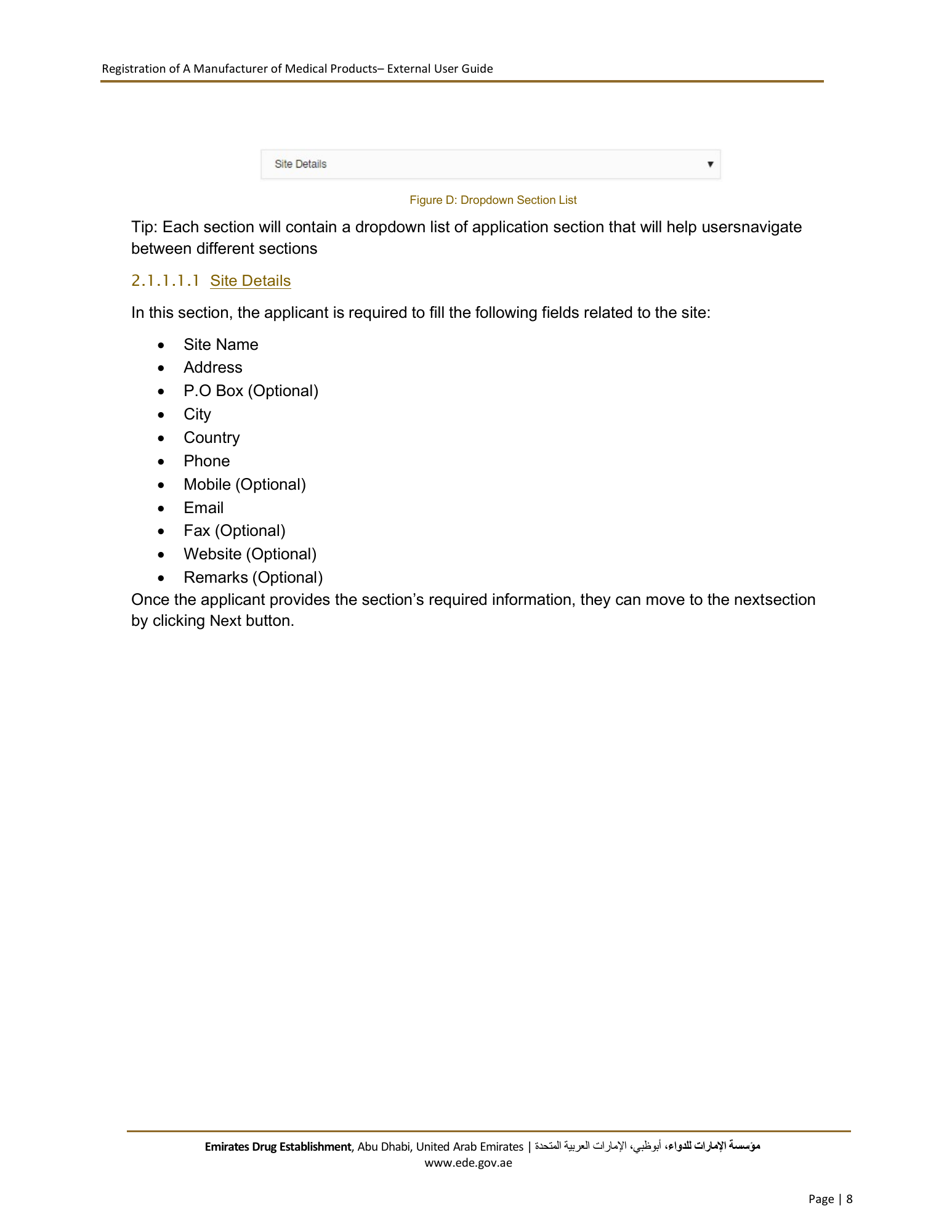
Registration of A Manufacturer of Medical Products– External User Guide Figure D: Dropdown Section List Tip: Each section will contain a dropdown list of application section that will help usersnavigate between different sections 2.1.1.1.1 Site Details In this section, the applicant is required to fill the following fields related to the site: Site Name Address P.O Box (Optional) City Country Phone Mobile (Optional) Email Fax (Optional) Website (Optional) Remarks (Optional) Once the applicant provides the section’s required information, they can move to the nextsection by clicking Next button. Emirates Drug Establishment, Abu Dhabi, United Arab Emirates | اﻹمارات العربية المتحدة، أبوظبي،مﺆﺳﺴﺔ اﻹمارات للدواء www.ede.gov.ae Page | 8
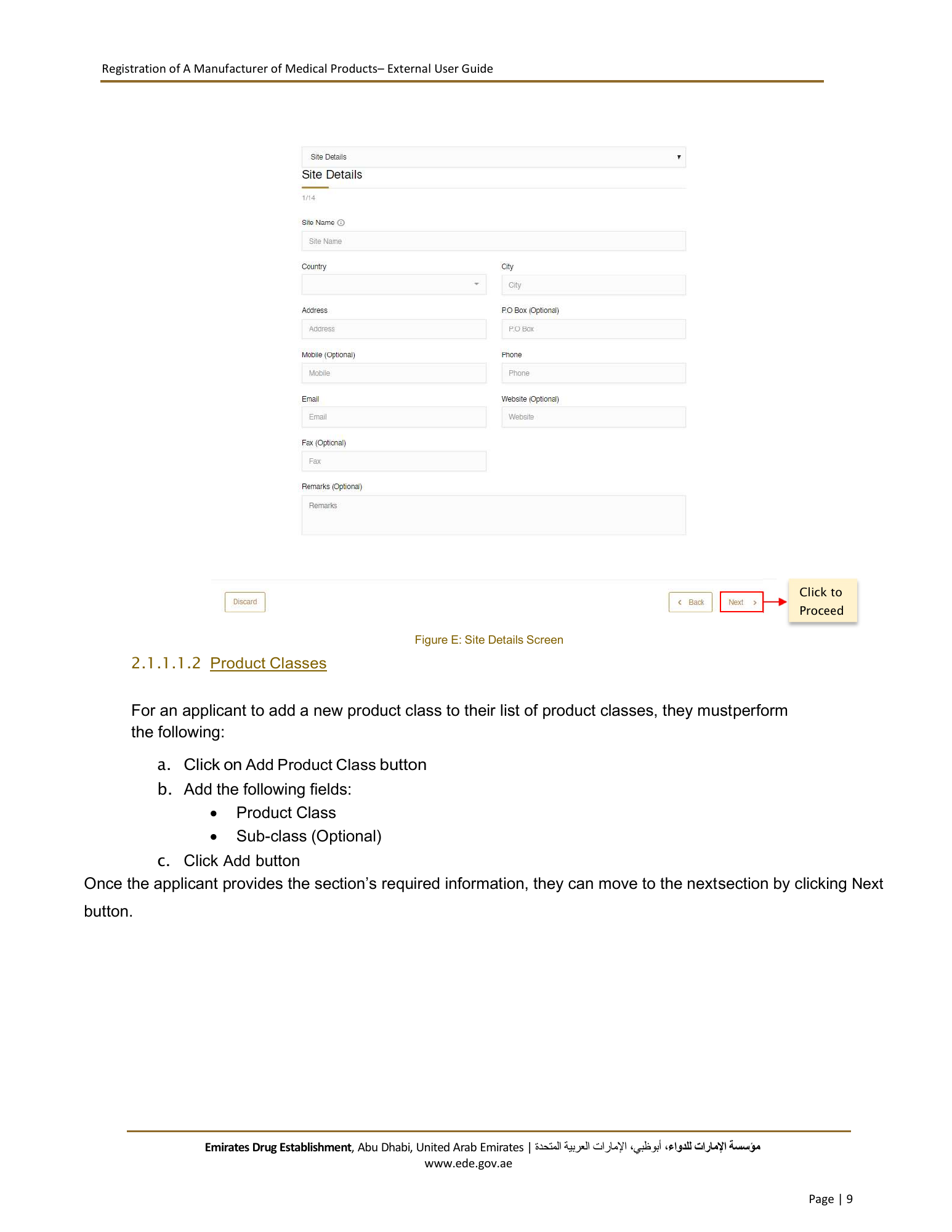
Registration of A Manufacturer of Medical Products– External User Guide Click to Proceed Figure E: Site Details Screen 2.1.1.1.2 Product Classes For an applicant to add a new product class to their list of product classes, they must perform the following: a. Click on Add Product Class button b. Add the following fields: Product Class Sub-class (Optional) c. Click Add button Once the applicant provides the section’s required information, they can move to the next section by clicking Next button. Emirates Drug Establishment, Abu Dhabi, United Arab Emirates | اﻹمارات العربية المتحدة، أبوظبي،مﺆﺳﺴﺔ اﻹمارات للدواء www.ede.gov.ae Page | 9
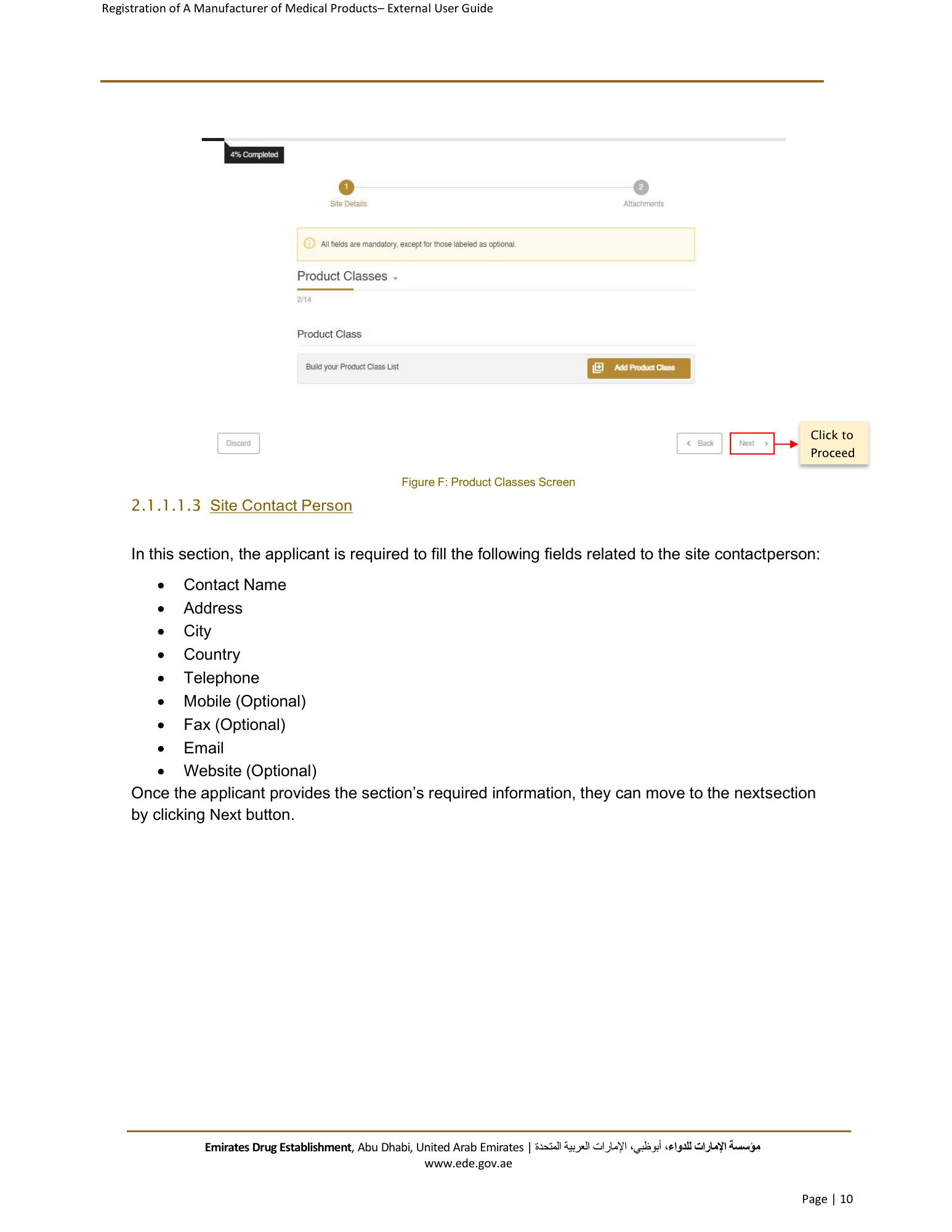
Registration of A Manufacturer of Medical Products– External User Guide Click to Proceed Figure F: Product Classes Screen 2.1.1.1.3 Site Contact Person In this section, the applicant is required to fill the following fields related to the site contact person: Contact Name Address City Country Telephone Mobile (Optional) Fax (Optional) Email Website (Optional) Once the applicant provides the section’s required information, they can move to the nextsection by clicking Next button. Emirates Drug Establishment, Abu Dhabi, United Arab Emirates | اﻹمارات العربية المتحدة، أبوظبي،مﺆﺳﺴﺔ اﻹمارات للدواء www.ede.gov.ae Page | 10
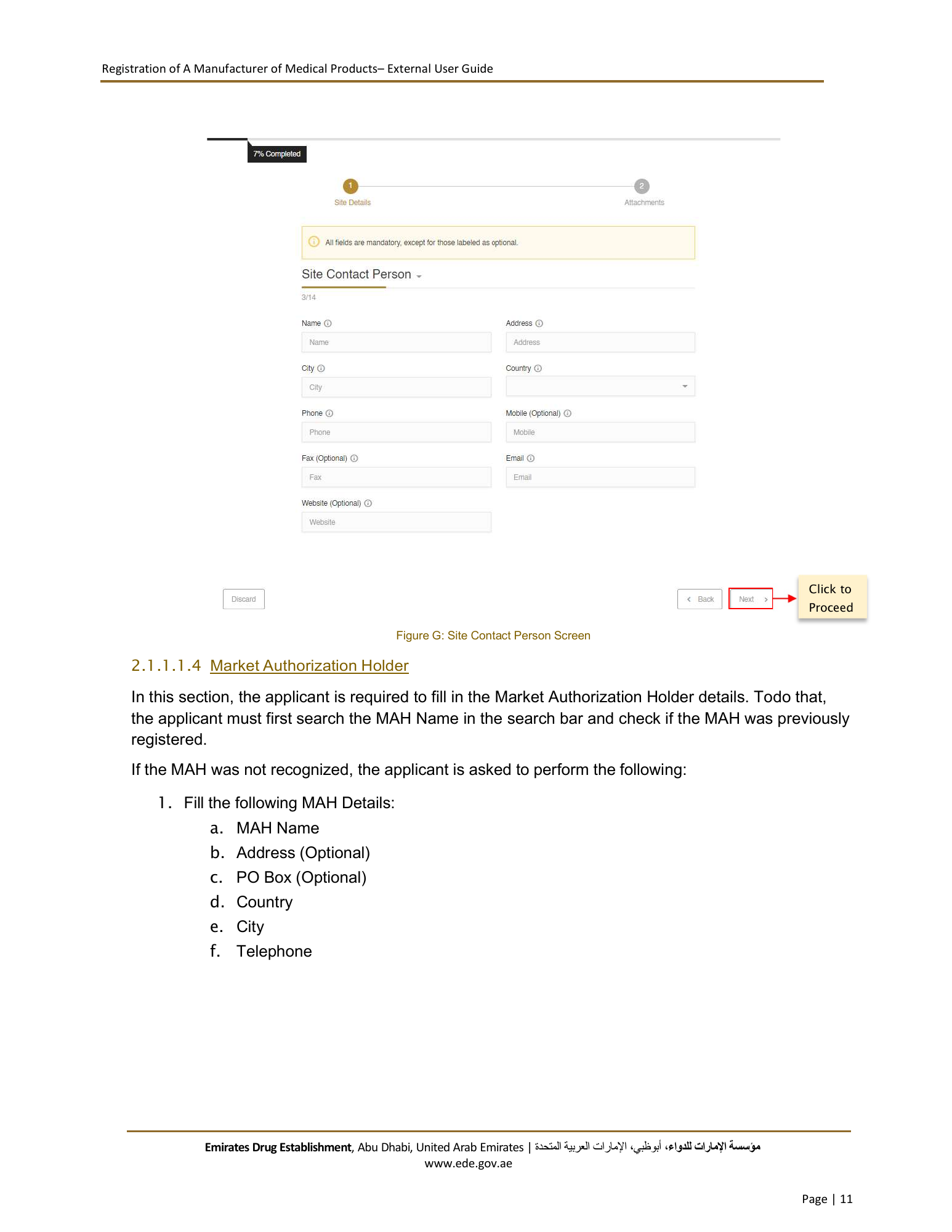
Registration of A Manufacturer of Medical Products– External User Guide Click to Proceed Figure G: Site Contact Person Screen 2.1.1.1.4 Market Authorization Holder In this section, the applicant is required to fill in the Market Authorization Holder details. Todo that, the applicant must first search the MAH Name in the search bar and check if the MAH was previously registered. If the MAH was not recognized, the applicant is asked to perform the following: 1. Fill the following MAH Details: a. MAH Name b. Address (Optional) c. PO Box (Optional) d. Country e. City f. Telephone Emirates Drug Establishment, Abu Dhabi, United Arab Emirates | اﻹمارات العربية المتحدة، أبوظبي،مﺆﺳﺴﺔ اﻹمارات للدواء www.ede.gov.ae Page | 11
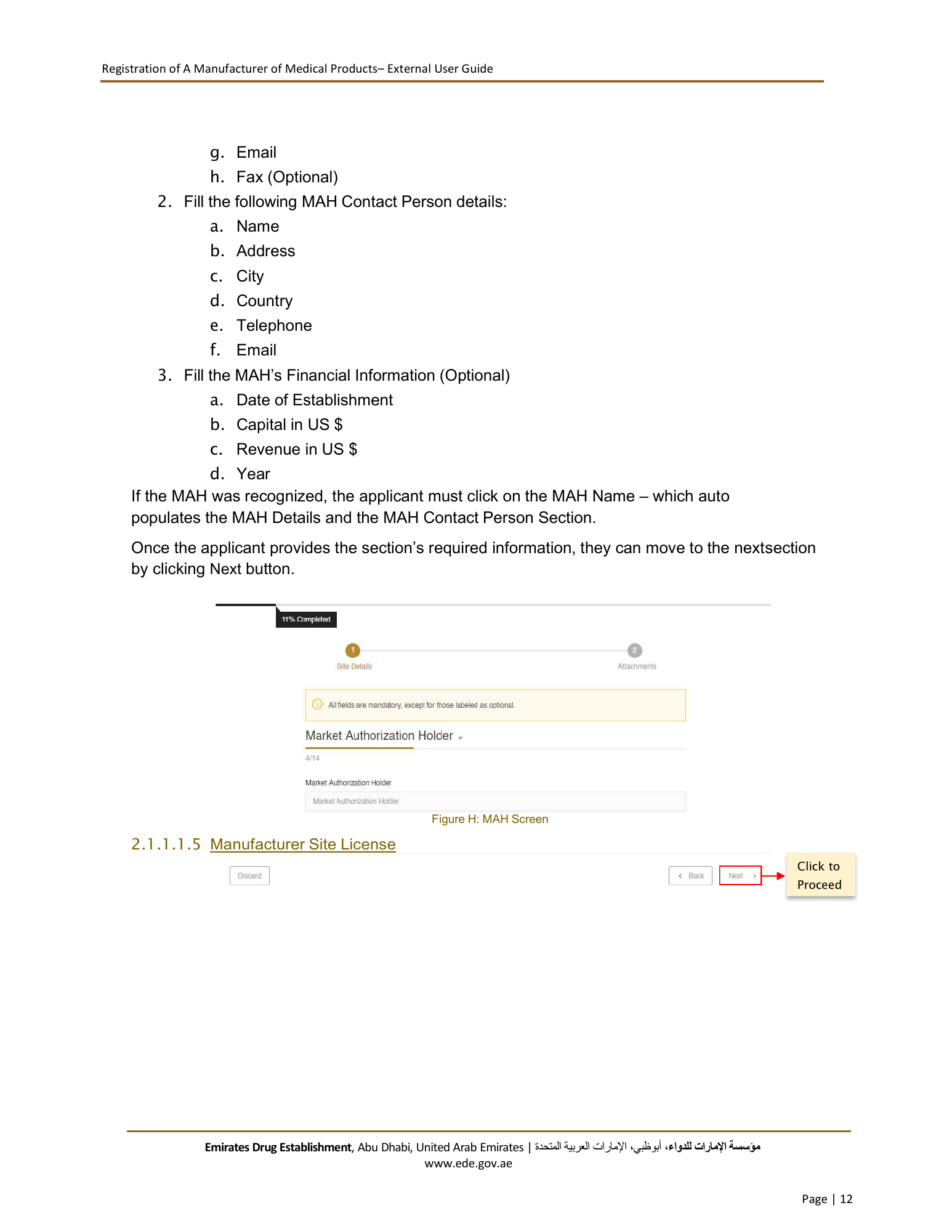
Registration of A Manufacturer of Medical Products– External User Guide g. Email h. Fax (Optional) 2. Fill the following MAH Contact Person details: a. Name b. Address c. City d. Country e. Telephone f. Email 3. Fill the MAH’s Financial Information (Optional) a. Date of Establishment b. Capital in US $ c. Revenue in US $ d. Year If the MAH was recognized, the applicant must click on the MAH Name – which auto populates the MAH Details and the MAH Contact Person Section. Once the applicant provides the section’s required information, they can move to the nextsection by clicking Next button. Figure H: MAH Screen 2.1.1.1.5 Manufacturer Site License Click to Proceed Emirates Drug Establishment, Abu Dhabi, United Arab Emirates | اﻹمارات العربية المتحدة، أبوظبي،مﺆﺳﺴﺔ اﻹمارات للدواء www.ede.gov.ae Page | 12
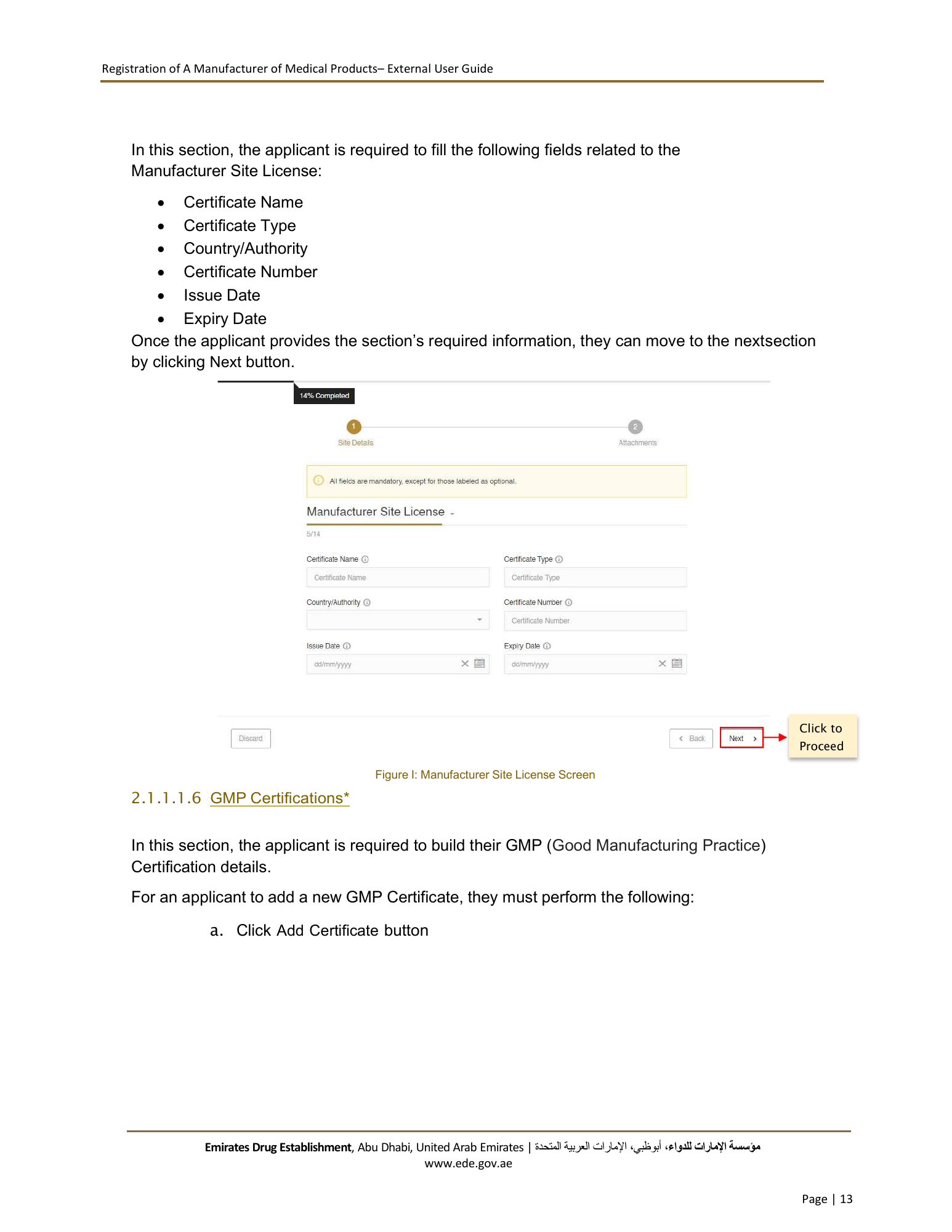
Registration of A Manufacturer of Medical Products– External User Guide In this section, the applicant is required to fill the following fields related to the Manufacturer Site License: Certificate Name Certificate Type Country/Authority Certificate Number Issue Date Expiry Date Once the applicant provides the section’s required information, they can move to the nextsection by clicking Next button. Click to Proceed Figure I: Manufacturer Site License Screen 2.1.1.1.6 GMP Certifications* In this section, the applicant is required to build their GMP (Good Manufacturing Practice) Certification details. For an applicant to add a new GMP Certificate, they must perform the following: a. Click Add Certificate button Emirates Drug Establishment, Abu Dhabi, United Arab Emirates | اﻹمارات العربية المتحدة، أبوظبي،مﺆﺳﺴﺔ اﻹمارات للدواء www.ede.gov.ae Page | 13
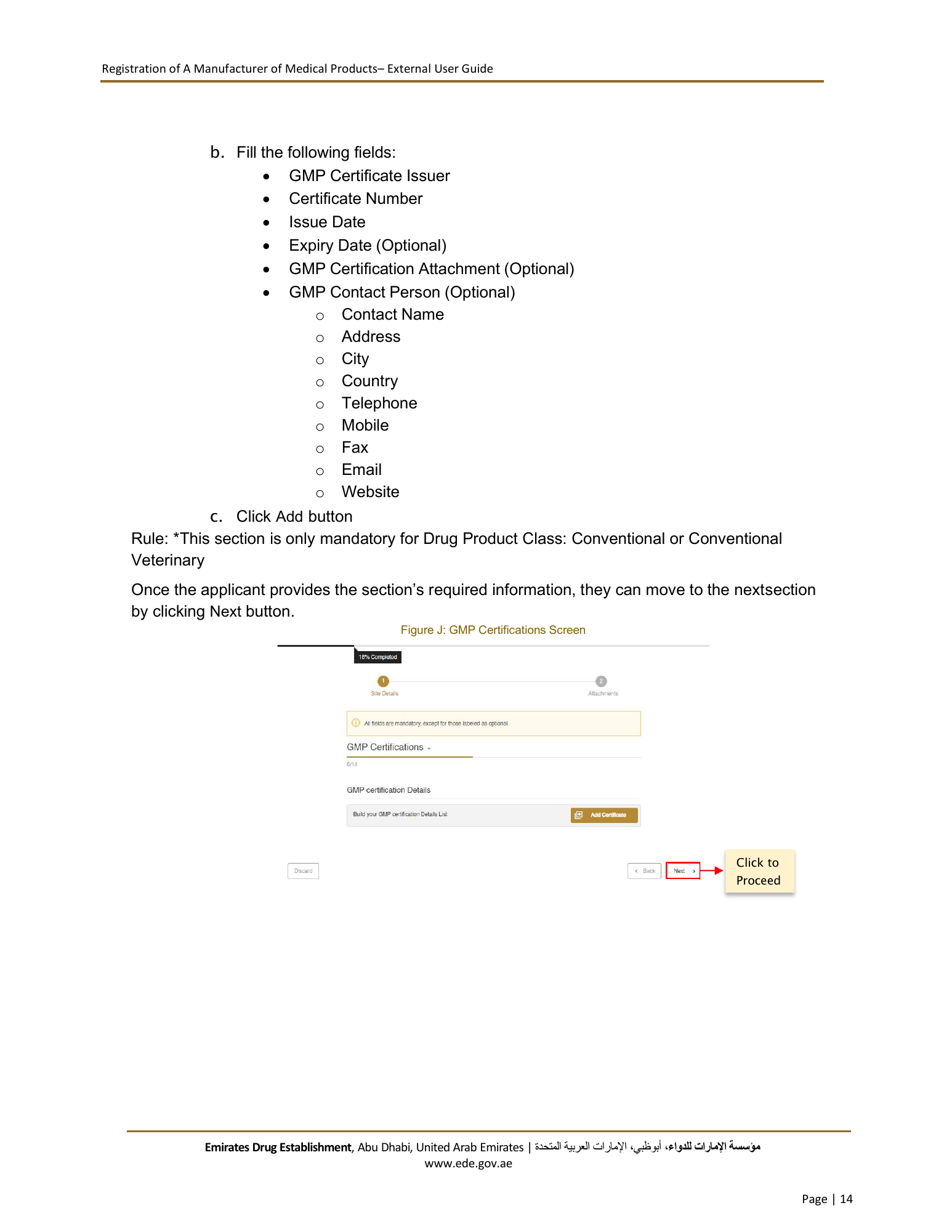
Registration of A Manufacturer of Medical Products– External User Guide b. Fill the following fields: GMP Certificate Issuer Certificate Number Issue Date Expiry Date (Optional) GMP Certification Attachment (Optional) GMP Contact Person (Optional) o Contact Name o Address o City o Country o Telephone o Mobile o Fax o Email o Website c. Click Add button Rule: *This section is only mandatory for Drug Product Class: Conventional or Conventional Veterinary Once the applicant provides the section’s required information, they can move to the nextsection by clicking Next button. Figure J: GMP Certifications Screen Click to Proceed Emirates Drug Establishment, Abu Dhabi, United Arab Emirates | اﻹمارات العربية المتحدة، أبوظبي،مﺆﺳﺴﺔ اﻹمارات للدواء www.ede.gov.ae Page | 14
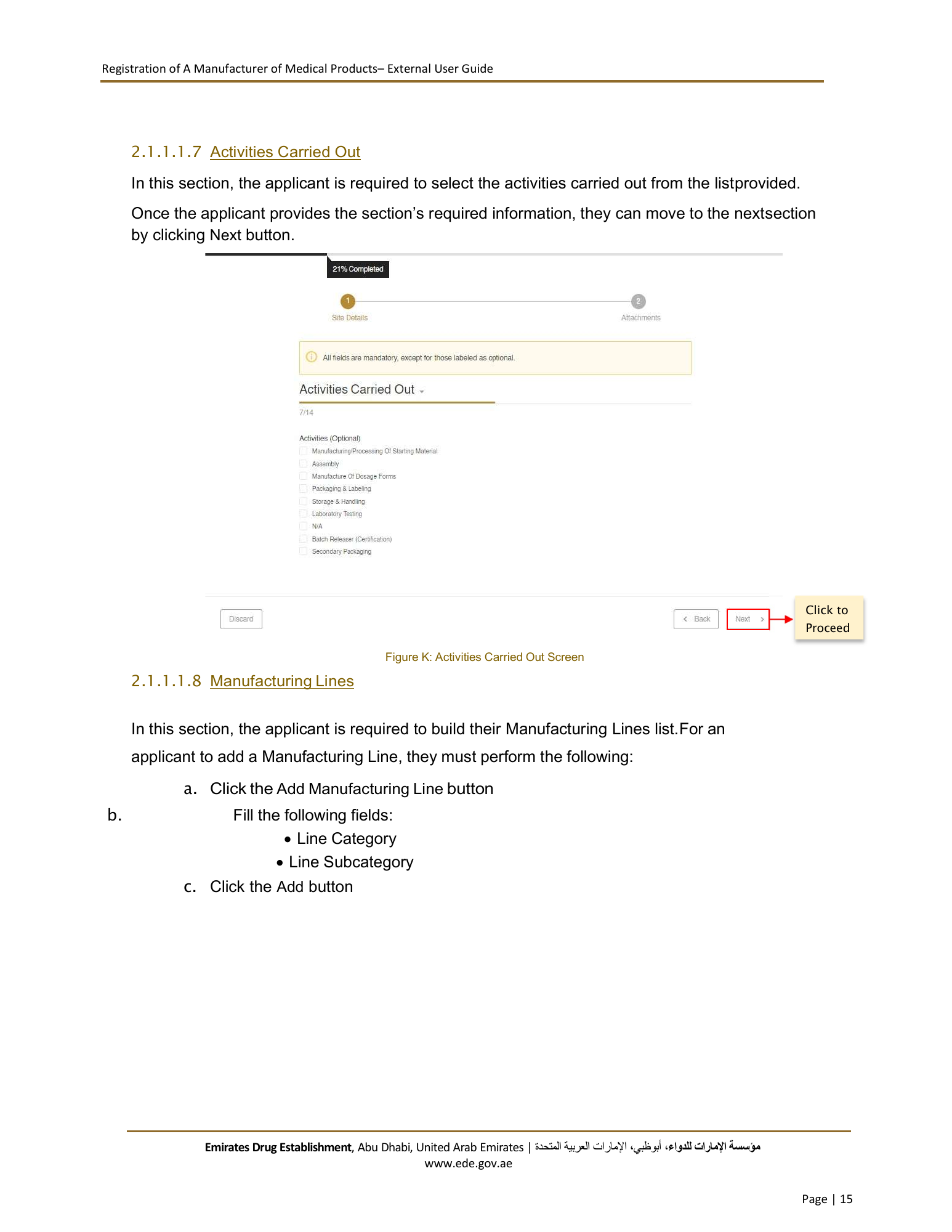
Registration of A Manufacturer of Medical Products– External User Guide 2.1.1.1.7 Activities Carried Out In this section, the applicant is required to select the activities carried out from the list provided. Once the applicant provides the section’s required information, they can move to the nextsection by clicking Next button. Click to Proceed Figure K: Activities Carried Out Screen 2.1.1.1.8 Manufacturing Lines In this section, the applicant is required to build their Manufacturing Lines list. For an applicant to add a Manufacturing Line, they must perform the following: a. Click the Add Manufacturing Line button b. Fill the following fields: Line Category Line Subcategory c. Click the Add button Emirates Drug Establishment, Abu Dhabi, United Arab Emirates | اﻹمارات العربية المتحدة، أبوظبي،مﺆﺳﺴﺔ اﻹمارات للدواء www.ede.gov.ae Page | 15
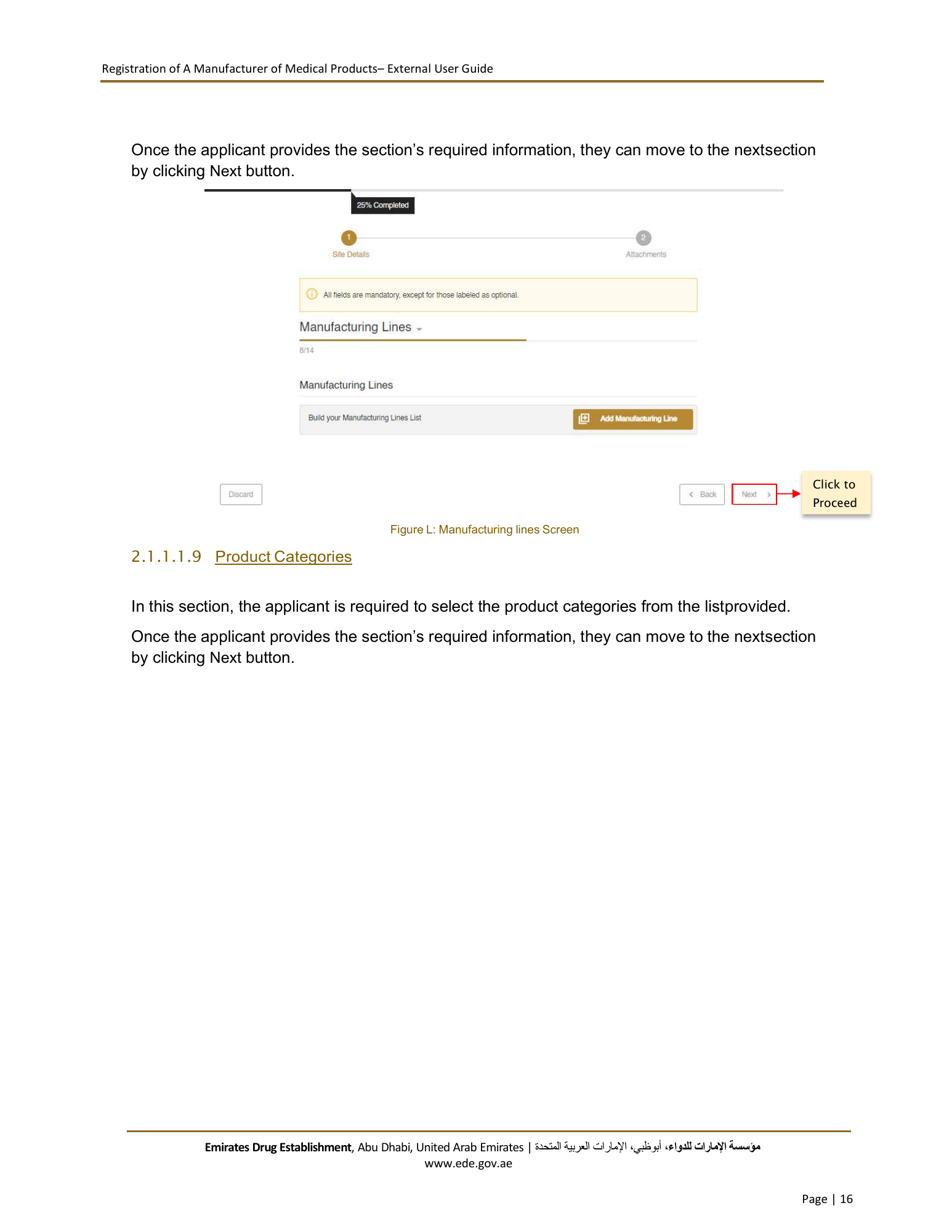
Registration of A Manufacturer of Medical Products– External User Guide Once the applicant provides the section’s required information, they can move to the nextsection by clicking Next button. Click to Proceed Figure L: Manufacturing lines Screen 2.1.1.1.9 Product Categories In this section, the applicant is required to select the product categories from the listprovided. Once the applicant provides the section’s required information, they can move to the nextsection by clicking Next button. Emirates Drug Establishment, Abu Dhabi, United Arab Emirates | اﻹمارات العربية المتحدة، أبوظبي،مﺆﺳﺴﺔ اﻹمارات للدواء www.ede.gov.ae Page | 16
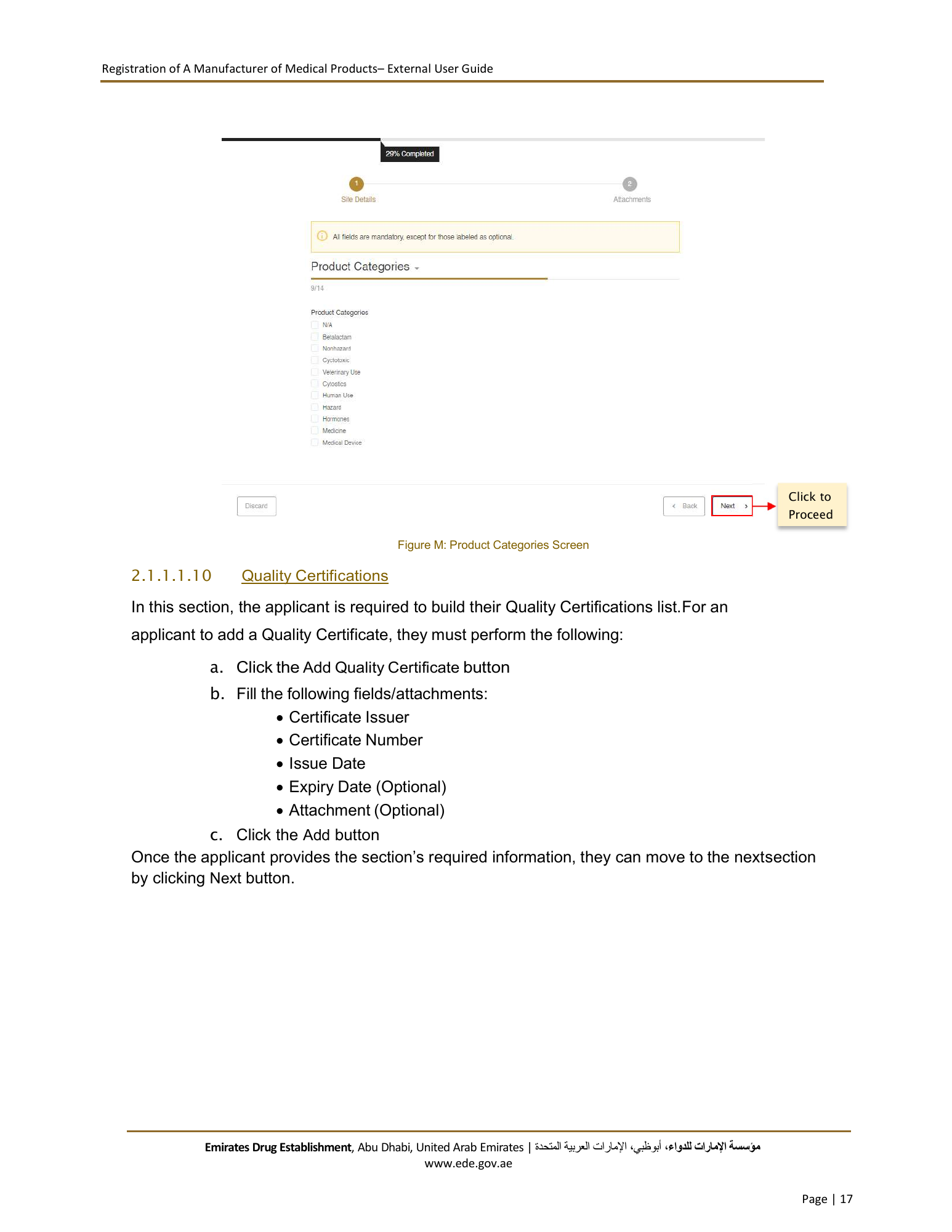
Registration of A Manufacturer of Medical Products– External User Guide Click to Proceed Figure M: Product Categories Screen 2.1.1.1.10 Quality Certifications In this section, the applicant is required to build their Quality Certifications list. For an applicant to add a Quality Certificate, they must perform the following: a. Click the Add Quality Certificate button b. Fill the following fields/attachments: Certificate Issuer Certificate Number Issue Date Expiry Date (Optional) Attachment (Optional) c. Click the Add button Once the applicant provides the section’s required information, they can move to the nextsection by clicking Next button. Emirates Drug Establishment, Abu Dhabi, United Arab Emirates | اﻹمارات العربية المتحدة، أبوظبي،مﺆﺳﺴﺔ اﻹمارات للدواء www.ede.gov.ae Page | 17
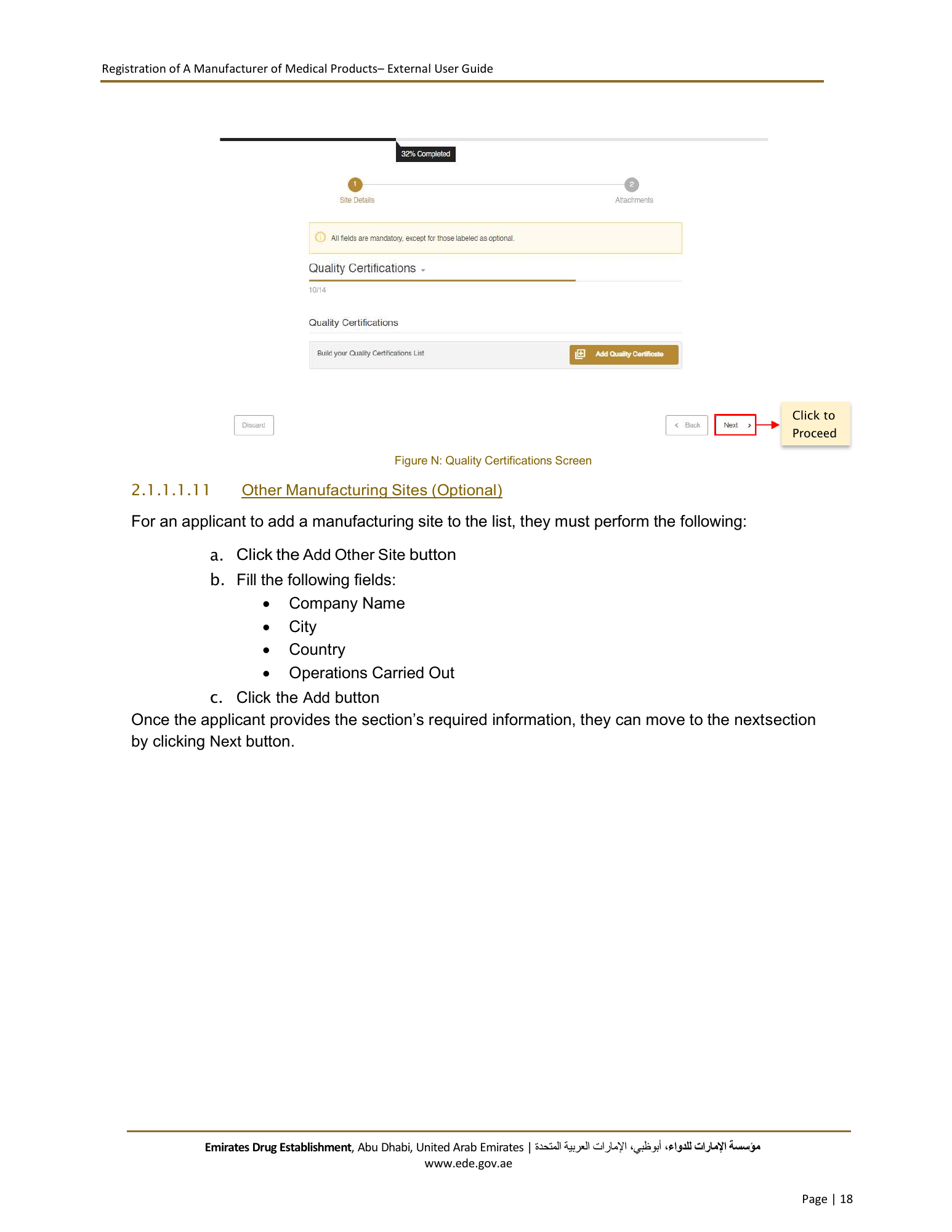
Registration of A Manufacturer of Medical Products– External User Guide Click to Proceed Figure N: Quality Certifications Screen 2.1.1.1.11 Other Manufacturing Sites (Optional) For an applicant to add a manufacturing site to the list, they must perform the following: a. Click the Add Other Site button b. Fill the following fields: Company Name City Country Operations Carried Out c. Click the Add button Once the applicant provides the section’s required information, they can move to the nextsection by clicking Next button. Emirates Drug Establishment, Abu Dhabi, United Arab Emirates | اﻹمارات العربية المتحدة، أبوظبي،مﺆﺳﺴﺔ اﻹمارات للدواء www.ede.gov.ae Page | 18
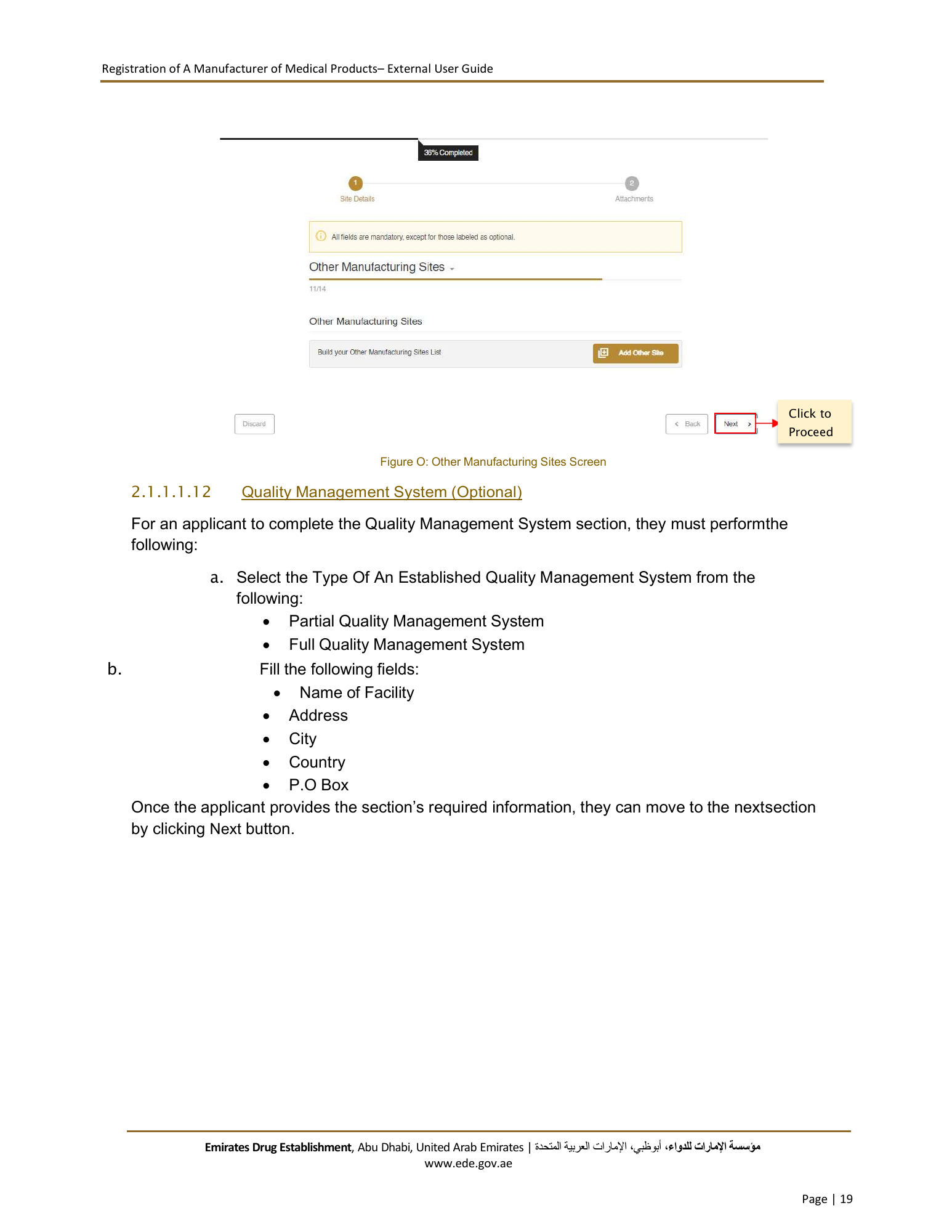
Registration of A Manufacturer of Medical Products– External User Guide Click to Proceed Figure O: Other Manufacturing Sites Screen 2.1.1.1.12 Quality Management System (Optional) For an applicant to complete the Quality Management System section, they must performthe following: a. Select the Type Of An Established Quality Management System from the following: Partial Quality Management System Full Quality Management System b. Fill the following fields: Name of Facility Address City Country P.O Box Once the applicant provides the section’s required information, they can move to the nextsection by clicking Next button. Emirates Drug Establishment, Abu Dhabi, United Arab Emirates | اﻹمارات العربية المتحدة، أبوظبي،مﺆﺳﺴﺔ اﻹمارات للدواء www.ede.gov.ae Page | 19
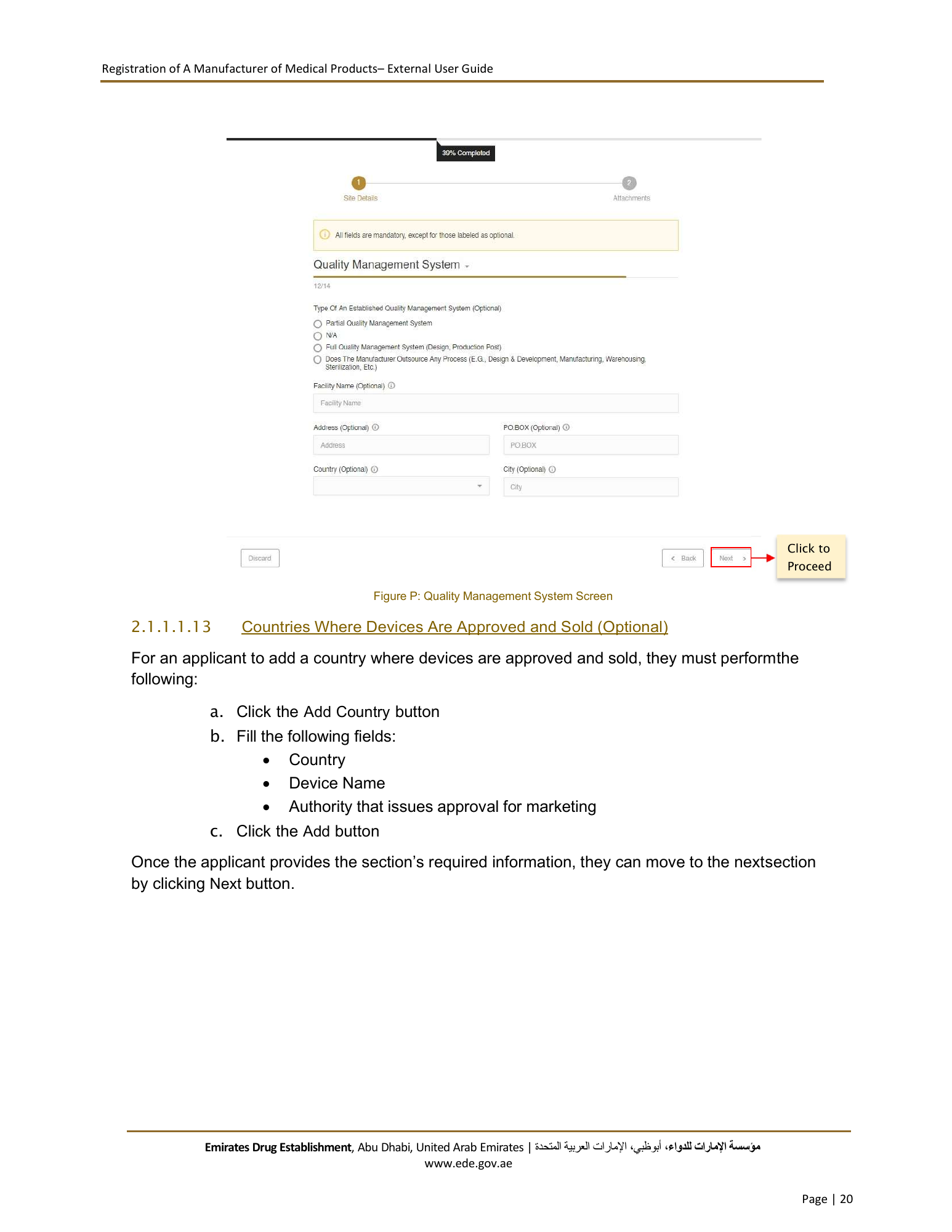
Registration of A Manufacturer of Medical Products– External User Guide Click to Proceed Figure P: Quality Management System Screen 2.1.1.1.13 Countries Where Devices Are Approved and Sold (Optional) For an applicant to add a country where devices are approved and sold, they must perform the following: a. Click the Add Country button b. Fill the following fields: Country Device Name Authority that issues approval for marketing c. Click the Add button Once the applicant provides the section’s required information, they can move to the nextsection by clicking Next button. Emirates Drug Establishment, Abu Dhabi, United Arab Emirates | اﻹمارات العربية المتحدة، أبوظبي،مﺆﺳﺴﺔ اﻹمارات للدواء www.ede.gov.ae Page | 20
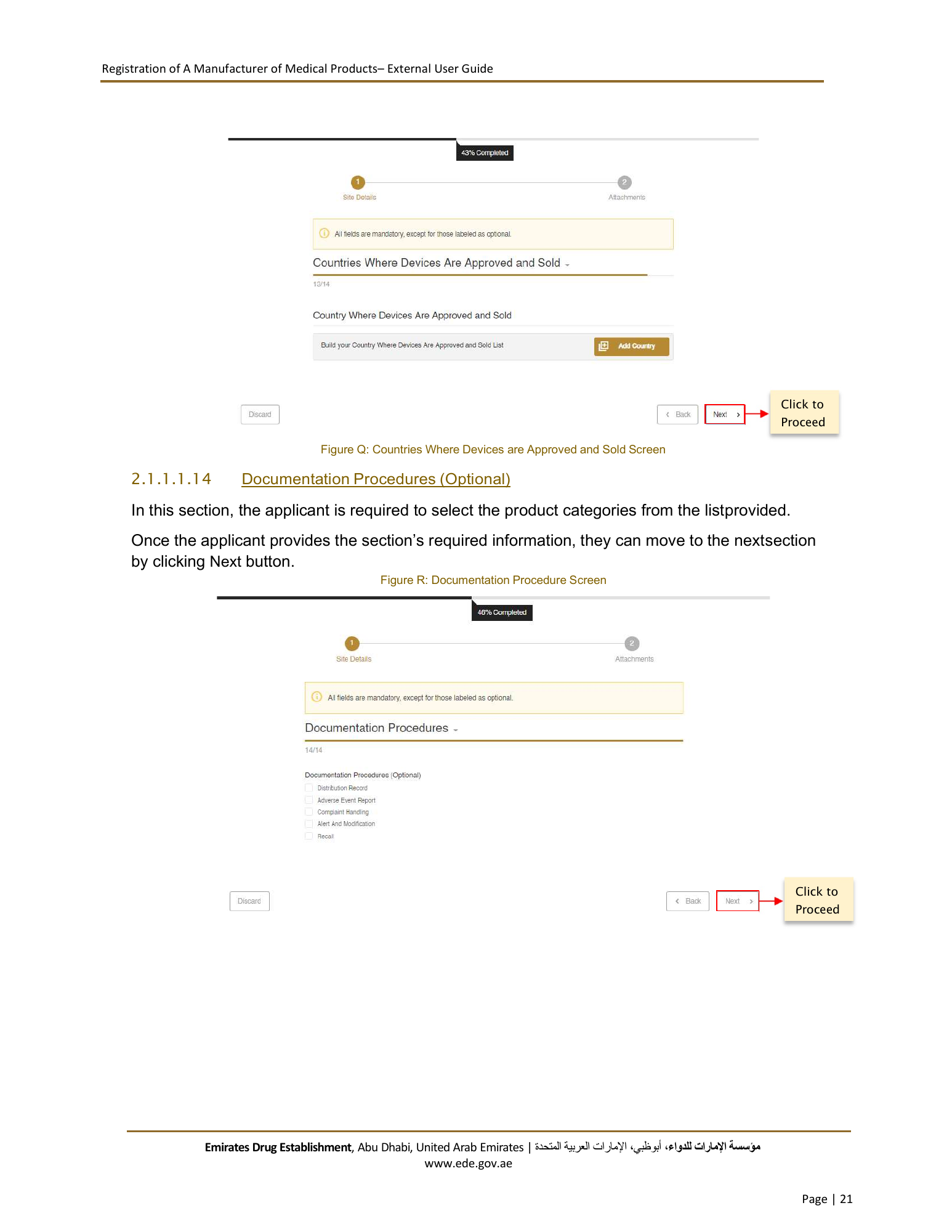
Registration of A Manufacturer of Medical Products– External User Guide Click to Proceed Figure Q: Countries Where Devices are Approved and Sold Screen 2.1.1.1.14 Documentation Procedures (Optional) In this section, the applicant is required to select the product categories from the listprovided. Once the applicant provides the section’s required information, they can move to the nextsection by clicking Next button. Figure R: Documentation Procedure Screen Click to Proceed Emirates Drug Establishment, Abu Dhabi, United Arab Emirates | اﻹمارات العربية المتحدة، أبوظبي،مﺆﺳﺴﺔ اﻹمارات للدواء www.ede.gov.ae Page | 21
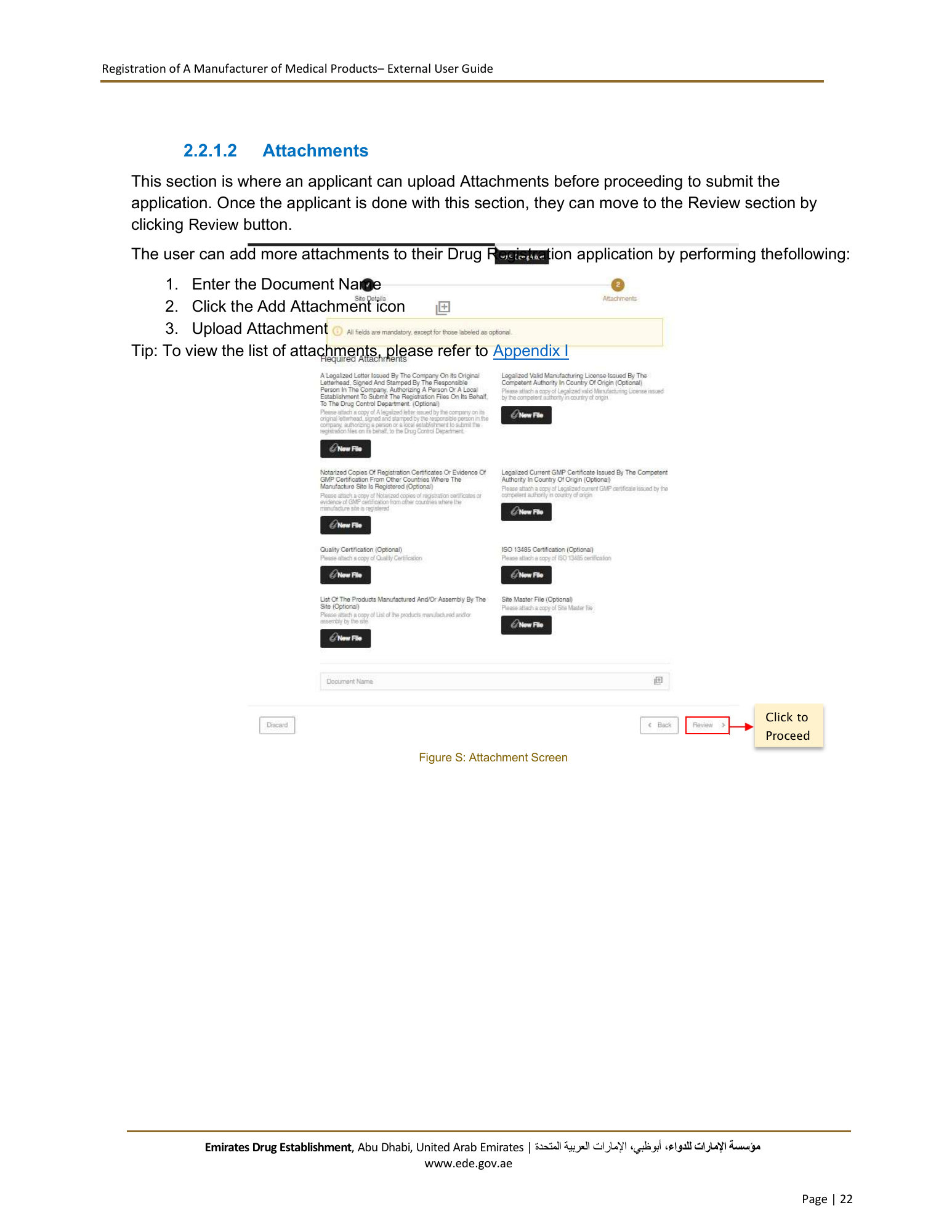
Registration of A Manufacturer of Medical Products– External User Guide 2.2.1.2 Attachments This section is where an applicant can upload Attachments before proceeding to submit the application. Once the applicant is done with this section, they can move to the Review section by clicking Review button. The user can add more attachments to their Drug Registration application by performing thefollowing: 1. Enter the Document Name 2. Click the Add Attachment icon 3. Upload Attachment Tip: To view the list of attachments, please refer to Appendix I Click to Proceed Figure S: Attachment Screen Emirates Drug Establishment, Abu Dhabi, United Arab Emirates | اﻹمارات العربية المتحدة، أبوظبي،مﺆﺳﺴﺔ اﻹمارات للدواء www.ede.gov.ae Page | 22
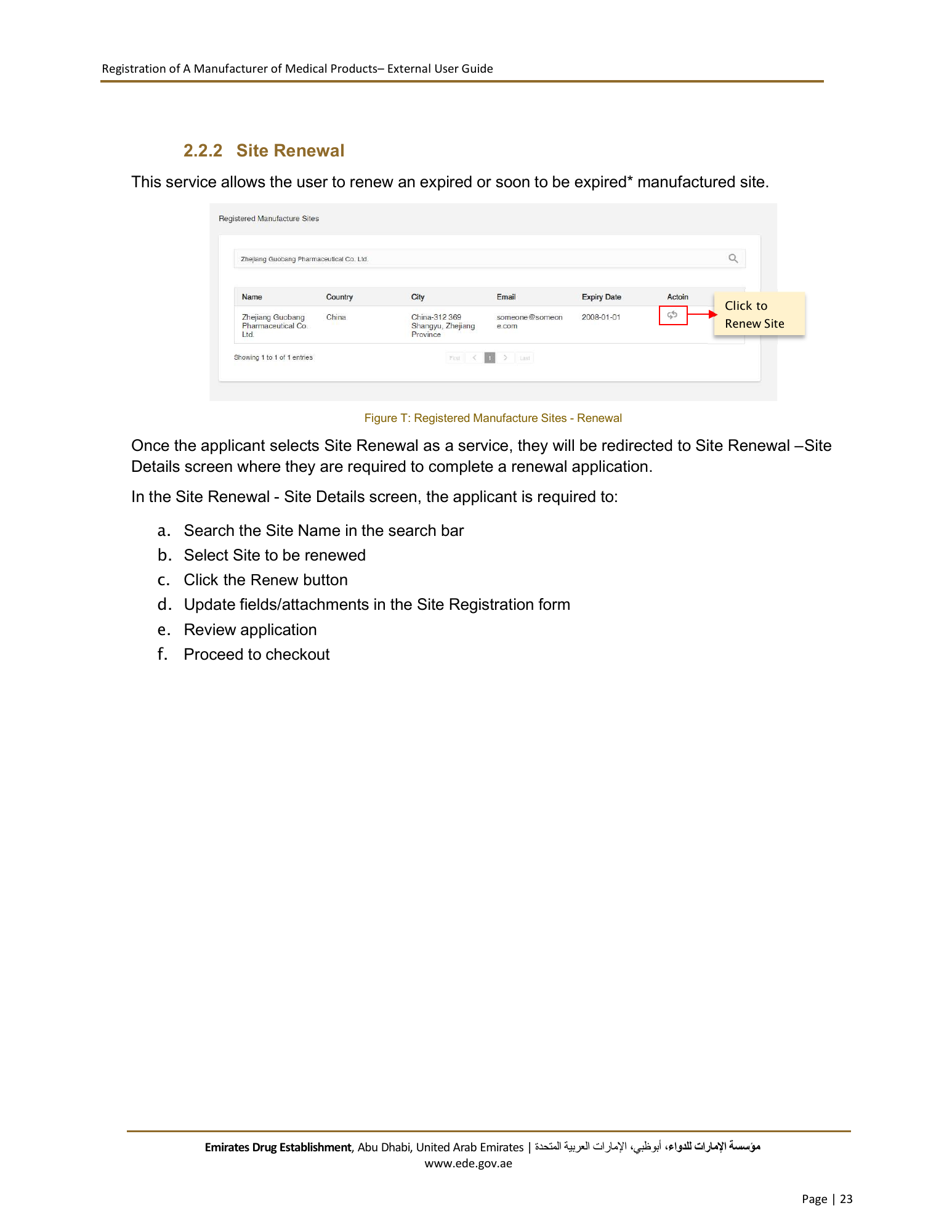
Registration of A Manufacturer of Medical Products– External User Guide 2.2.2 Site Renewal This service allows the user to renew an expired or soon to be expired* manufactured site. Click to Renew Site Figure T: Registered Manufacture Sites - Renewal Once the applicant selects Site Renewal as a service, they will be redirected to Site Renewal – Site Details screen where they are required to complete a renewal application. In the Site Renewal - Site Details screen, the applicant is required to: a. Search the Site Name in the search bar b. Select Site to be renewed c. Click the Renew button d. Update fields/attachments in the Site Registration form e. Review application f. Proceed to checkout Emirates Drug Establishment, Abu Dhabi, United Arab Emirates | اﻹمارات العربية المتحدة، أبوظبي،مﺆﺳﺴﺔ اﻹمارات للدواء www.ede.gov.ae Page | 23
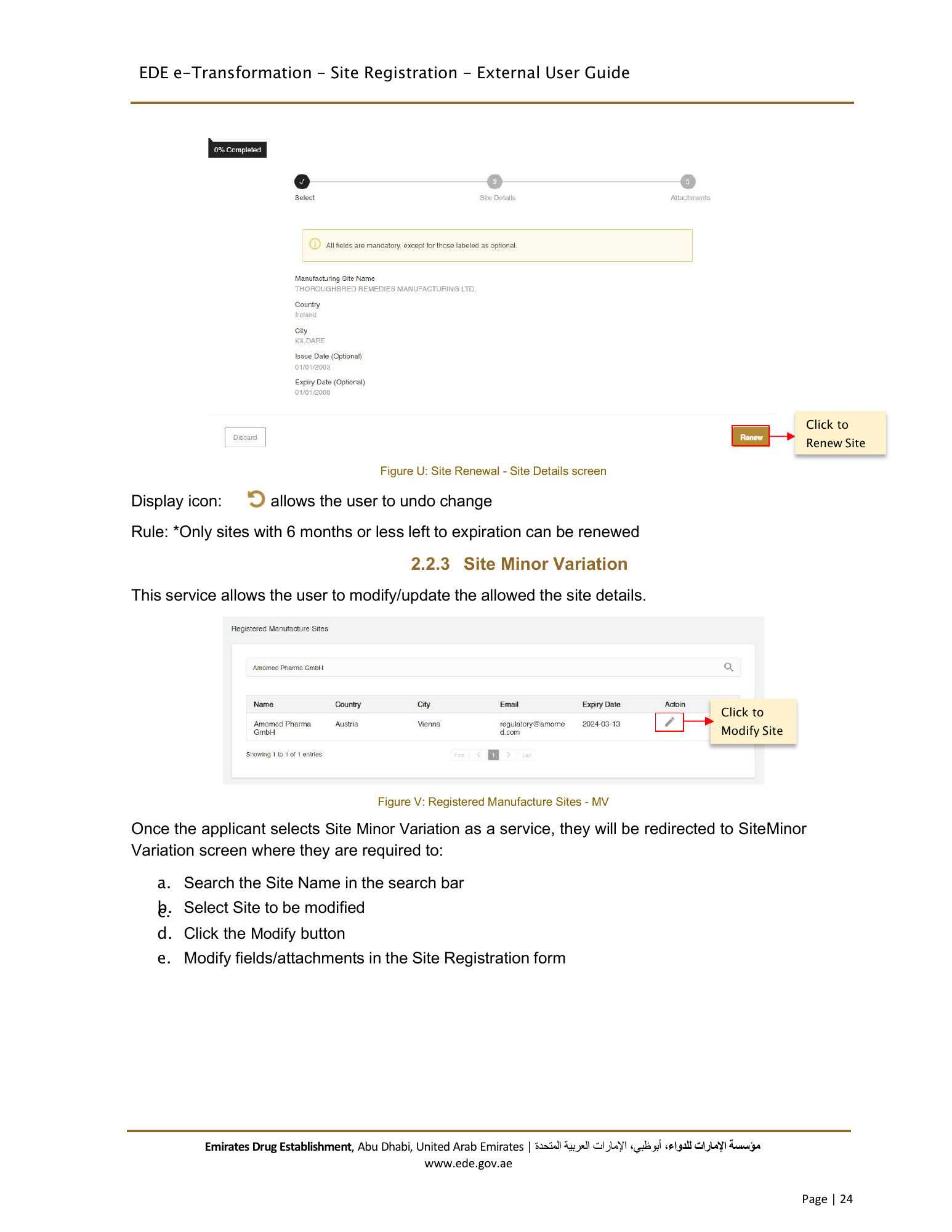
EDE e-Transformation - Site Registration - External User Guide Click to Renew Site Figure U: Site Renewal - Site Details screen Display icon: allows the user to undo change Rule: *Only sites with 6 months or less left to expiration can be renewed 2.2.3 Site Minor Variation This service allows the user to modify/update the allowed the site details. Click to Modify Site Figure V: Registered Manufacture Sites - MV Once the applicant selects Site Minor Variation as a service, they will be redirected to SiteMinor Variation screen where they are required to: a. Search the Site Name in the search bar b. c. Select Site to be modified d. Click the Modify button e. Modify fields/attachments in the Site Registration form Emirates Drug Establishment, Abu Dhabi, United Arab Emirates | اﻹمارات العربية المتحدة، أبوظبي،مﺆﺳﺴﺔ اﻹمارات للدواء www.ede.gov.ae Page | 24
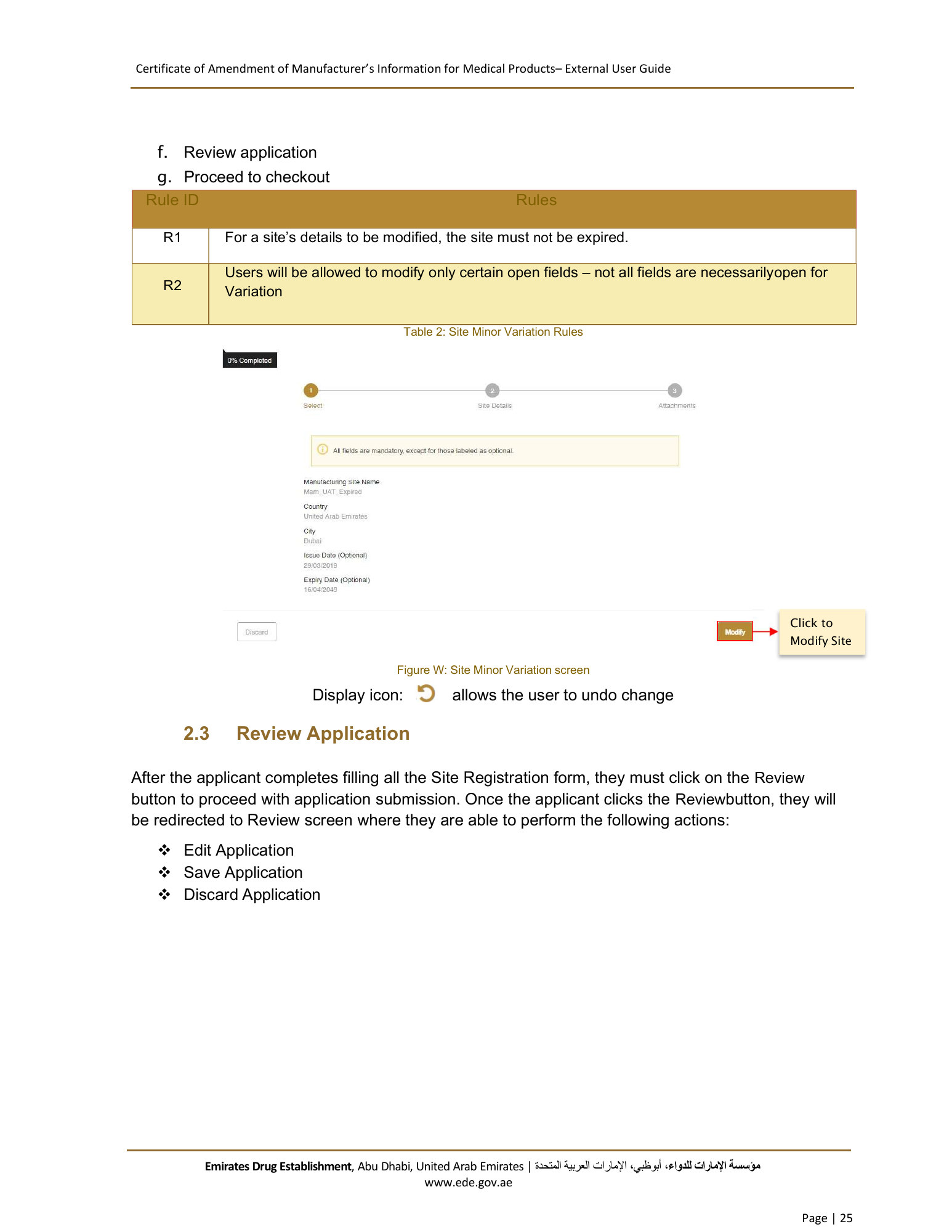
Certificate of Amendment of Manufacturer’s Information for Medical Products– External User Guide f. Review application g. Proceed to checkout Rule ID Rules R1 For a site’s details to be modified, the site must not be expired. Users will be allowed to modify only certain open fields – not all fields are necessarily open for R2 Variation Table 2: Site Minor Variation Rules Click to Modify Site Figure W: Site Minor Variation screen Display icon: allows the user to undo change 2.3 Review Application After the applicant completes filling all the Site Registration form, they must click on the Review button to proceed with application submission. Once the applicant clicks the Reviewbutton, they will be redirected to Review screen where they are able to perform the following actions: Edit Application Save Application Discard Application Emirates Drug Establishment, Abu Dhabi, United Arab Emirates | اﻹمارات العربية المتحدة، أبوظبي،مﺆﺳﺴﺔ اﻹمارات للدواء www.ede.gov.ae Page | 25
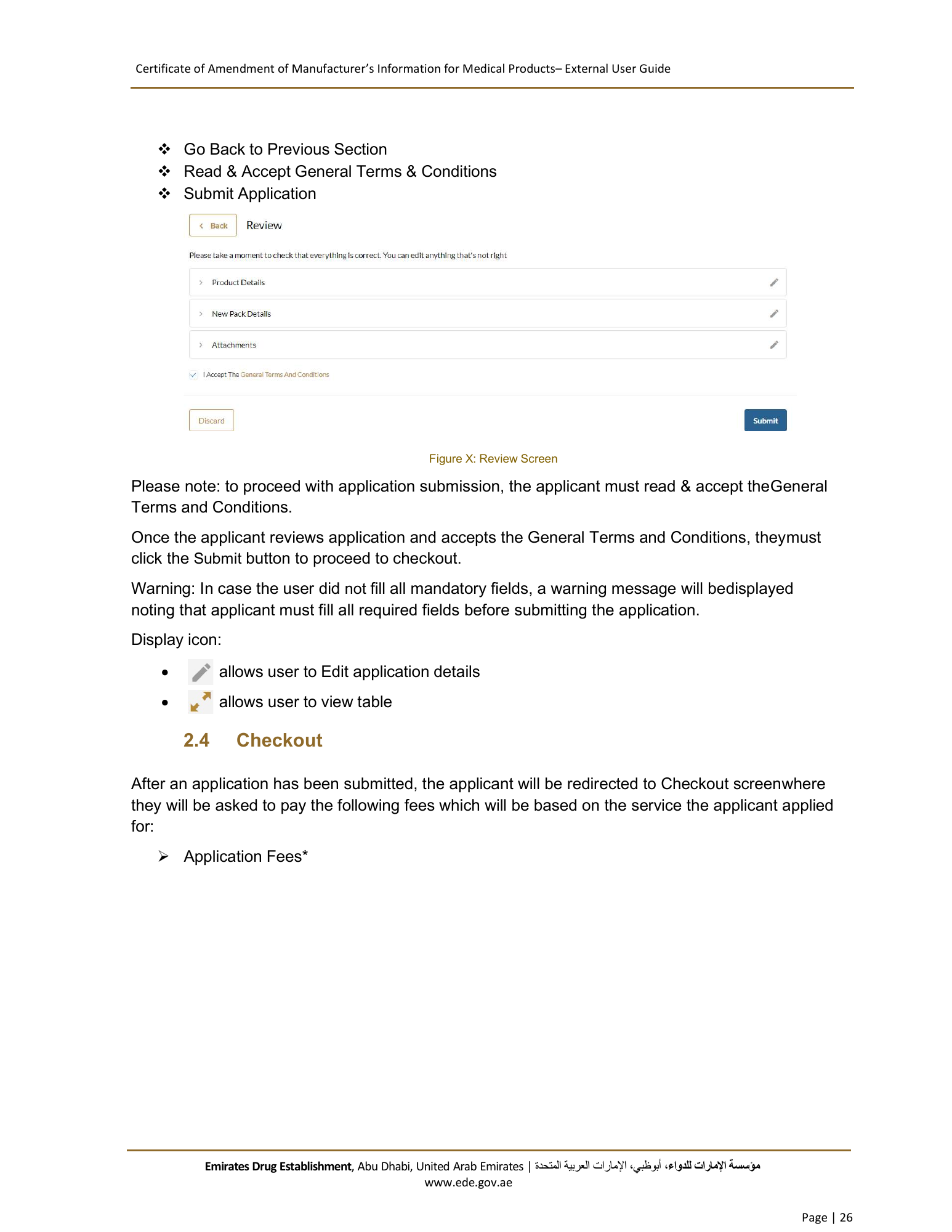
Certificate of Amendment of Manufacturer’s Information for Medical Products– External User Guide Go Back to Previous Section Read & Accept General Terms & Conditions Submit Application Figure X: Review Screen Please note: to proceed with application submission, the applicant must read & accept theGeneral Terms and Conditions. Once the applicant reviews application and accepts the General Terms and Conditions, theymust click the Submit button to proceed to checkout. Warning: In case the user did not fill all mandatory fields, a warning message will bedisplayed noting that applicant must fill all required fields before submitting the application. Display icon: allows user to Edit application details allows user to view table 2.4 Checkout After an application has been submitted, the applicant will be redirected to Checkout screen where they will be asked to pay the following fees which will be based on the service the applicant applied for: Application Fees* Emirates Drug Establishment, Abu Dhabi, United Arab Emirates | اﻹمارات العربية المتحدة، أبوظبي،مﺆﺳﺴﺔ اﻹمارات للدواء www.ede.gov.ae Page | 26
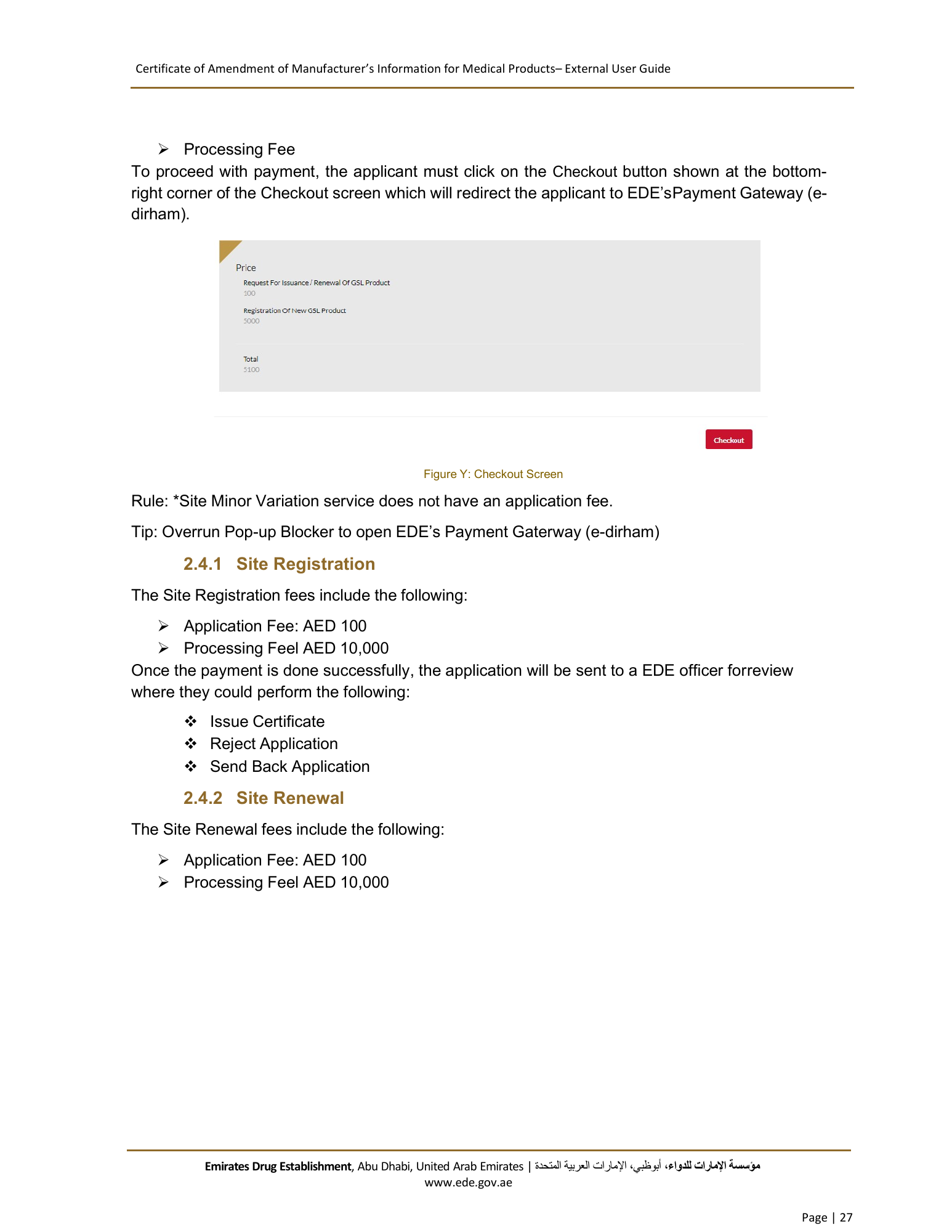
Certificate of Amendment of Manufacturer’s Information for Medical Products– External User Guide Processing Fee To proceed with payment, the applicant must click on the Checkout button shown at the bottom- right corner of the Checkout screen which will redirect the applicant to EDE’s Payment Gateway (e- dirham). Figure Y: Checkout Screen Rule: *Site Minor Variation service does not have an application fee. Tip: Overrun Pop-up Blocker to open EDE’s Payment Gaterway (e-dirham) 2.4.1 Site Registration The Site Registration fees include the following: Application Fee: AED 100 Processing Feel AED 10,000 Once the payment is done successfully, the application will be sent to a EDE officer for review where they could perform the following: Issue Certificate Reject Application Send Back Application 2.4.2 Site Renewal The Site Renewal fees include the following: Application Fee: AED 100 Processing Feel AED 10,000 Emirates Drug Establishment, Abu Dhabi, United Arab Emirates | اﻹمارات العربية المتحدة، أبوظبي،مﺆﺳﺴﺔ اﻹمارات للدواء www.ede.gov.ae Page | 27
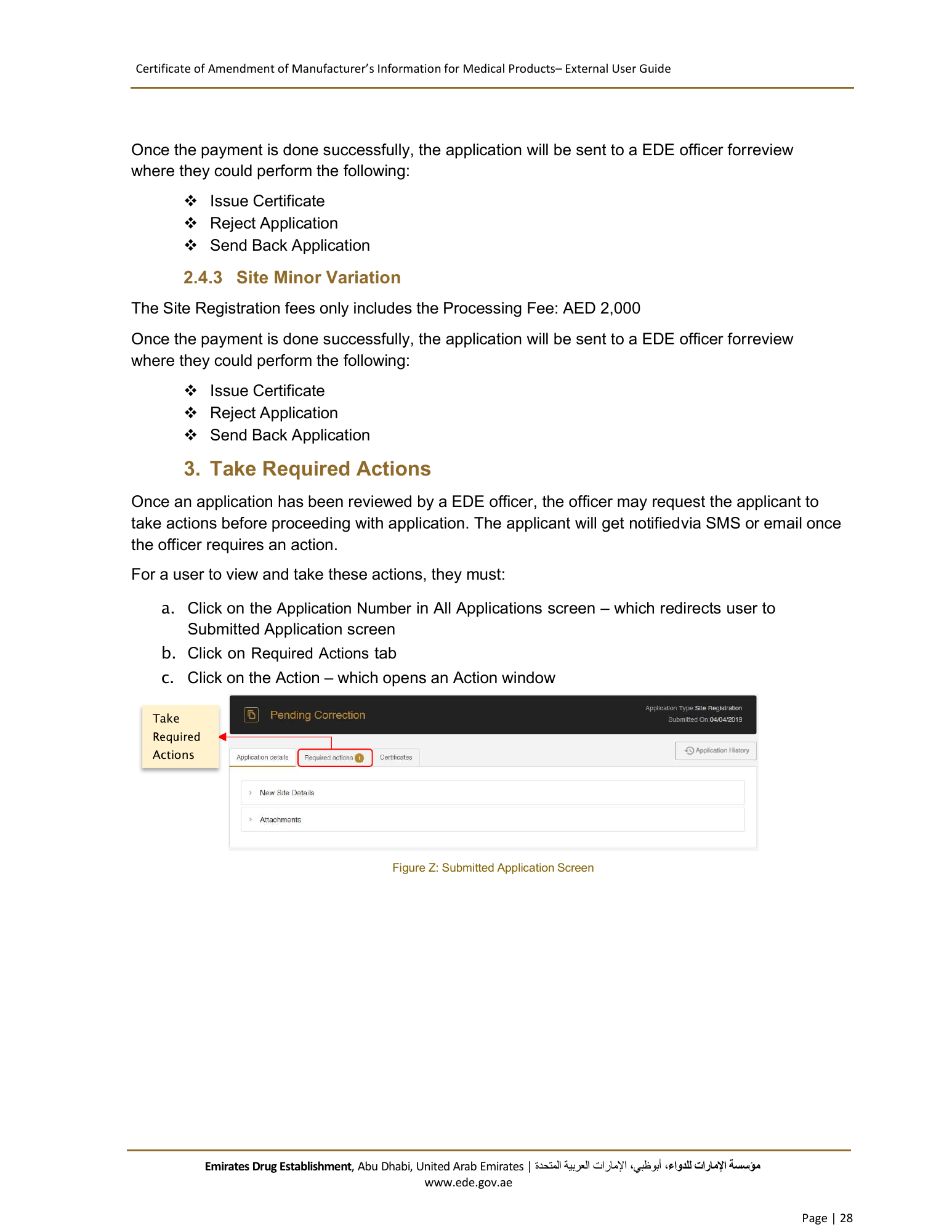
Certificate of Amendment of Manufacturer’s Information for Medical Products– External User Guide Once the payment is done successfully, the application will be sent to a EDE officer for review where they could perform the following: Issue Certificate Reject Application Send Back Application 2.4.3 Site Minor Variation The Site Registration fees only includes the Processing Fee: AED 2,000 Once the payment is done successfully, the application will be sent to a EDE officer for review where they could perform the following: Issue Certificate Reject Application Send Back Application 3. Take Required Actions Once an application has been reviewed by a EDE officer, the officer may request the applicant to take actions before proceeding with application. The applicant will get notified via SMS or email once the officer requires an action. For a user to view and take these actions, they must: a. Click on the Application Number in All Applications screen – which redirects user to Submitted Application screen b. Click on Required Actions tab c. Click on the Action – which opens an Action window Take Actions Figure Z: Submitted Application Screen Emirates Drug Establishment, Abu Dhabi, United Arab Emirates | اﻹمارات العربية المتحدة، أبوظبي،مﺆﺳﺴﺔ اﻹمارات للدواء www.ede.gov.ae Page | 28
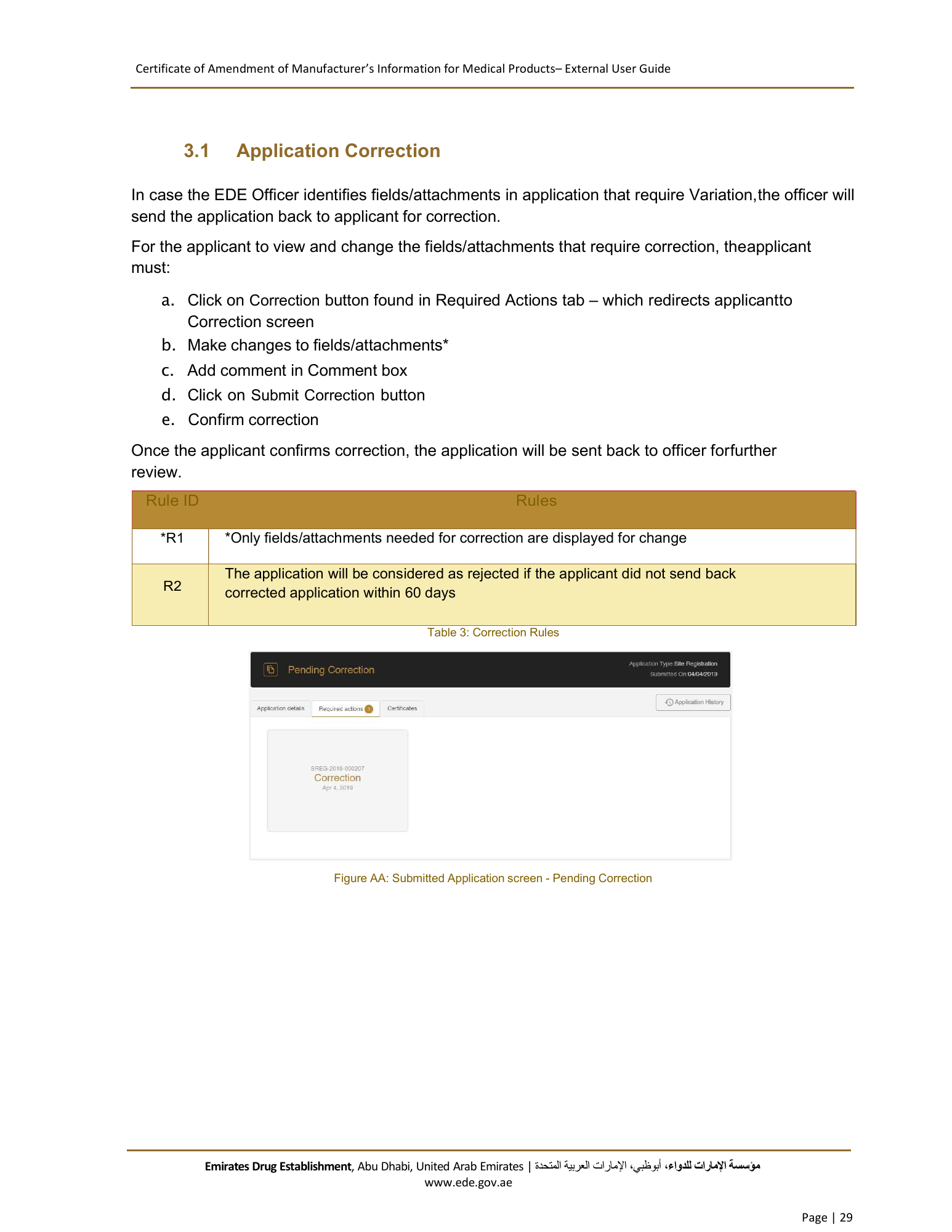
Certificate of Amendment of Manufacturer’s Information for Medical Products– External User Guide 3.1 Application Correction In case the EDE Officer identifies fields/attachments in application that require Variation, the officer will send the application back to applicant for correction. For the applicant to view and change the fields/attachments that require correction, theapplicant must: a. Click on Correction button found in Required Actions tab – which redirects applicantto Correction screen b. Make changes to fields/attachments* c. Add comment in Comment box d. Click on Submit Correction button e. Confirm correction Once the applicant confirms correction, the application will be sent back to officer for further review. Rule ID Rules *R1 *Only fields/attachments needed for correction are displayed for change The application will be considered as rejected if the applicant did not send back R2 corrected application within 60 days Table 3: Correction Rules Figure AA: Submitted Application screen - Pending Correction Emirates Drug Establishment, Abu Dhabi, United Arab Emirates | اﻹمارات العربية المتحدة، أبوظبي،مﺆﺳﺴﺔ اﻹمارات للدواء www.ede.gov.ae Page | 29
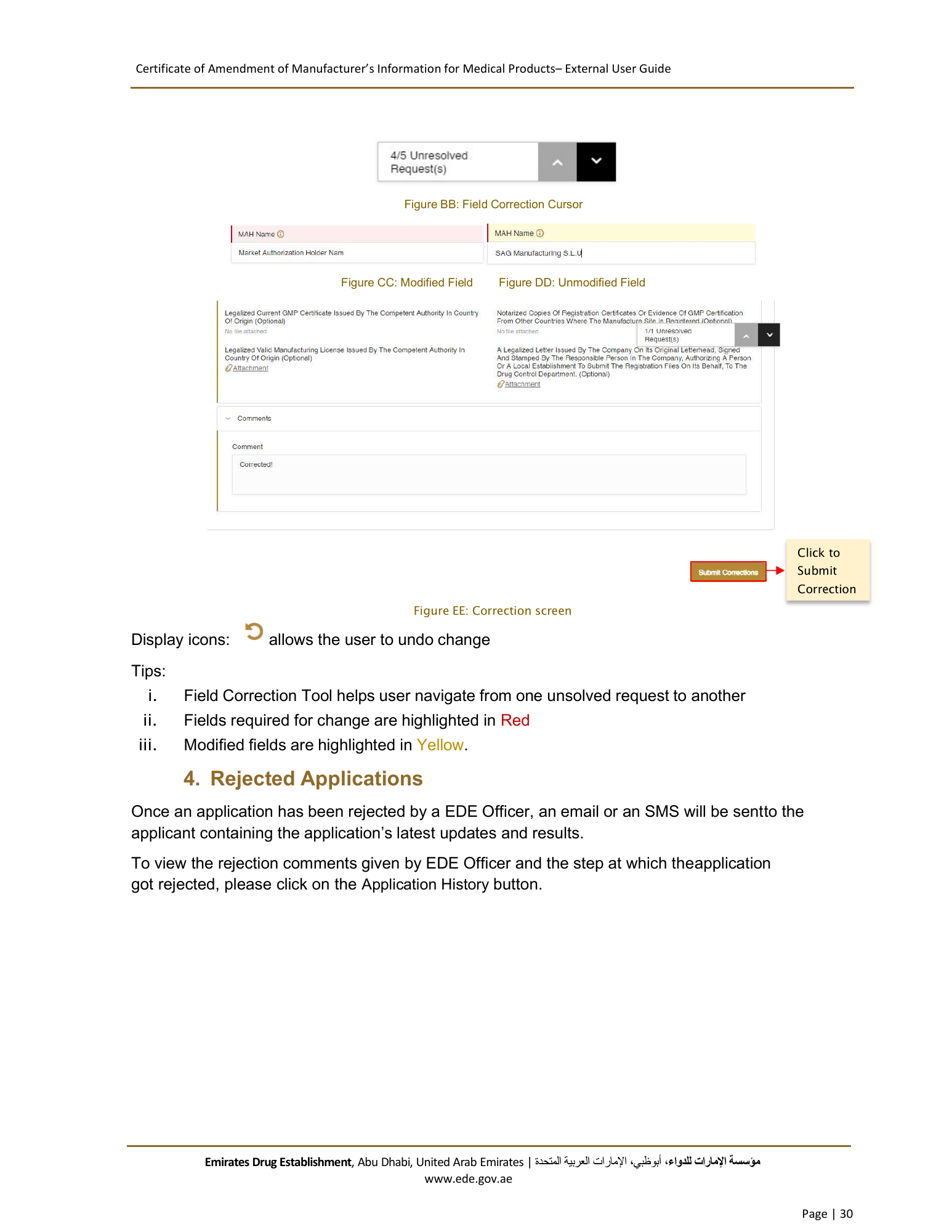
Certificate of Amendment of Manufacturer’s Information for Medical Products– External User Guide Figure BB: Field Correction Cursor Figure CC: Modified Field Figure DD: Unmodified Field Click to Submit Correction Figure EE: Correction screen Display icons: allows the user to undo change Tips: i. Field Correction Tool helps user navigate from one unsolved request to another ii. Fields required for change are highlighted in Red iii. Modified fields are highlighted in Yellow. 4. Rejected Applications Once an application has been rejected by a EDE Officer, an email or an SMS will be sent to the applicant containing the application’s latest updates and results. To view the rejection comments given by EDE Officer and the step at which theapplication got rejected, please click on the Application History button. Emirates Drug Establishment, Abu Dhabi, United Arab Emirates | اﻹمارات العربية المتحدة، أبوظبي،مﺆﺳﺴﺔ اﻹمارات للدواء www.ede.gov.ae Page | 30
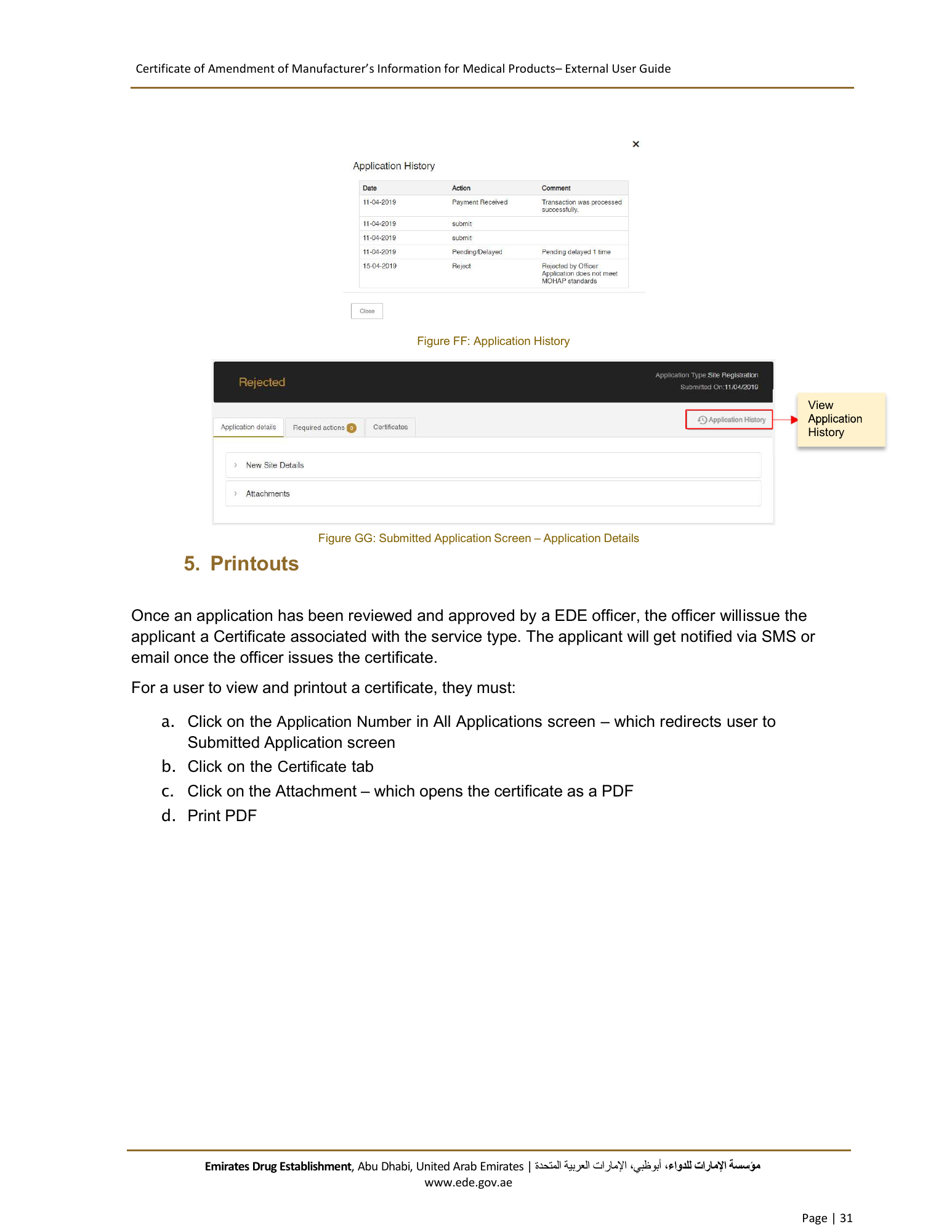
Certificate of Amendment of Manufacturer’s Information for Medical Products– External User Guide Figure FF: Application History View History Figure GG: Submitted Application Screen – Application Details 5. Printouts Once an application has been reviewed and approved by a EDE officer, the officer will issue the applicant a Certificate associated with the service type. The applicant will get notified via SMS or email once the officer issues the certificate. For a user to view and printout a certificate, they must: a. Click on the Application Number in All Applications screen – which redirects user to Submitted Application screen b. Click on the Certificate tab c. Click on the Attachment – which opens the certificate as a PDF d. Print PDF Emirates Drug Establishment, Abu Dhabi, United Arab Emirates | اﻹمارات العربية المتحدة، أبوظبي،مﺆﺳﺴﺔ اﻹمارات للدواء www.ede.gov.ae Page | 31
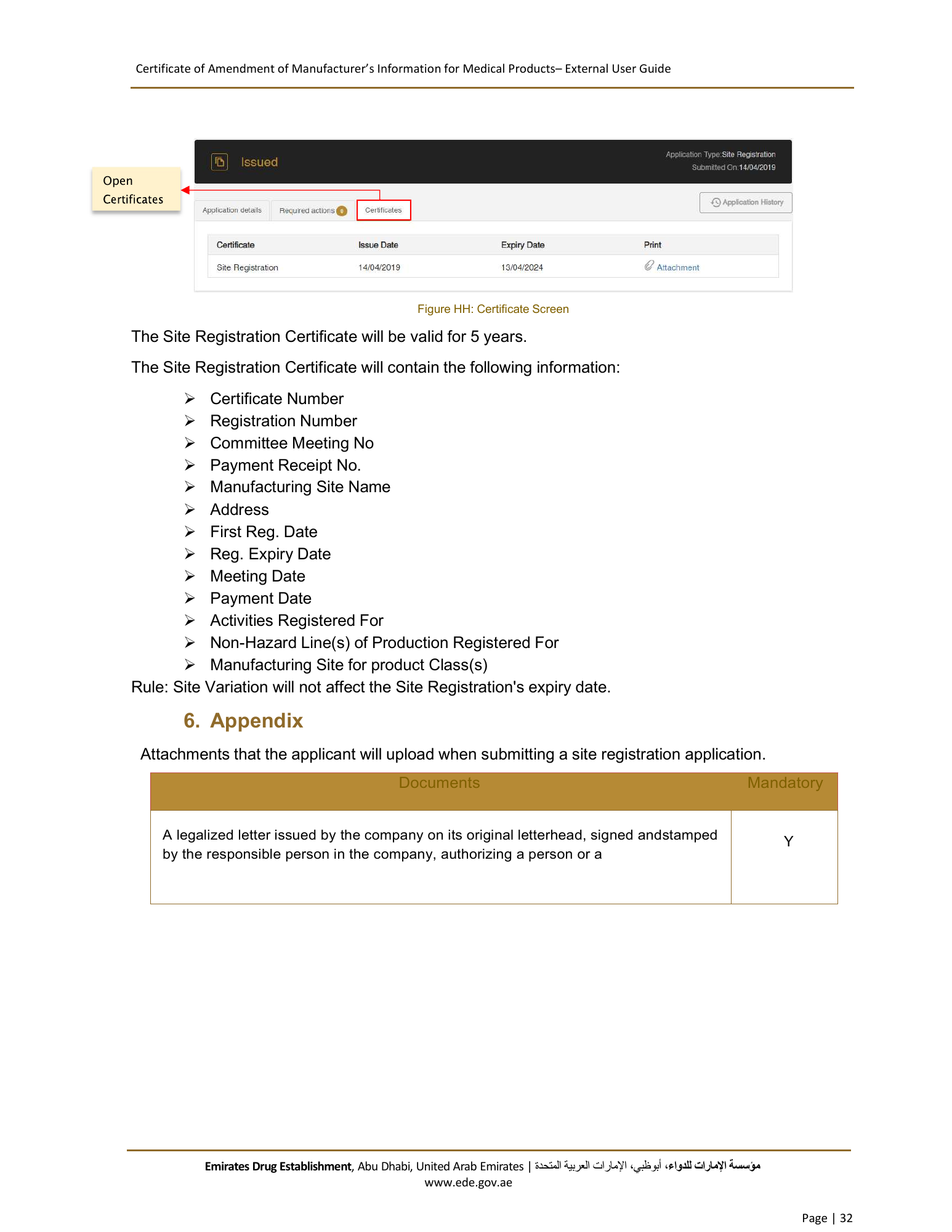
Certificate of Amendment of Manufacturer’s Information for Medical Products– External User Guide Open Figure HH: Certificate Screen The Site Registration Certificate will be valid for 5 years. The Site Registration Certificate will contain the following information: Certificate Number Registration Number Committee Meeting No Payment Receipt No. Manufacturing Site Name Address First Reg. Date Reg. Expiry Date Meeting Date Payment Date Activities Registered For Non-Hazard Line(s) of Production Registered For Manufacturing Site for product Class(s) Rule: Site Variation will not affect the Site Registration's expiry date. 6. Appendix Attachments that the applicant will upload when submitting a site registration application. Documents Mandatory A legalized letter issued by the company on its original letterhead, signed andstamped Y by the responsible person in the company, authorizing a person or a Emirates Drug Establishment, Abu Dhabi, United Arab Emirates | اﻹمارات العربية المتحدة، أبوظبي،مﺆﺳﺴﺔ اﻹمارات للدواء www.ede.gov.ae Page | 32
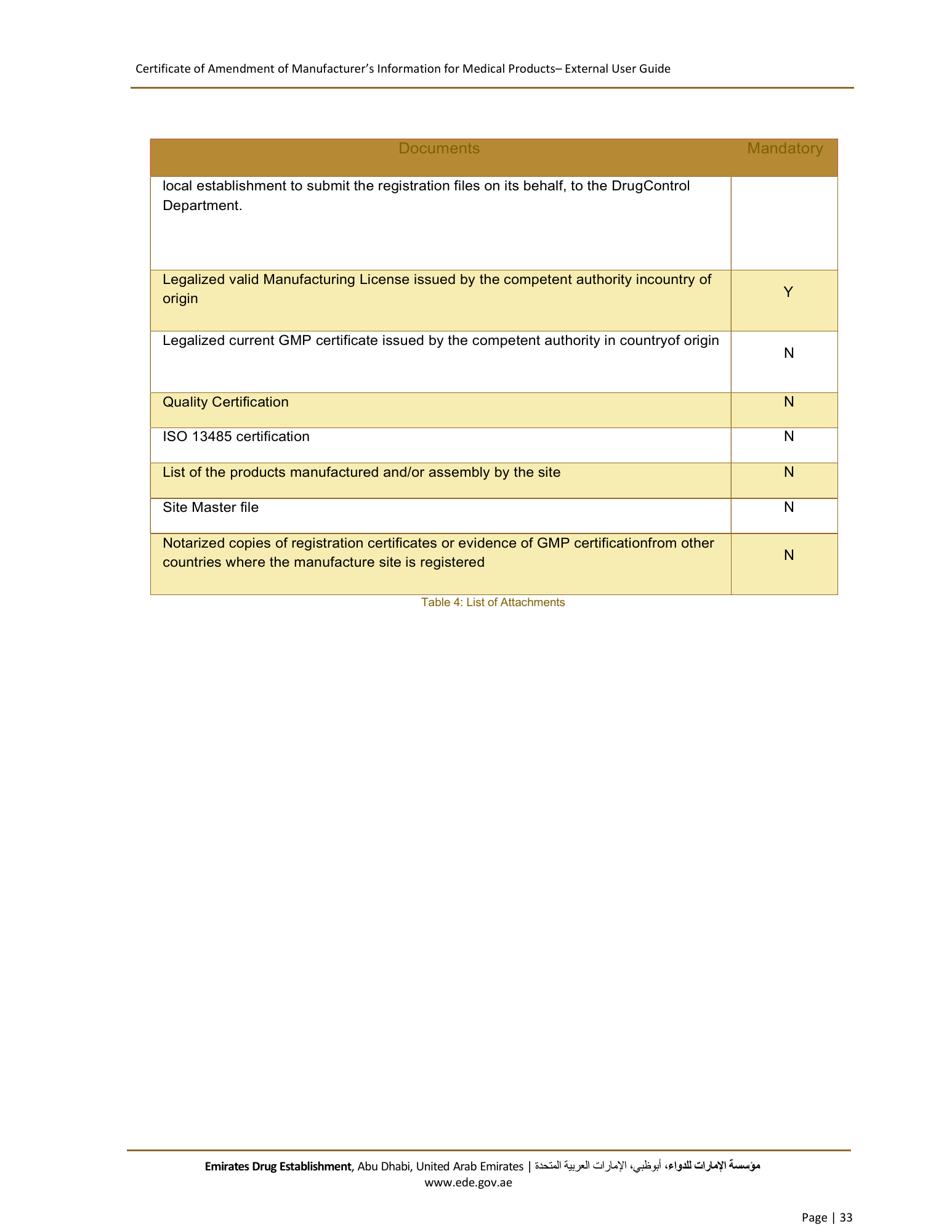
Certificate of Amendment of Manufacturer’s Information for Medical Products– External User Guide Documents Mandatory local establishment to submit the registration files on its behalf, to the DrugControl Department. Legalized valid Manufacturing License issued by the competent authority incountry of origin Y Legalized current GMP certificate issued by the competent authority in countryof origin N Quality Certification N ISO 13485 certification N List of the products manufactured and/or assembly by the site N Site Master file N Notarized copies of registration certificates or evidence of GMP certificationfrom other countries where the manufacture site is registered N Table 4: List of Attachments Emirates Drug Establishment, Abu Dhabi, United Arab Emirates | اﻹمارات العربية المتحدة، أبوظبي،مﺆﺳﺴﺔ اﻹمارات للدواء www.ede.gov.ae Page | 33