Searchable PDF text layer
Certificates of Free Sale Reference Guide Please do not print this document. View online only to ensure you have the latest version. © Crown Copyright 2026
Currentness under review. Whether this instrument remains applicable is under review. Consult the later instruments and source context below before relying on it.
Original page images are authoritative. Searchable text is the PDF text layer and may omit image text or contain extraction artifacts. Quote and verify against the page images.
Link directly to a passage with its anchor — for example #pdf-page-1 — to open it highlighted. This reference version is generated from the authority’s publication and does not replace it. Language: English.
Certificates of Free Sale Reference Guide Please do not print this document. View online only to ensure you have the latest version. © Crown Copyright 2026
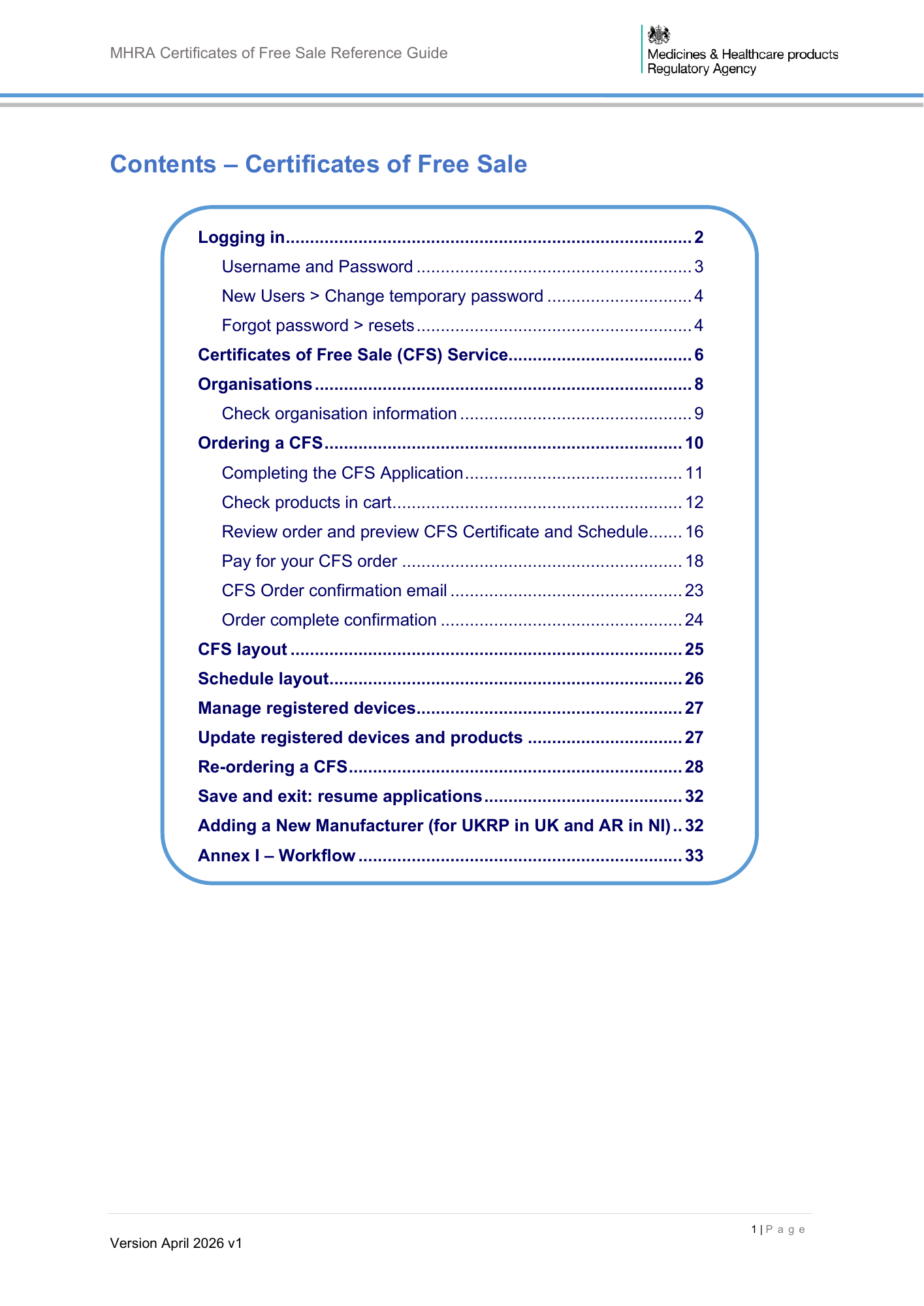
MHRA Certificates of Free Sale Reference Guide Contents – Certificates of Free Sale Logging in.................................................................................... 2 Username and Password ......................................................... 3 New Users > Change temporary password .............................. 4 Forgot password > resets ......................................................... 4 Certificates of Free Sale (CFS) Service...................................... 6 Organisations .............................................................................. 8 Check organisation information ................................................ 9 Ordering a CFS .......................................................................... 10 Completing the CFS Application ............................................. 11 Check products in cart ............................................................ 12 Review order and preview CFS Certificate and Schedule....... 16 Pay for your CFS order .......................................................... 18 CFS Order confirmation email ................................................ 23 Order complete confirmation .................................................. 24 CFS layout ................................................................................. 25 Schedule layout......................................................................... 26 Manage registered devices....................................................... 27 Update registered devices and products ................................ 27 Re-ordering a CFS ..................................................................... 28 Save and exit: resume applications ......................................... 32 Adding a New Manufacturer (for UKRP in UK and AR in NI) .. 32 Annex I – Workflow ................................................................... 33 1|P a g e Version April 2026 v1
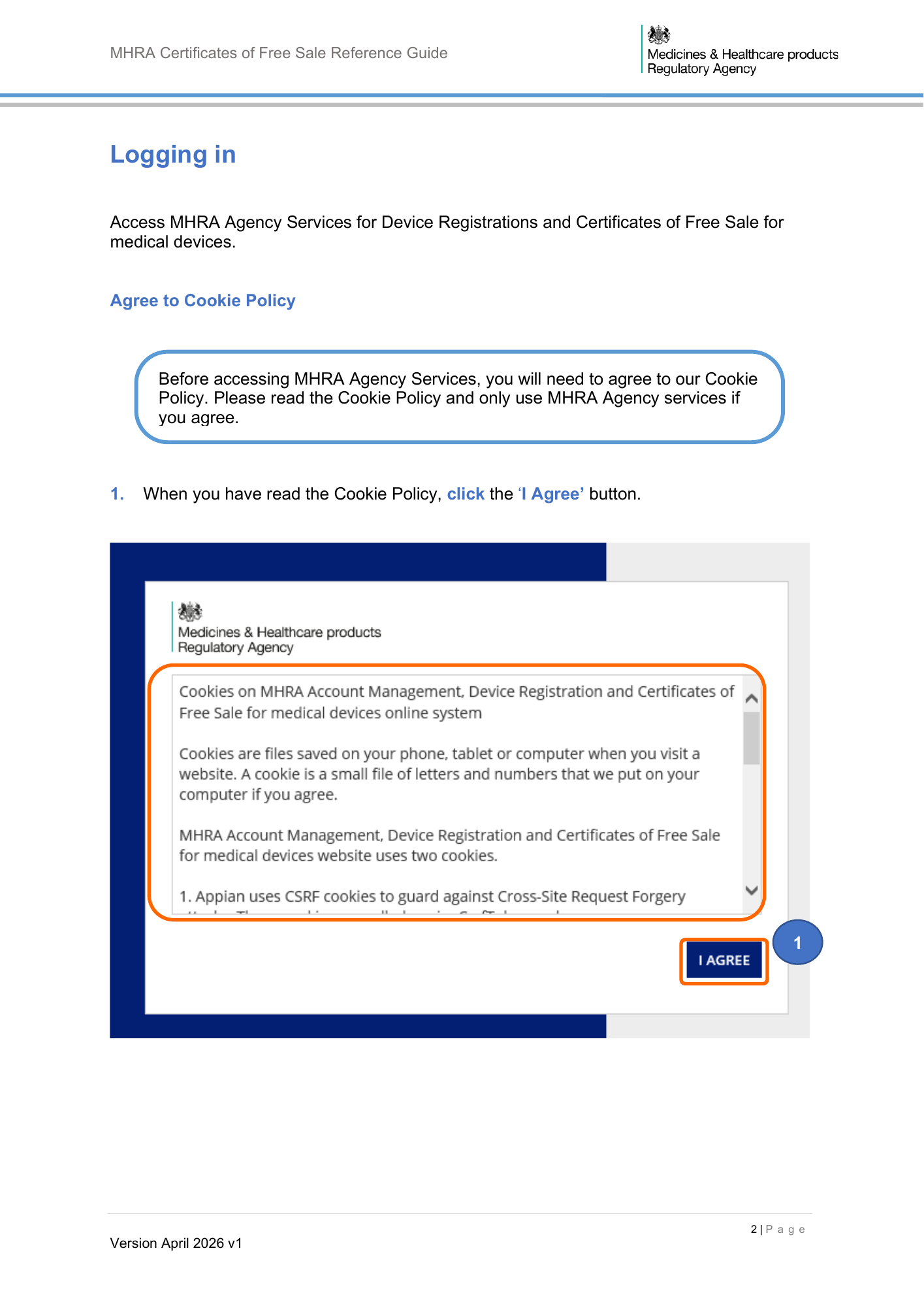
MHRA Certificates of Free Sale Reference Guide Logging in Access MHRA Agency Services for Device Registrations and Certificates of Free Sale for medical devices. Agree to Cookie Policy Before accessing MHRA Agency Services, you will need to agree to our Cookie Policy. Please read the Cookie Policy and only use MHRA Agency services if you agree. 1. When you have read the Cookie Policy, click the ‘I Agree’ button. 1 2|P a g e Version April 2026 v1
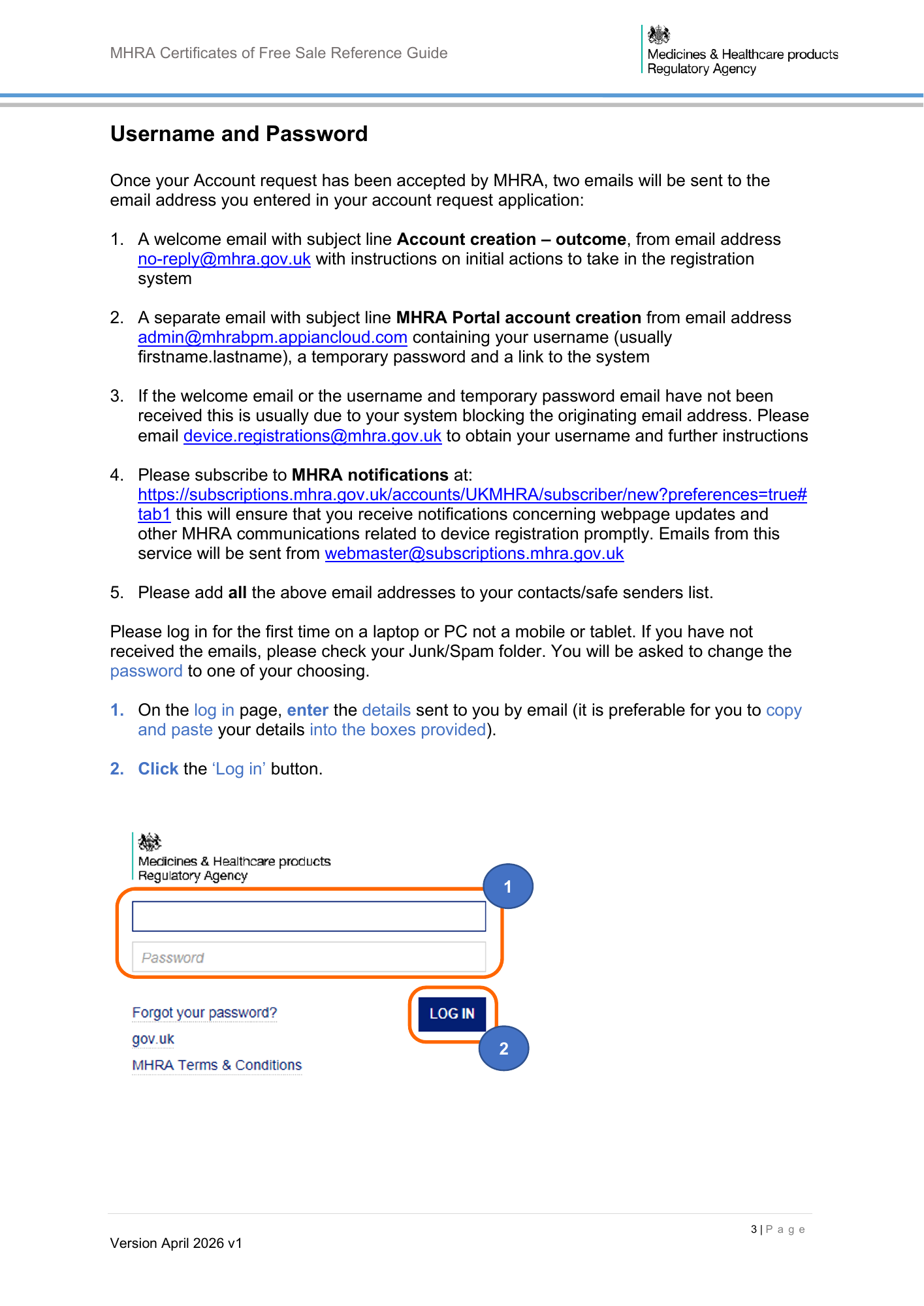
MHRA Certificates of Free Sale Reference Guide Username and Password Once your Account request has been accepted by MHRA, two emails will be sent to the email address you entered in your account request application: 1. A welcome email with subject line Account creation – outcome, from email address no-reply@mhra.gov.uk with instructions on initial actions to take in the registration system 2. A separate email with subject line MHRA Portal account creation from email address admin@mhrabpm.appiancloud.com containing your username (usually firstname.lastname), a temporary password and a link to the system 3. If the welcome email or the username and temporary password email have not been received this is usually due to your system blocking the originating email address. Please email device.registrations@mhra.gov.uk to obtain your username and further instructions 4. Please subscribe to MHRA notifications at: https://subscriptions.mhra.gov.uk/accounts/UKMHRA/subscriber/new?preferences=true# tab1 this will ensure that you receive notifications concerning webpage updates and other MHRA communications related to device registration promptly. Emails from this service will be sent from webmaster@subscriptions.mhra.gov.uk 5. Please add all the above email addresses to your contacts/safe senders list. Please log in for the first time on a laptop or PC not a mobile or tablet. If you have not received the emails, please check your Junk/Spam folder. You will be asked to change the password to one of your choosing. 1. On the log in page, enter the details sent to you by email (it is preferable for you to copy and paste your details into the boxes provided). 2. Click the ‘Log in’ button. 1 2 3|P a g e Version April 2026 v1
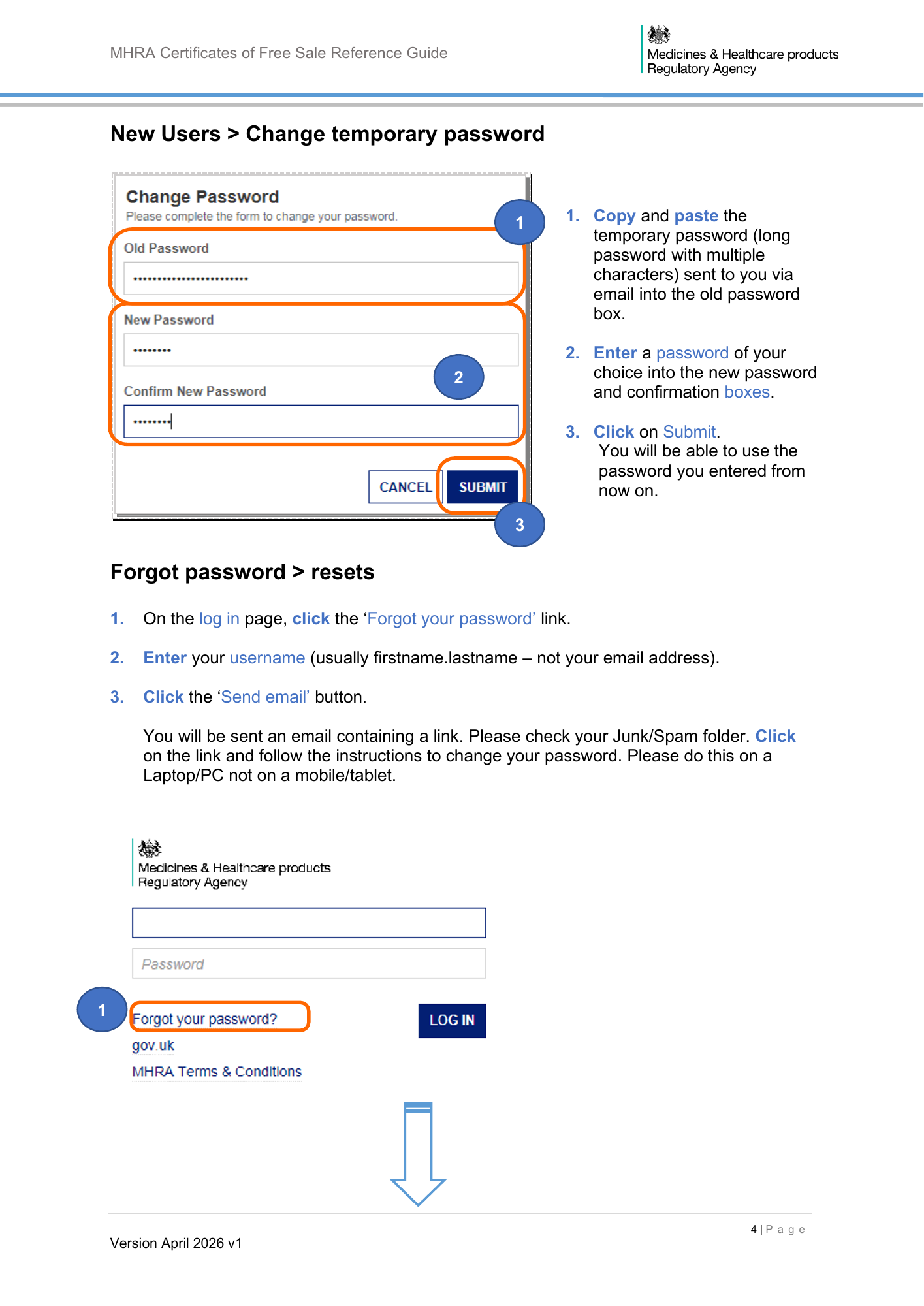
MHRA Certificates of Free Sale Reference Guide New Users > Change temporary password 1 1. Copy and paste the temporary password (long password with multiple characters) sent to you via email into the old password box. 2. Enter a password of your 2 choice into the new password and confirmation boxes. 3. Click on Submit. You will be able to use the password you entered from now on. 3 Forgot password > resets 1. On the log in page, click the ‘Forgot your password’ link. 2. Enter your username (usually firstname.lastname – not your email address). 3. Click the ‘Send email’ button. You will be sent an email containing a link. Please check your Junk/Spam folder. Click on the link and follow the instructions to change your password. Please do this on a Laptop/PC not on a mobile/tablet. 1 4|P a g e Version April 2026 v1
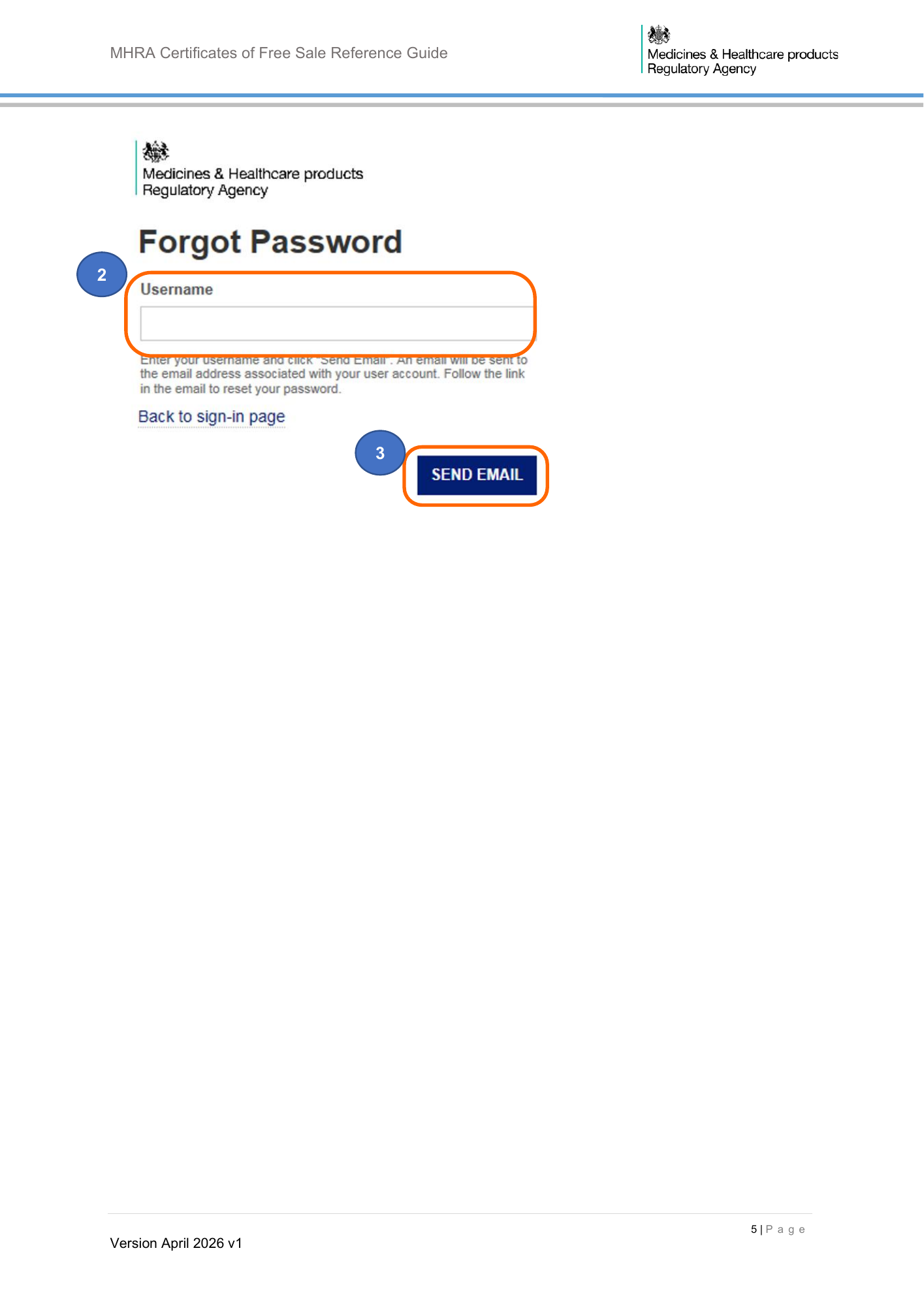
MHRA Certificates of Free Sale Reference Guide 2 3 5|P a g e Version April 2026 v1
MHRA Certificates of Free Sale Reference Guide Certificates of Free Sale (CFS) Service This service enables UK based manufacturers, UK Responsible Persons and Authorised Representatives in Northern Ireland to apply for Certificates of Free Sale for medical device products that have been registered with MHRA. Please follow all the instructions in the Device Registration Reference Guide to register devices for your organisation or manufacturers you represent. Please note the important information in the above guide on adding product (model/version Catalogue/Reference and UDI DI etc.) data – only the Medical Device Name, Model/Version and Catalogue/Reference, Basic UDI DI and UKCA or CE Certificate Reference No. data that you enter will appear on the Certificate of Free Sale. in vitro diagnostic medical devices for performance evaluation cannot be included on CFS orders. It is your responsibility to check with the receiving country that they will accept the CFS before your make payment for your order. You will be given the option to download a preview sample that you can email to the country. Please note the formatting on the preview sample may not match the final certificate formatting. CFS order applications are non-refundable – please see our terms and conditions. You must preview the CFS Certificate and Schedule before making payment to ensure it meets your needs and before you pay. Since 01 January 2021 new medical device regulations have applied in the UK. Depending on your location and the type of Conformity Assessment that your registered device(s) comply with, the CFS certificate will state that the devices can be placed on either the GB (England, Scotland, Wales) market, or the UK (England, Scotland, Wales and Northern Ireland) market. For Northern Ireland-based manufacturers and Authorised Representatives with devices that are CE marked, the CFS certificate will also state that devices can be placed on the EU/EEA market. Please ensure that you download the preview and check with the recipient country before placing your order. CFS for medical devices are issued as pdf documents with electronic signature. Hard copies with wet signature are no longer issued. We will try to process your order within 10 working days from date of receipt. During busy periods orders may take longer. Please order as far in advance as possible. Please note that the Foreign, Commonwealth & Development Office will not apostille pdf documents directly from MHRA. You will need a Notary to carry out checks on the certificates with MHRA to ascertain their authenticity, and can then notarise the certificates, if required by the recipient country. Once notarised, the Foreign, Commonwealth & Development Office will apostille the documents. Where appropriate, Certificates of Free Sale are issued as a service to UK exporters. A Certificate of Free Sale should not be taken as a Government endorsement of any product that is referred to on the certificate. In issuing Certificates of Free Sale, the MHRA does not assess or verify that the product complies with relevant export requirements and restrictions. It is the applicant’s responsibility to ensure compliance with these requirements and restrictions. 6|P a g e Version April 2026 v1
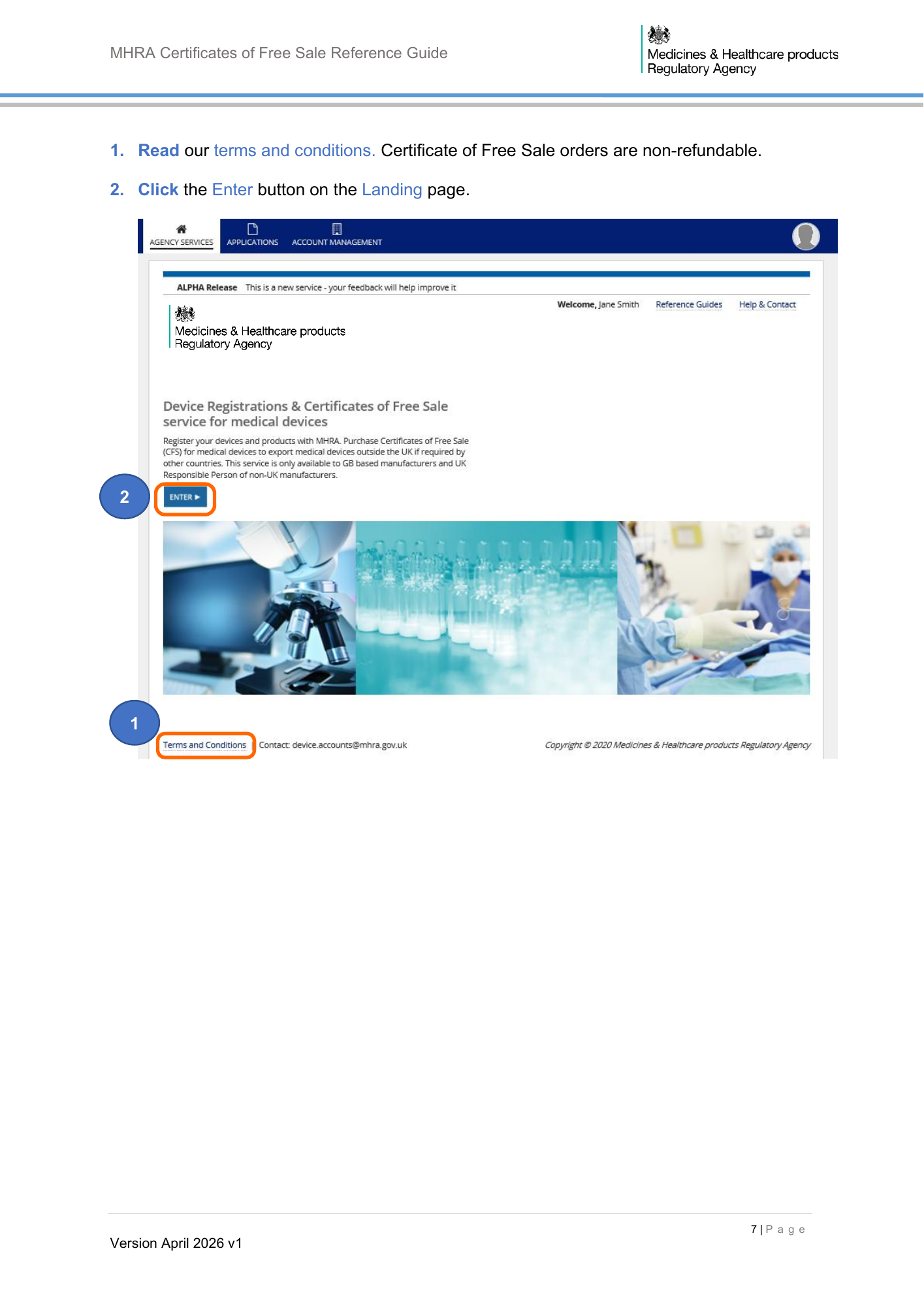
MHRA Certificates of Free Sale Reference Guide 1. Read our terms and conditions. Certificate of Free Sale orders are non-refundable. 2. Click the Enter button on the Landing page. 2 1 7|P a g e Version April 2026 v1
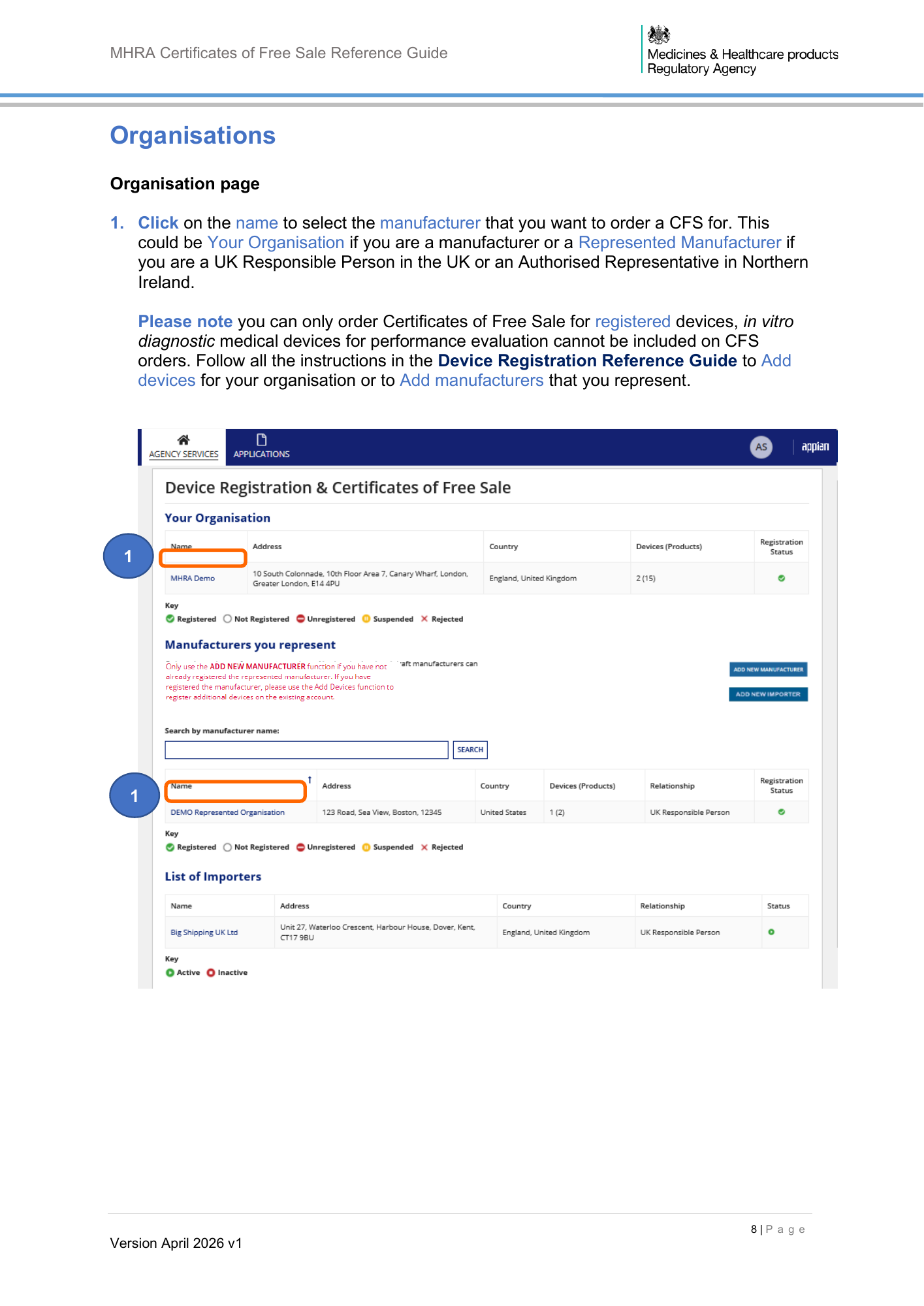
MHRA Certificates of Free Sale Reference Guide Organisations Organisation page 1. Click on the name to select the manufacturer that you want to order a CFS for. This could be Your Organisation if you are a manufacturer or a Represented Manufacturer if you are a UK Responsible Person in the UK or an Authorised Representative in Northern Ireland. Please note you can only order Certificates of Free Sale for registered devices, in vitro diagnostic medical devices for performance evaluation cannot be included on CFS orders. Follow all the instructions in the Device Registration Reference Guide to Add devices for your organisation or to Add manufacturers that you represent. 1 1 8|P a g e Version April 2026 v1
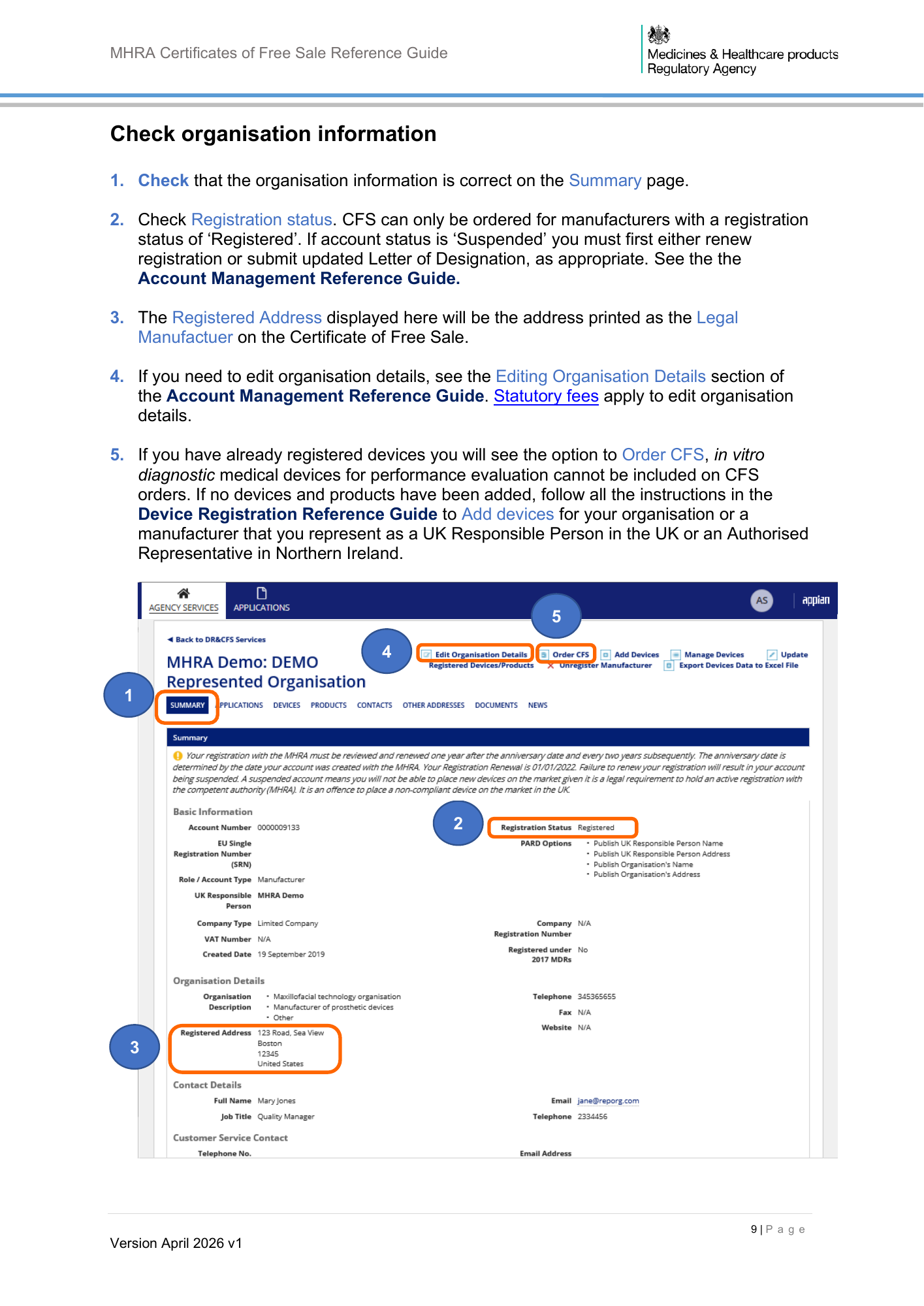
MHRA Certificates of Free Sale Reference Guide Check organisation information 1. Check that the organisation information is correct on the Summary page. 2. Check Registration status. CFS can only be ordered for manufacturers with a registration status of ‘Registered’. If account status is ‘Suspended’ you must first either renew registration or submit updated Letter of Designation, as appropriate. See the the Account Management Reference Guide. 3. The Registered Address displayed here will be the address printed as the Legal Manufactuer on the Certificate of Free Sale. 4. If you need to edit organisation details, see the Editing Organisation Details section of the Account Management Reference Guide. Statutory fees apply to edit organisation details. 5. If you have already registered devices you will see the option to Order CFS, in vitro diagnostic medical devices for performance evaluation cannot be included on CFS orders. If no devices and products have been added, follow all the instructions in the Device Registration Reference Guide to Add devices for your organisation or a manufacturer that you represent as a UK Responsible Person in the UK or an Authorised Representative in Northern Ireland. 5 4 1 2 3 9|P a g e Version April 2026 v1
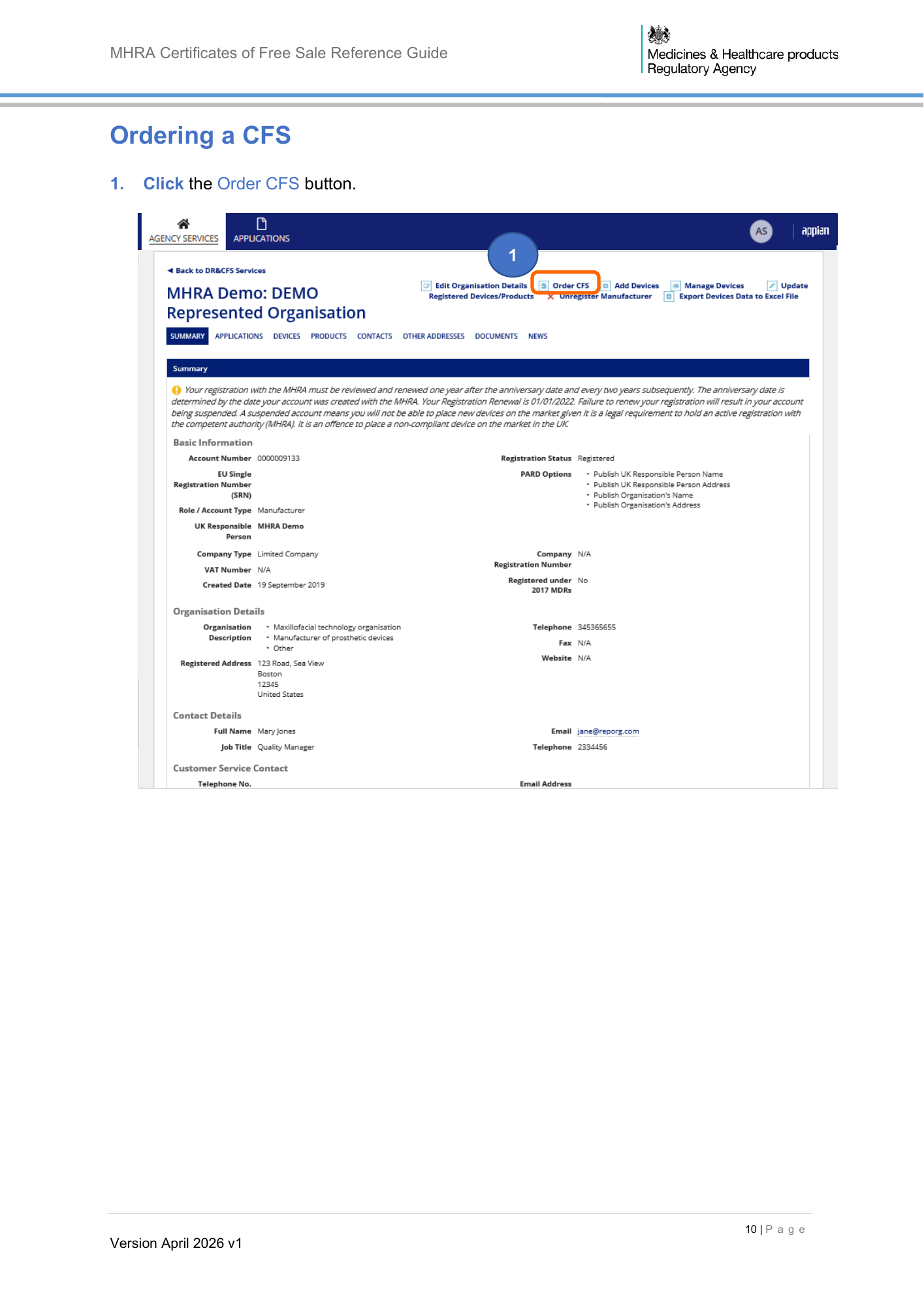
MHRA Certificates of Free Sale Reference Guide Ordering a CFS 1. Click the Order CFS button. 1 10 | P a g e Version April 2026 v1
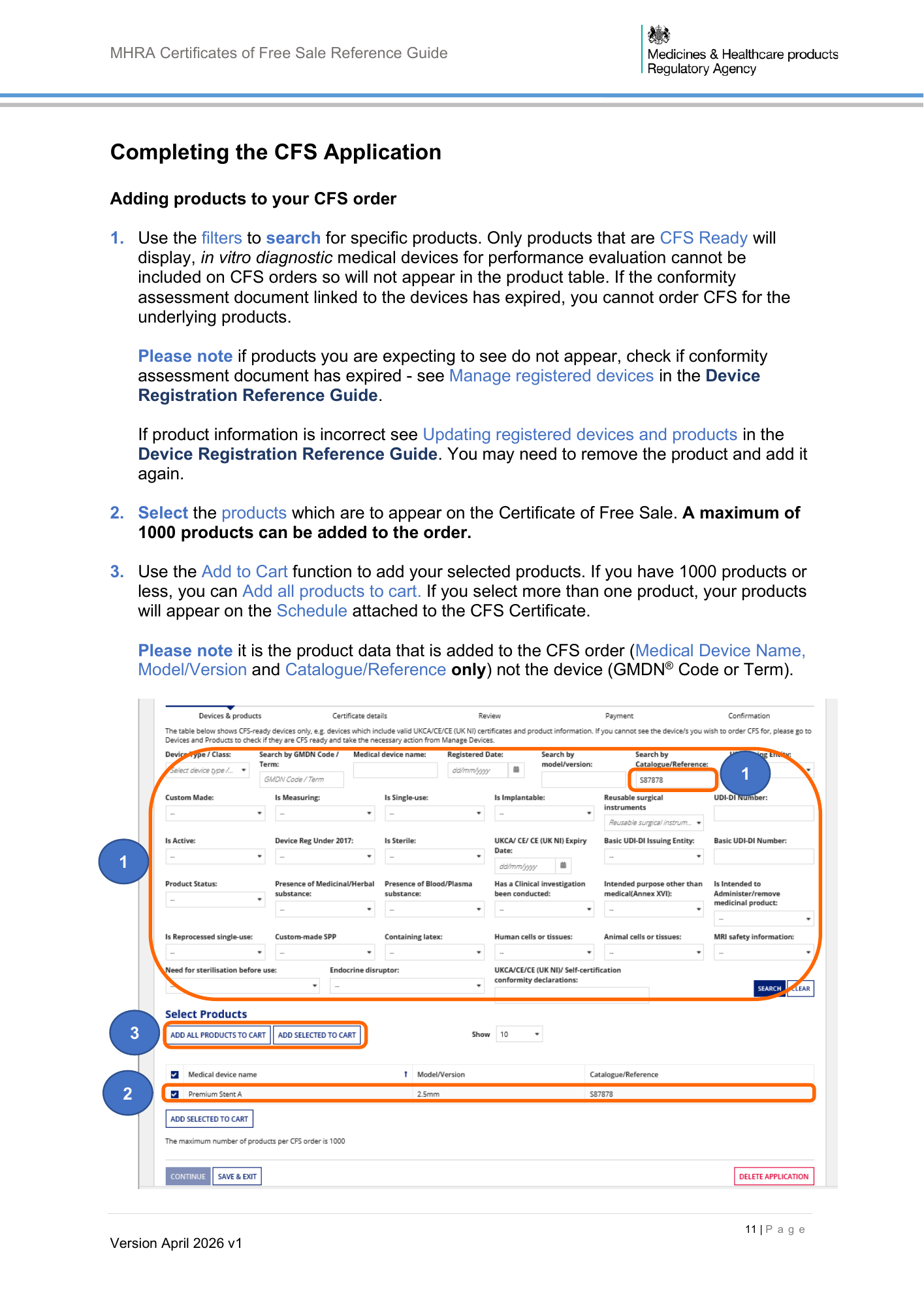
MHRA Certificates of Free Sale Reference Guide Completing the CFS Application Adding products to your CFS order 1. Use the filters to search for specific products. Only products that are CFS Ready will display, in vitro diagnostic medical devices for performance evaluation cannot be included on CFS orders so will not appear in the product table. If the conformity assessment document linked to the devices has expired, you cannot order CFS for the underlying products. Please note if products you are expecting to see do not appear, check if conformity assessment document has expired - see Manage registered devices in the Device Registration Reference Guide. If product information is incorrect see Updating registered devices and products in the Device Registration Reference Guide. You may need to remove the product and add it again. 2. Select the products which are to appear on the Certificate of Free Sale. A maximum of 1000 products can be added to the order. 3. Use the Add to Cart function to add your selected products. If you have 1000 products or less, you can Add all products to cart. If you select more than one product, your products will appear on the Schedule attached to the CFS Certificate. Please note it is the product data that is added to the CFS order (Medical Device Name, Model/Version and Catalogue/Reference only) not the device (GMDN® Code or Term). 1 1 3 2 11 | P a g e Version April 2026 v1
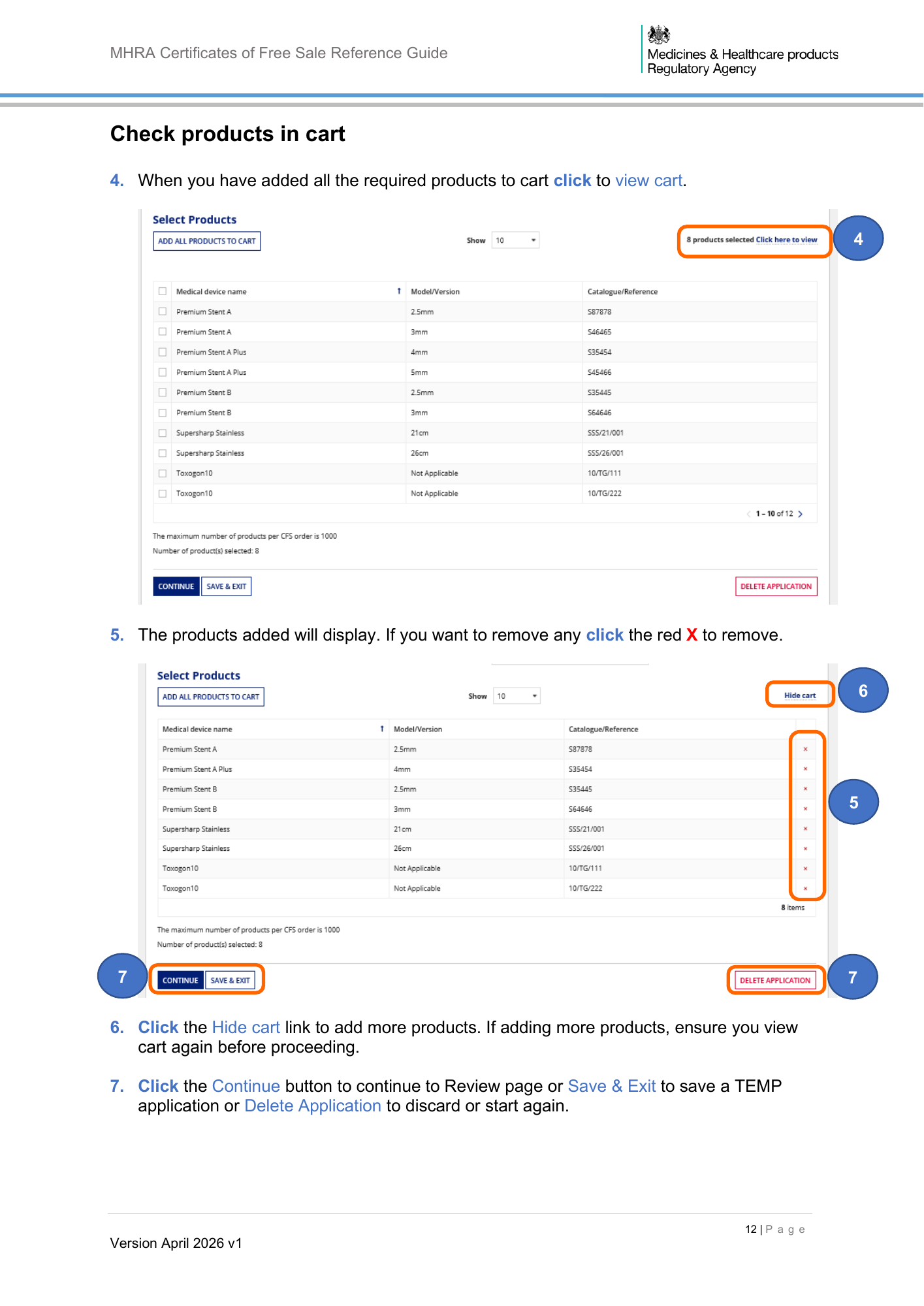
MHRA Certificates of Free Sale Reference Guide Check products in cart 4. When you have added all the required products to cart click to view cart. 4 5. The products added will display. If you want to remove any click the red X to remove. 6 5 7 7 6. Click the Hide cart link to add more products. If adding more products, ensure you view cart again before proceeding. 7. Click the Continue button to continue to Review page or Save & Exit to save a TEMP application or Delete Application to discard or start again. 12 | P a g e Version April 2026 v1
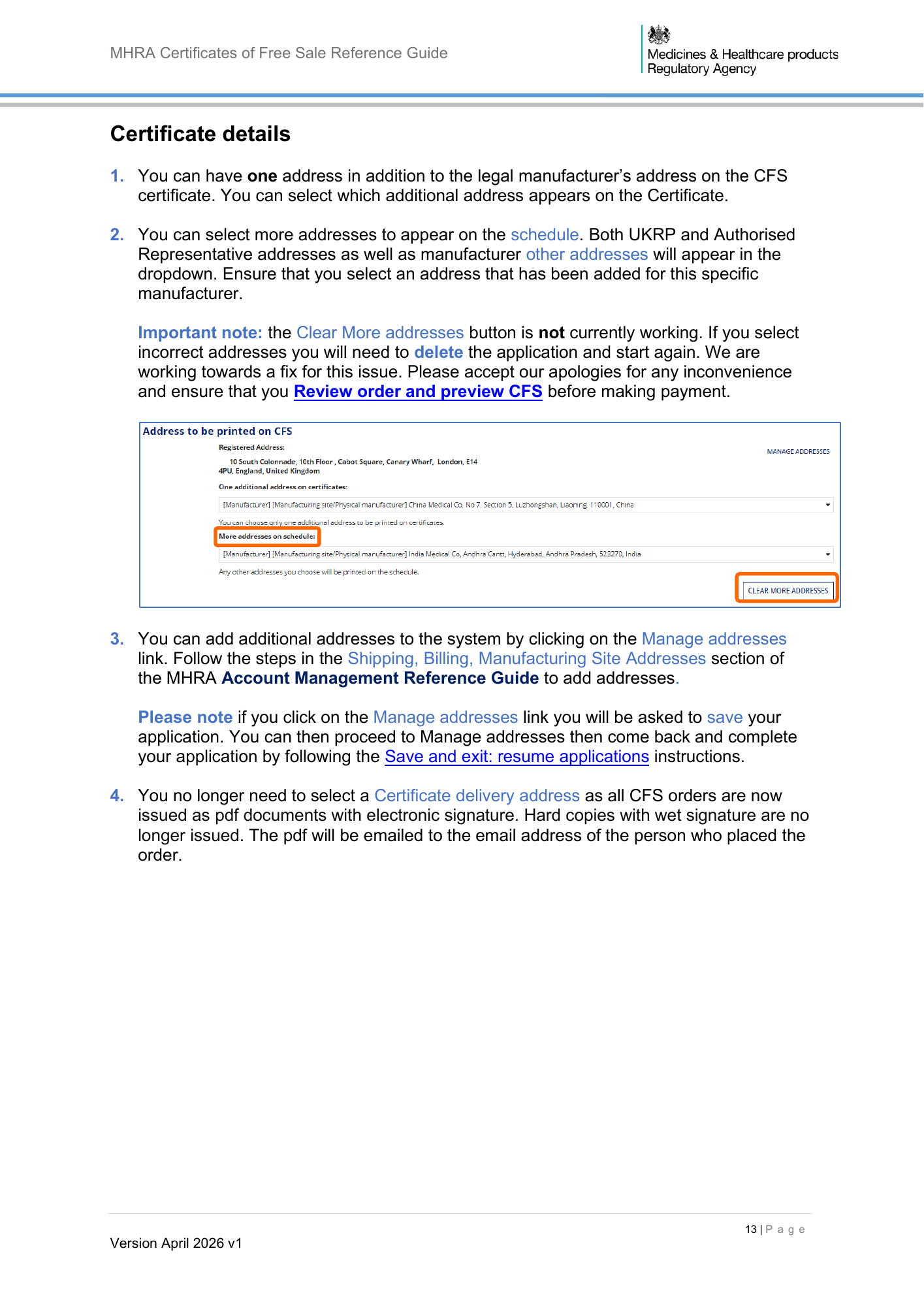
MHRA Certificates of Free Sale Reference Guide Certificate details 1. You can have one address in addition to the legal manufacturer’s address on the CFS certificate. You can select which additional address appears on the Certificate. 2. You can select more addresses to appear on the schedule. Both UKRP and Authorised Representative addresses as well as manufacturer other addresses will appear in the dropdown. Ensure that you select an address that has been added for this specific manufacturer. Important note: the Clear More addresses button is not currently working. If you select incorrect addresses you will need to delete the application and start again. We are working towards a fix for this issue. Please accept our apologies for any inconvenience and ensure that you Review order and preview CFS before making payment. 3. You can add additional addresses to the system by clicking on the Manage addresses link. Follow the steps in the Shipping, Billing, Manufacturing Site Addresses section of the MHRA Account Management Reference Guide to add addresses. Please note if you click on the Manage addresses link you will be asked to save your application. You can then proceed to Manage addresses then come back and complete your application by following the Save and exit: resume applications instructions. 4. You no longer need to select a Certificate delivery address as all CFS orders are now issued as pdf documents with electronic signature. Hard copies with wet signature are no longer issued. The pdf will be emailed to the email address of the person who placed the order. 13 | P a g e Version April 2026 v1
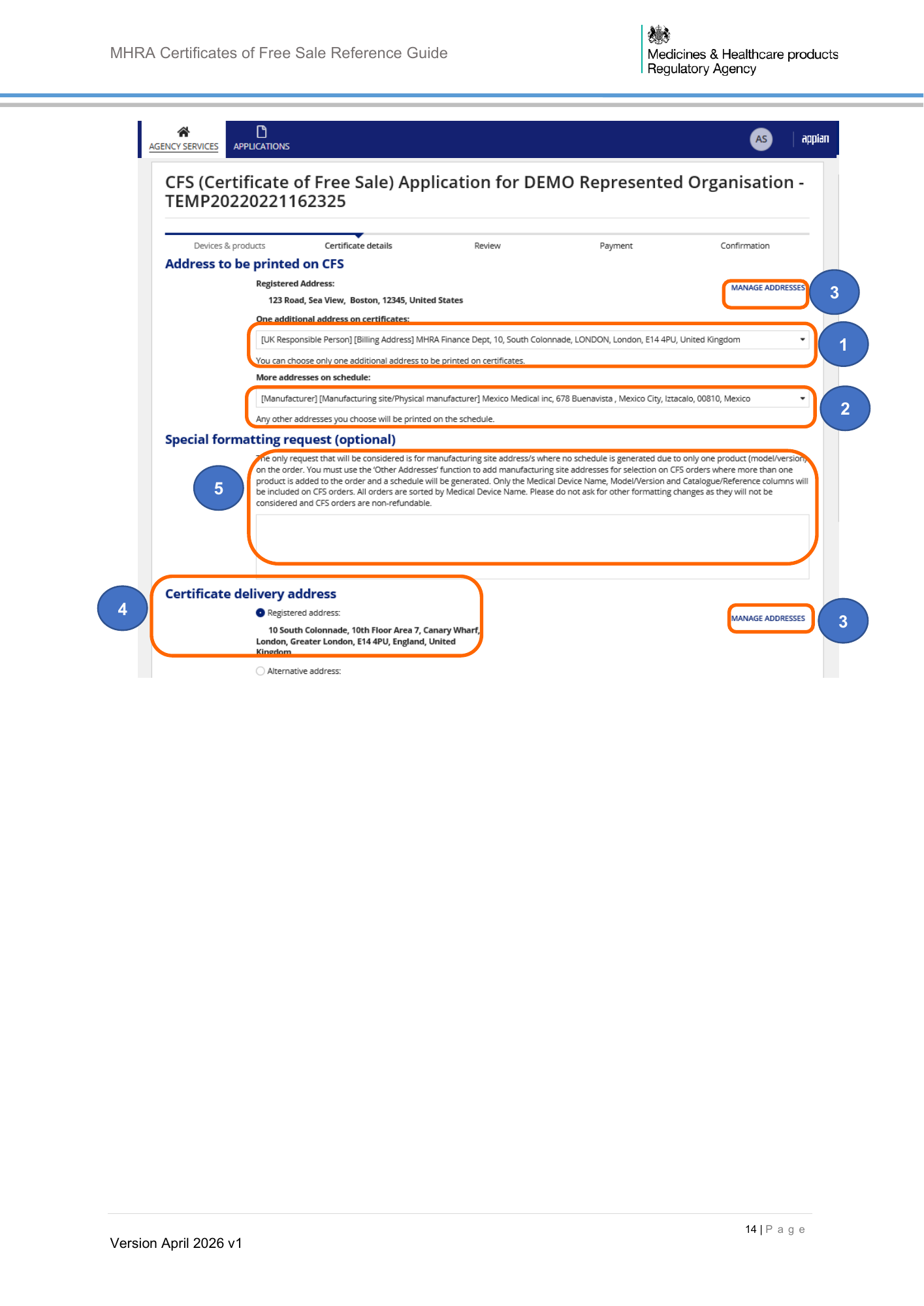
MHRA Certificates of Free Sale Reference Guide 3 1 2 5 4 3 14 | P a g e Version April 2026 v1
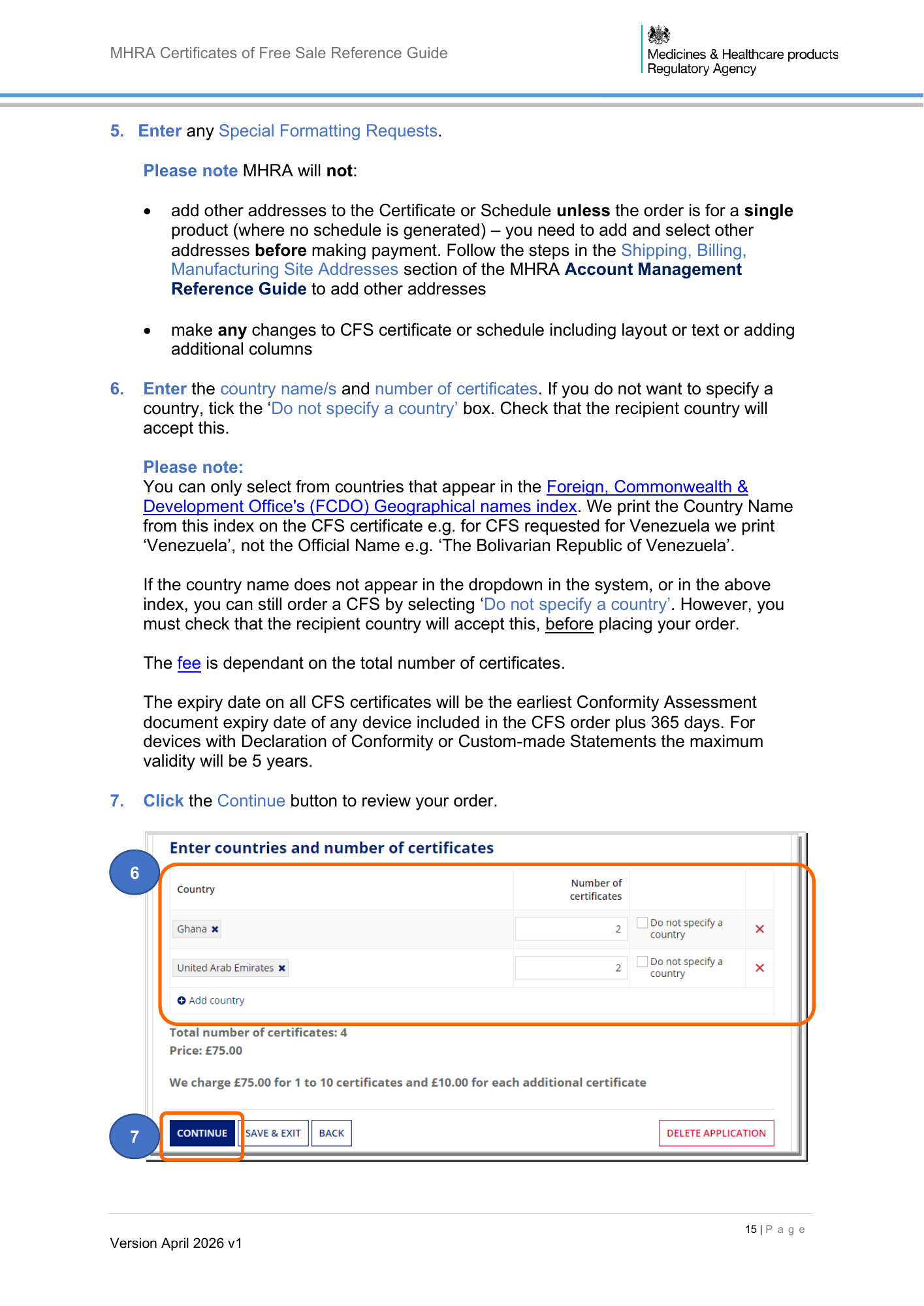
MHRA Certificates of Free Sale Reference Guide 5. Enter any Special Formatting Requests. Please note MHRA will not: • add other addresses to the Certificate or Schedule unless the order is for a single product (where no schedule is generated) – you need to add and select other addresses before making payment. Follow the steps in the Shipping, Billing, Manufacturing Site Addresses section of the MHRA Account Management Reference Guide to add other addresses • make any changes to CFS certificate or schedule including layout or text or adding additional columns 6. Enter the country name/s and number of certificates. If you do not want to specify a country, tick the ‘Do not specify a country’ box. Check that the recipient country will accept this. Please note: You can only select from countries that appear in the Foreign, Commonwealth & Development Office's (FCDO) Geographical names index. We print the Country Name from this index on the CFS certificate e.g. for CFS requested for Venezuela we print ‘Venezuela’, not the Official Name e.g. ‘The Bolivarian Republic of Venezuela’. If the country name does not appear in the dropdown in the system, or in the above index, you can still order a CFS by selecting ‘Do not specify a country’. However, you must check that the recipient country will accept this, before placing your order. The fee is dependant on the total number of certificates. The expiry date on all CFS certificates will be the earliest Conformity Assessment document expiry date of any device included in the CFS order plus 365 days. For devices with Declaration of Conformity or Custom-made Statements the maximum validity will be 5 years. 7. Click the Continue button to review your order. 6 7 15 | P a g e Version April 2026 v1
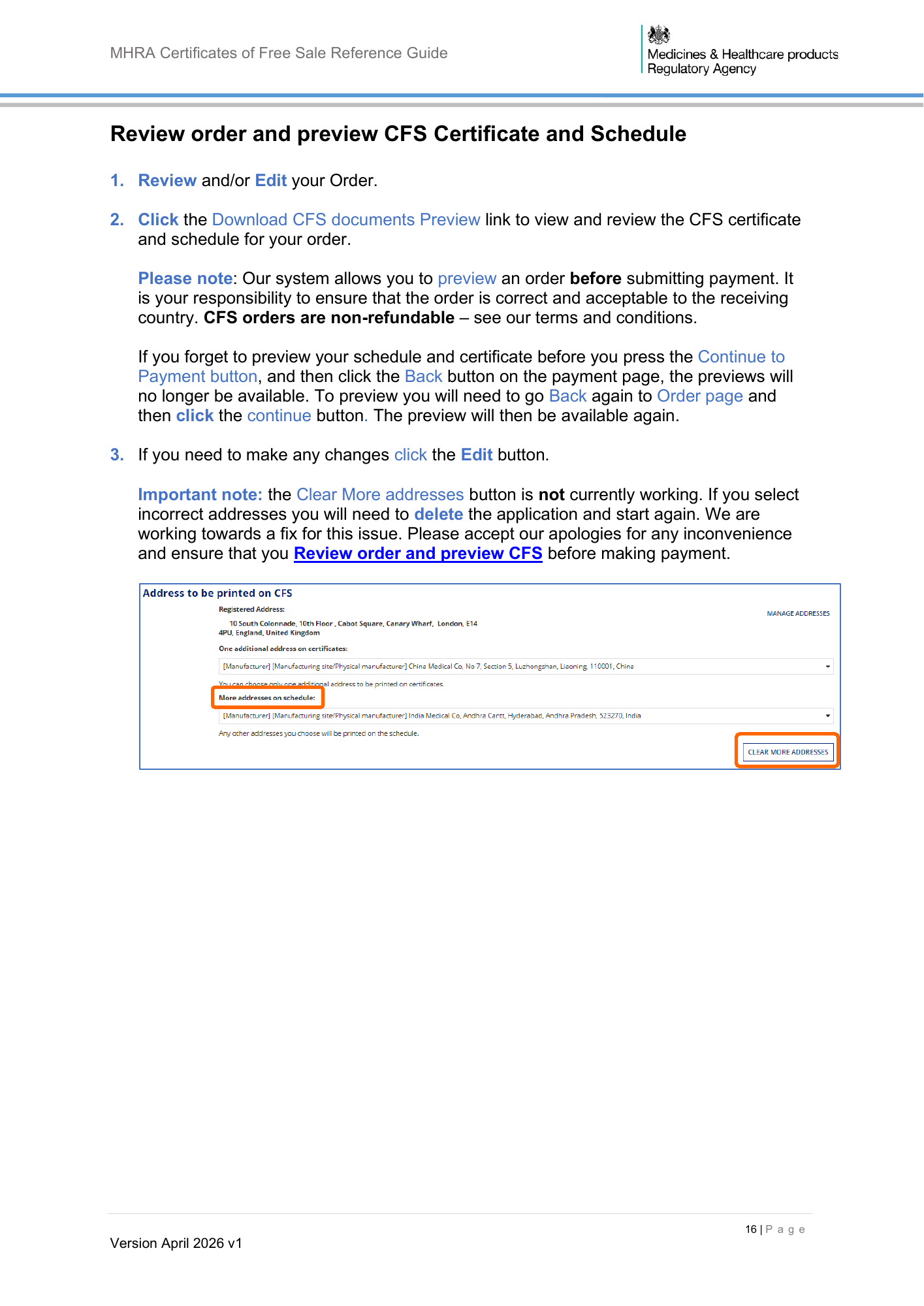
MHRA Certificates of Free Sale Reference Guide Review order and preview CFS Certificate and Schedule 1. Review and/or Edit your Order. 2. Click the Download CFS documents Preview link to view and review the CFS certificate and schedule for your order. Please note: Our system allows you to preview an order before submitting payment. It is your responsibility to ensure that the order is correct and acceptable to the receiving country. CFS orders are non-refundable – see our terms and conditions. If you forget to preview your schedule and certificate before you press the Continue to Payment button, and then click the Back button on the payment page, the previews will no longer be available. To preview you will need to go Back again to Order page and then click the continue button. The preview will then be available again. 3. If you need to make any changes click the Edit button. Important note: the Clear More addresses button is not currently working. If you select incorrect addresses you will need to delete the application and start again. We are working towards a fix for this issue. Please accept our apologies for any inconvenience and ensure that you Review order and preview CFS before making payment. 16 | P a g e Version April 2026 v1
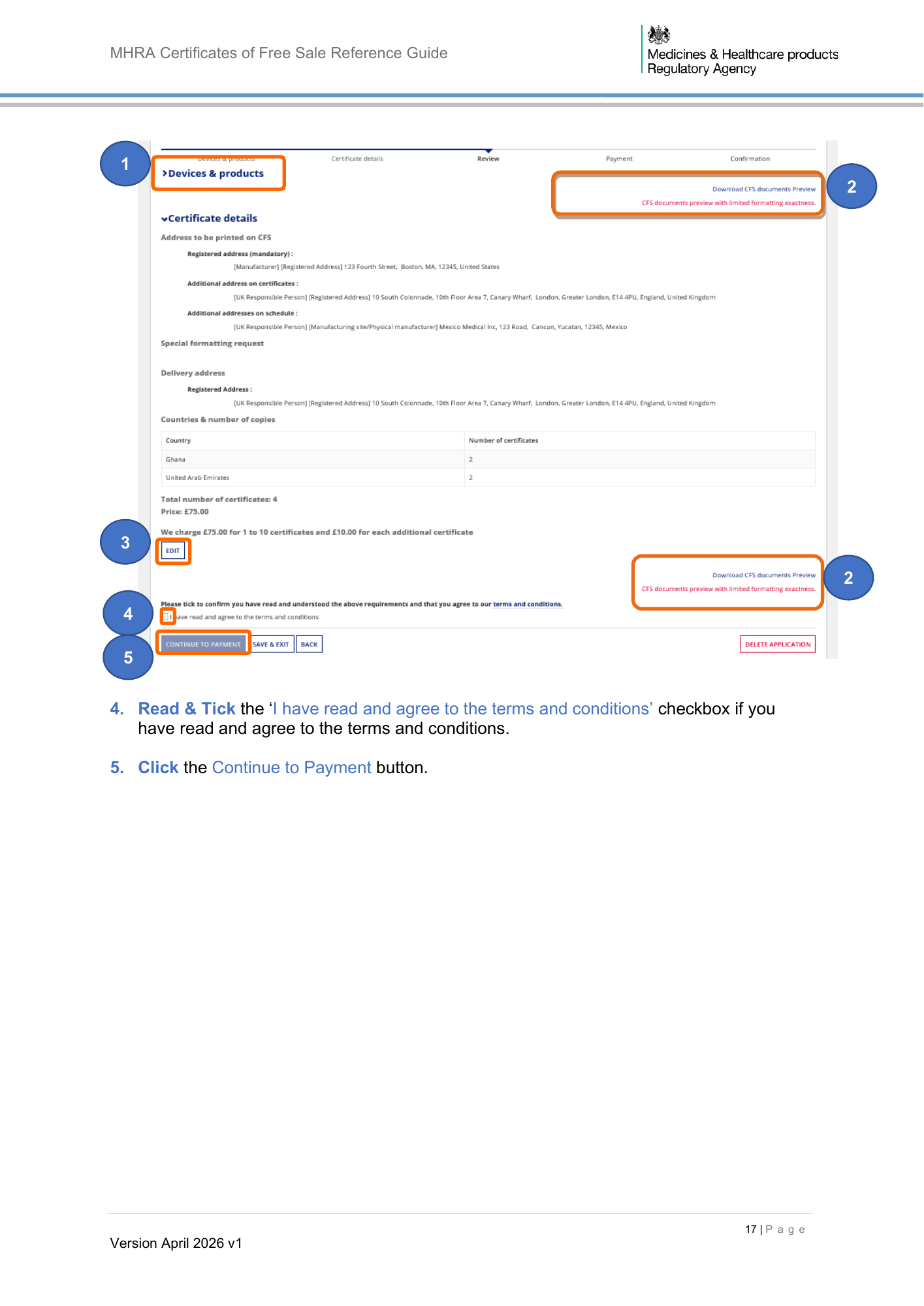
MHRA Certificates of Free Sale Reference Guide 1 2 3 2 4 5 4. Read & Tick the ‘I have read and agree to the terms and conditions’ checkbox if you have read and agree to the terms and conditions. 5. Click the Continue to Payment button. 17 | P a g e Version April 2026 v1
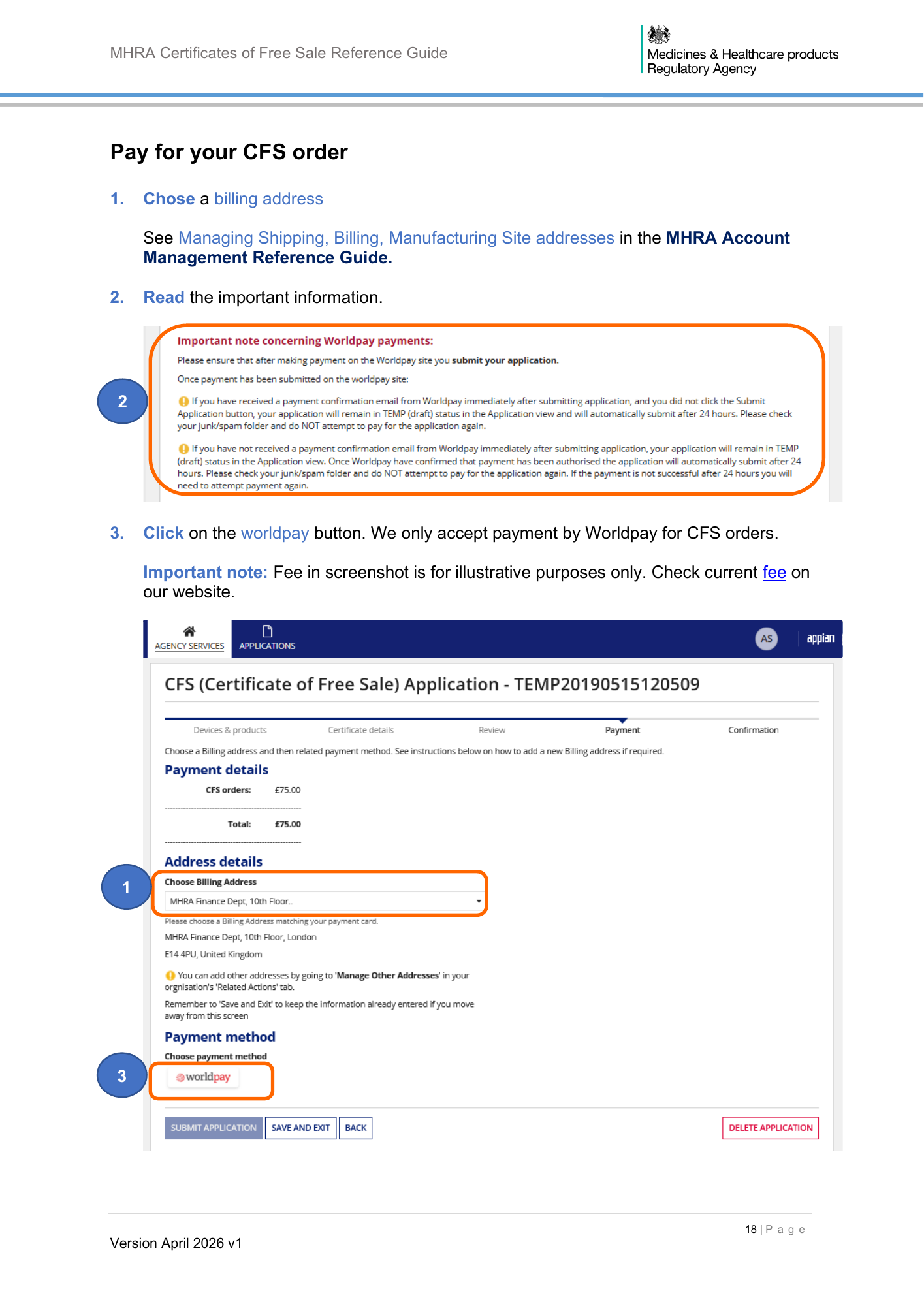
MHRA Certificates of Free Sale Reference Guide Pay for your CFS order 1. Chose a billing address See Managing Shipping, Billing, Manufacturing Site addresses in the MHRA Account Management Reference Guide. 2. Read the important information. 2 3. Click on the worldpay button. We only accept payment by Worldpay for CFS orders. Important note: Fee in screenshot is for illustrative purposes only. Check current fee on our website. 1 3 18 | P a g e Version April 2026 v1
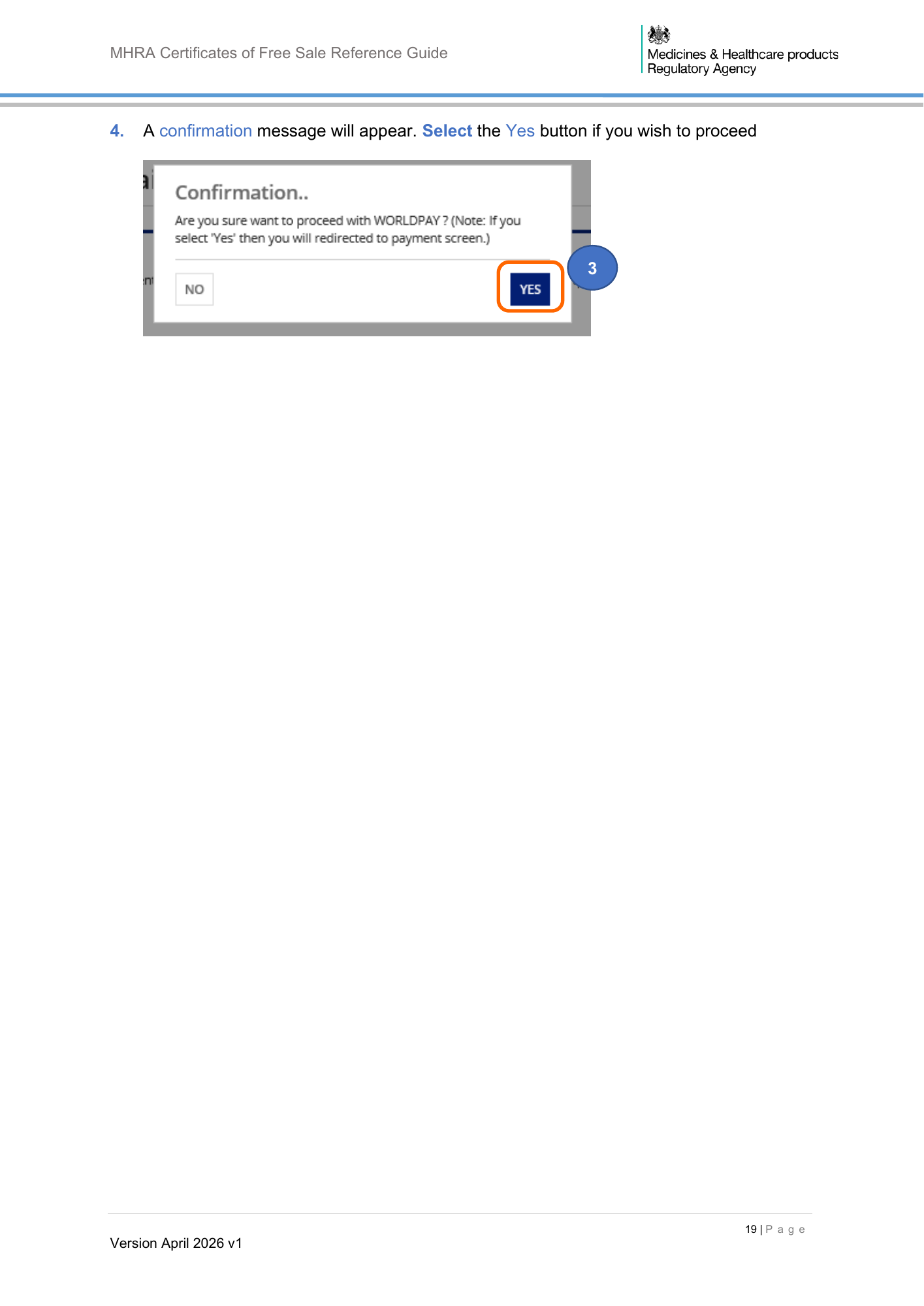
MHRA Certificates of Free Sale Reference Guide 4. A confirmation message will appear. Select the Yes button if you wish to proceed 3 19 | P a g e Version April 2026 v1
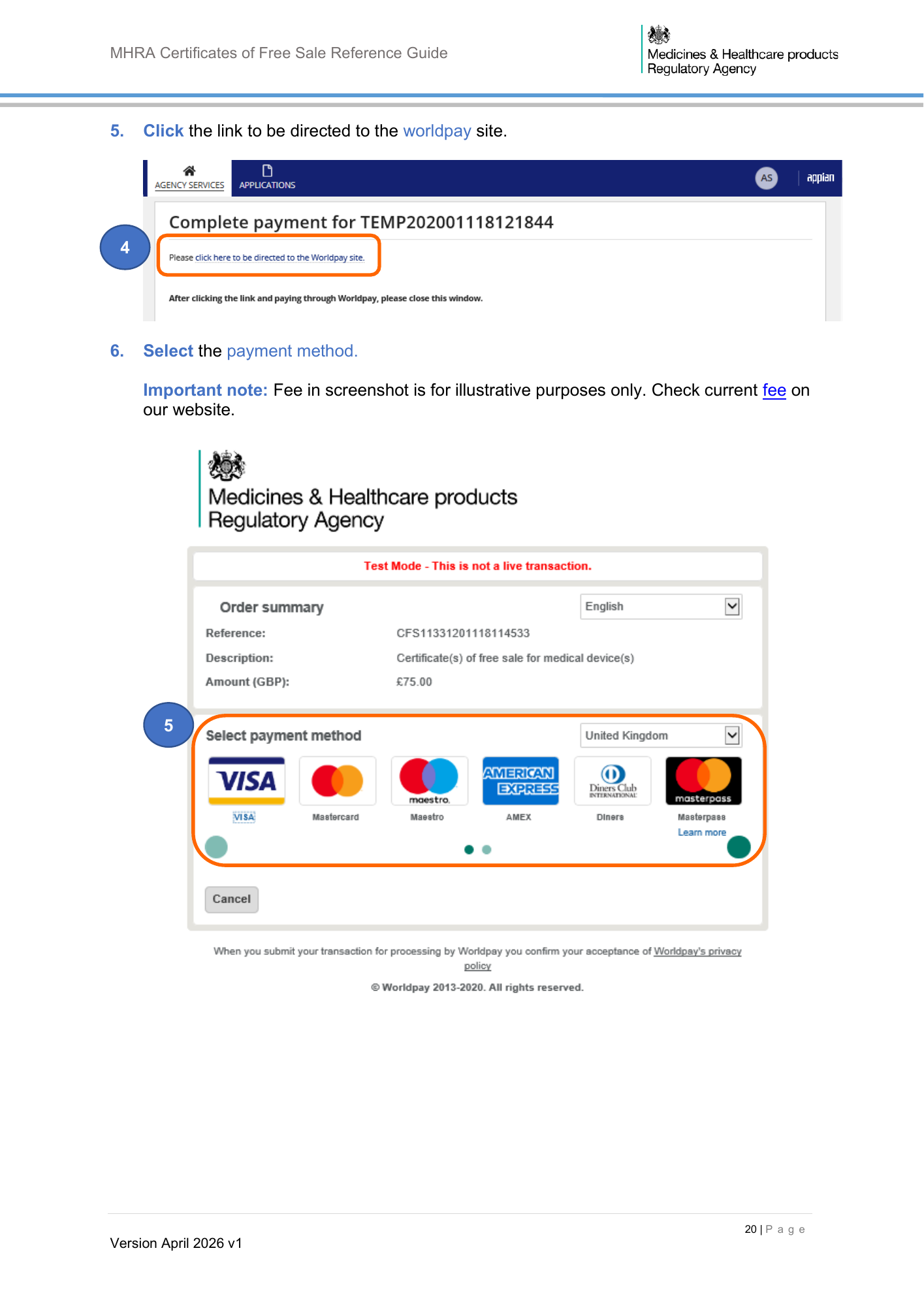
MHRA Certificates of Free Sale Reference Guide 5. Click the link to be directed to the worldpay site. 4 6. Select the payment method. Important note: Fee in screenshot is for illustrative purposes only. Check current fee on our website. 5 20 | P a g e Version April 2026 v1
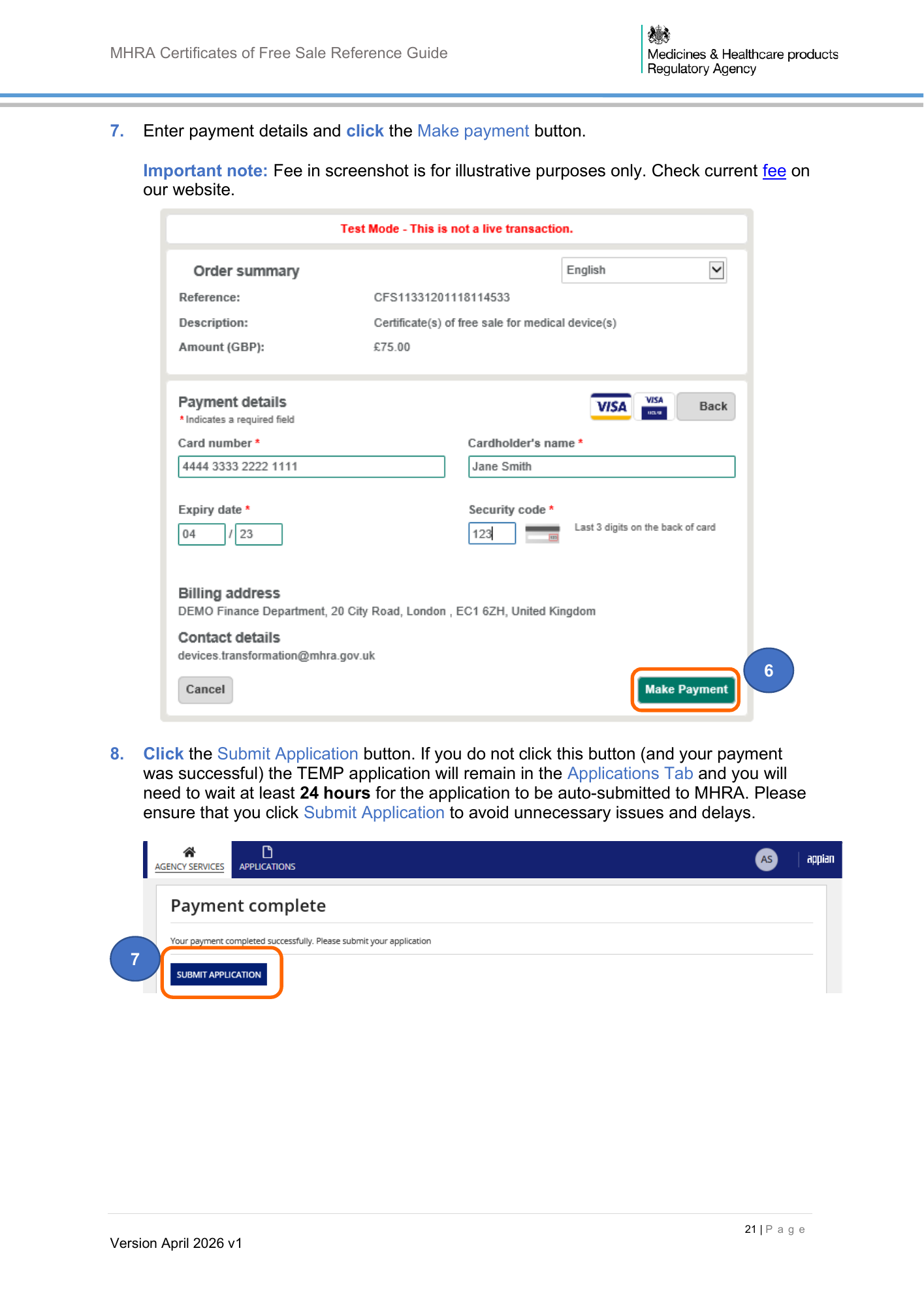
MHRA Certificates of Free Sale Reference Guide 7. Enter payment details and click the Make payment button. Important note: Fee in screenshot is for illustrative purposes only. Check current fee on our website. 6 8. Click the Submit Application button. If you do not click this button (and your payment was successful) the TEMP application will remain in the Applications Tab and you will need to wait at least 24 hours for the application to be auto-submitted to MHRA. Please ensure that you click Submit Application to avoid unnecessary issues and delays. 7 21 | P a g e Version April 2026 v1
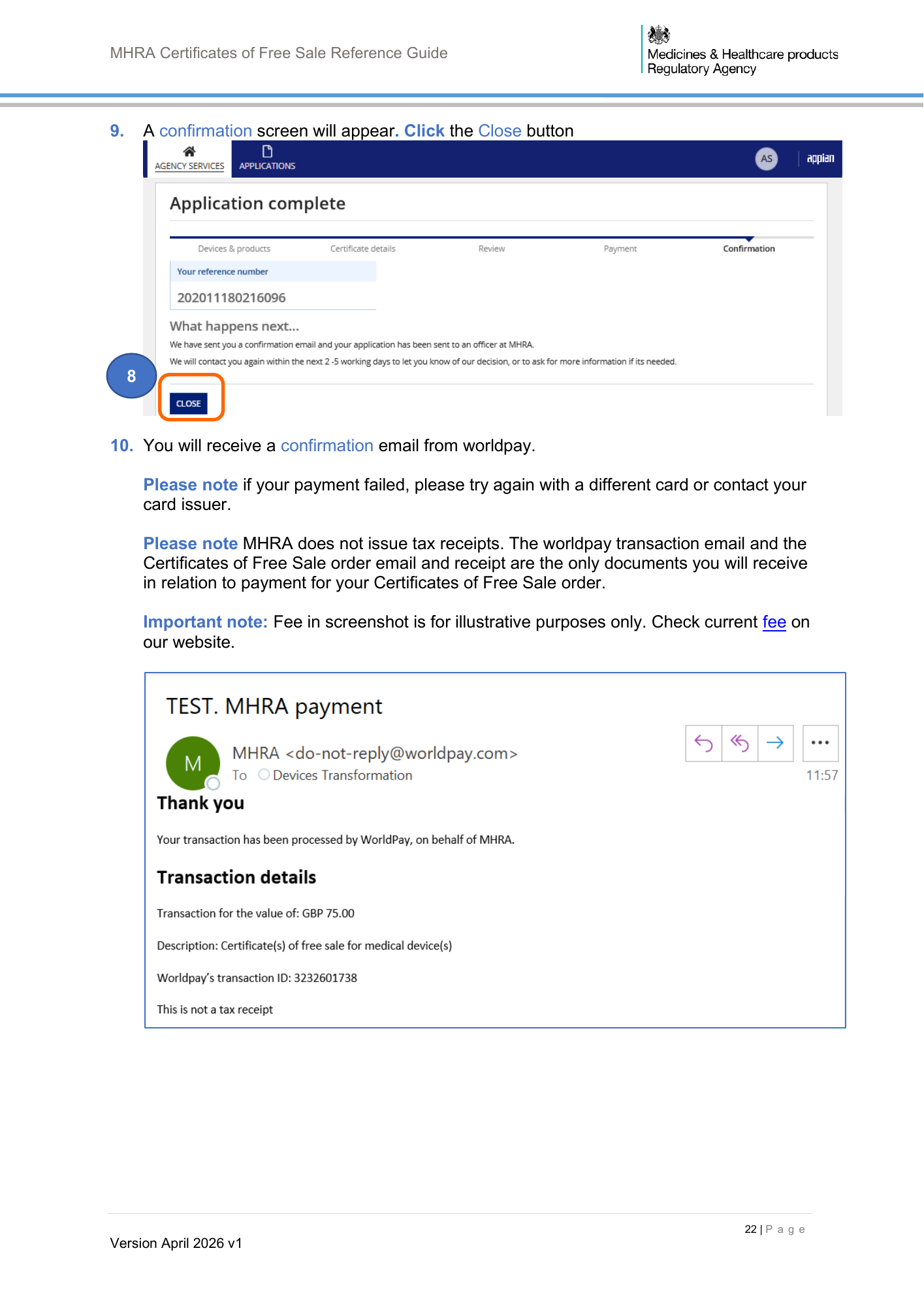
MHRA Certificates of Free Sale Reference Guide 9. A confirmation screen will appear. Click the Close button 8 10. You will receive a confirmation email from worldpay. Please note if your payment failed, please try again with a different card or contact your card issuer. Please note MHRA does not issue tax receipts. The worldpay transaction email and the Certificates of Free Sale order email and receipt are the only documents you will receive in relation to payment for your Certificates of Free Sale order. Important note: Fee in screenshot is for illustrative purposes only. Check current fee on our website. 22 | P a g e Version April 2026 v1
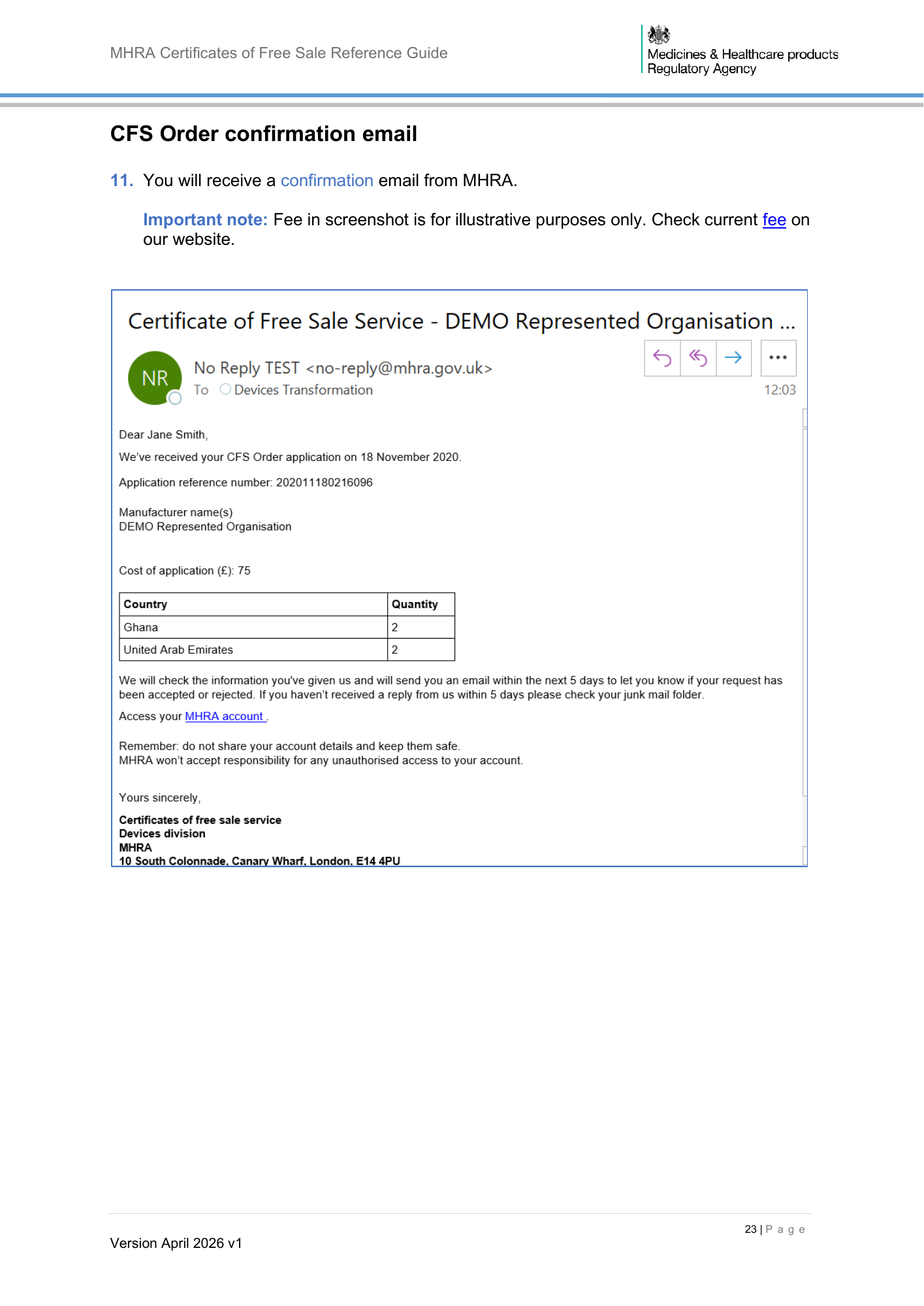
MHRA Certificates of Free Sale Reference Guide CFS Order confirmation email 11. You will receive a confirmation email from MHRA. Important note: Fee in screenshot is for illustrative purposes only. Check current fee on our website. 23 | P a g e Version April 2026 v1
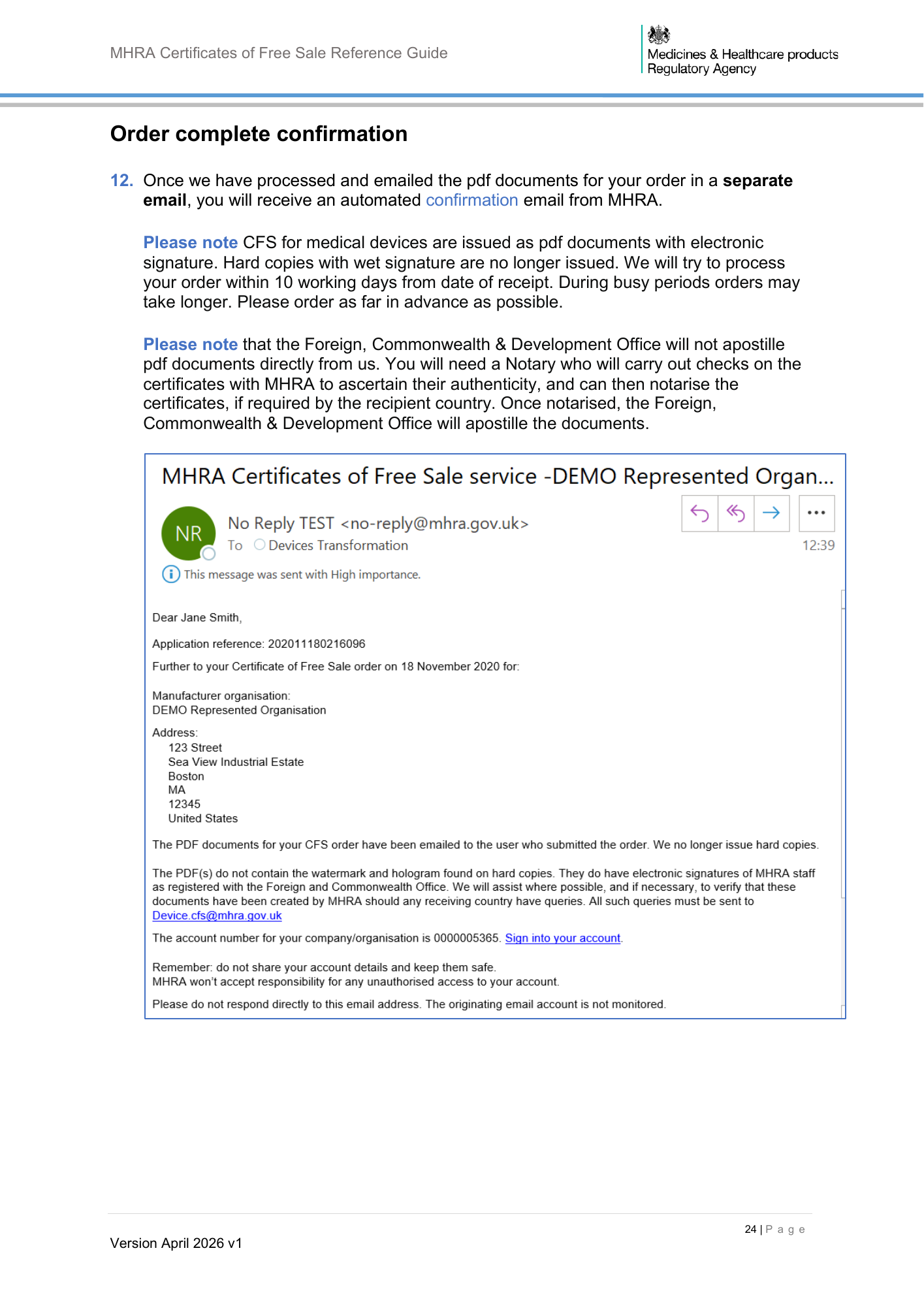
MHRA Certificates of Free Sale Reference Guide Order complete confirmation 12. Once we have processed and emailed the pdf documents for your order in a separate email, you will receive an automated confirmation email from MHRA. Please note CFS for medical devices are issued as pdf documents with electronic signature. Hard copies with wet signature are no longer issued. We will try to process your order within 10 working days from date of receipt. During busy periods orders may take longer. Please order as far in advance as possible. Please note that the Foreign, Commonwealth & Development Office will not apostille pdf documents directly from us. You will need a Notary who will carry out checks on the certificates with MHRA to ascertain their authenticity, and can then notarise the certificates, if required by the recipient country. Once notarised, the Foreign, Commonwealth & Development Office will apostille the documents. 24 | P a g e Version April 2026 v1
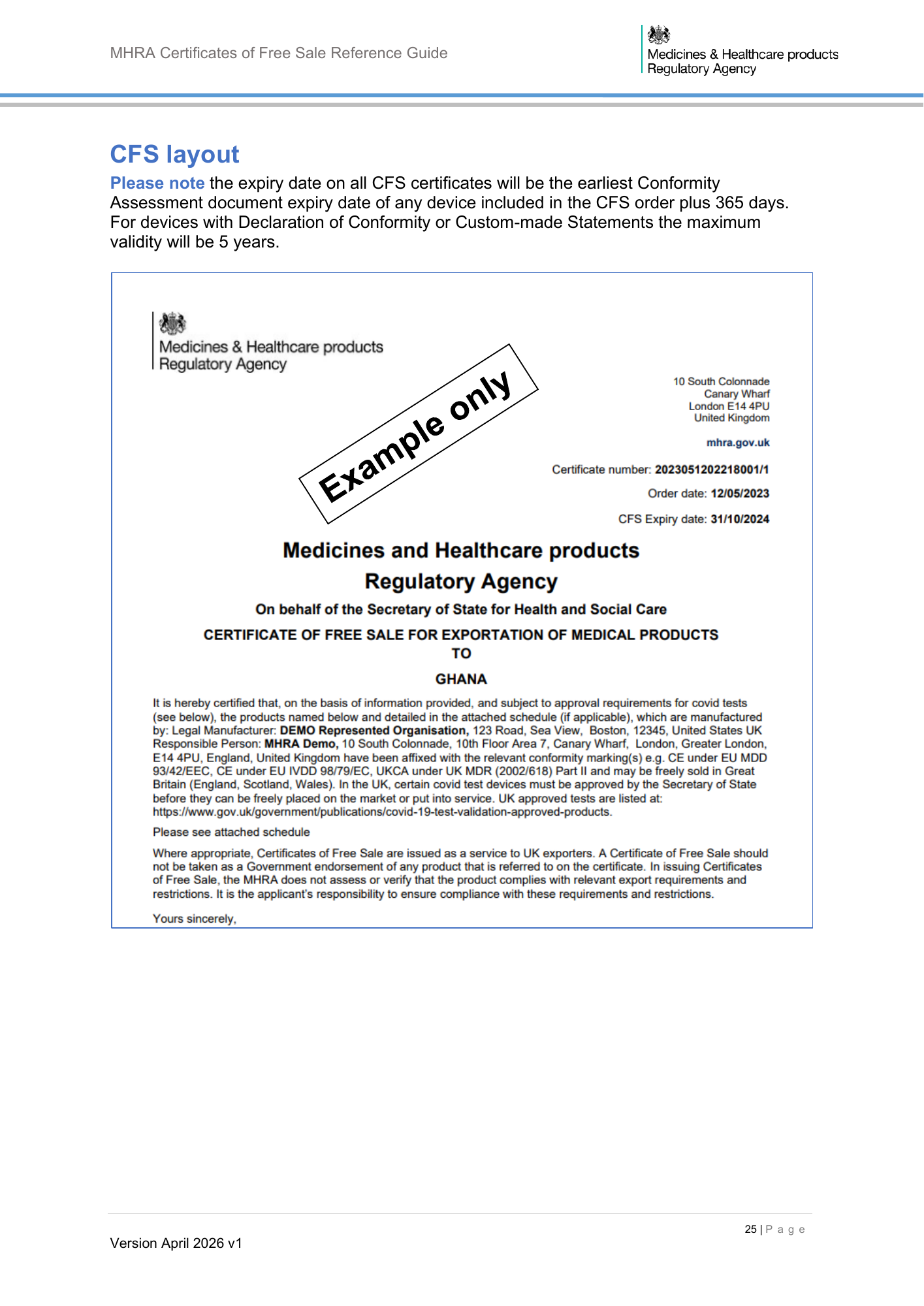
MHRA Certificates of Free Sale Reference Guide CFS layout Please note the expiry date on all CFS certificates will be the earliest Conformity Assessment document expiry date of any device included in the CFS order plus 365 days. For devices with Declaration of Conformity or Custom-made Statements the maximum validity will be 5 years. 25 | P a g e Version April 2026 v1
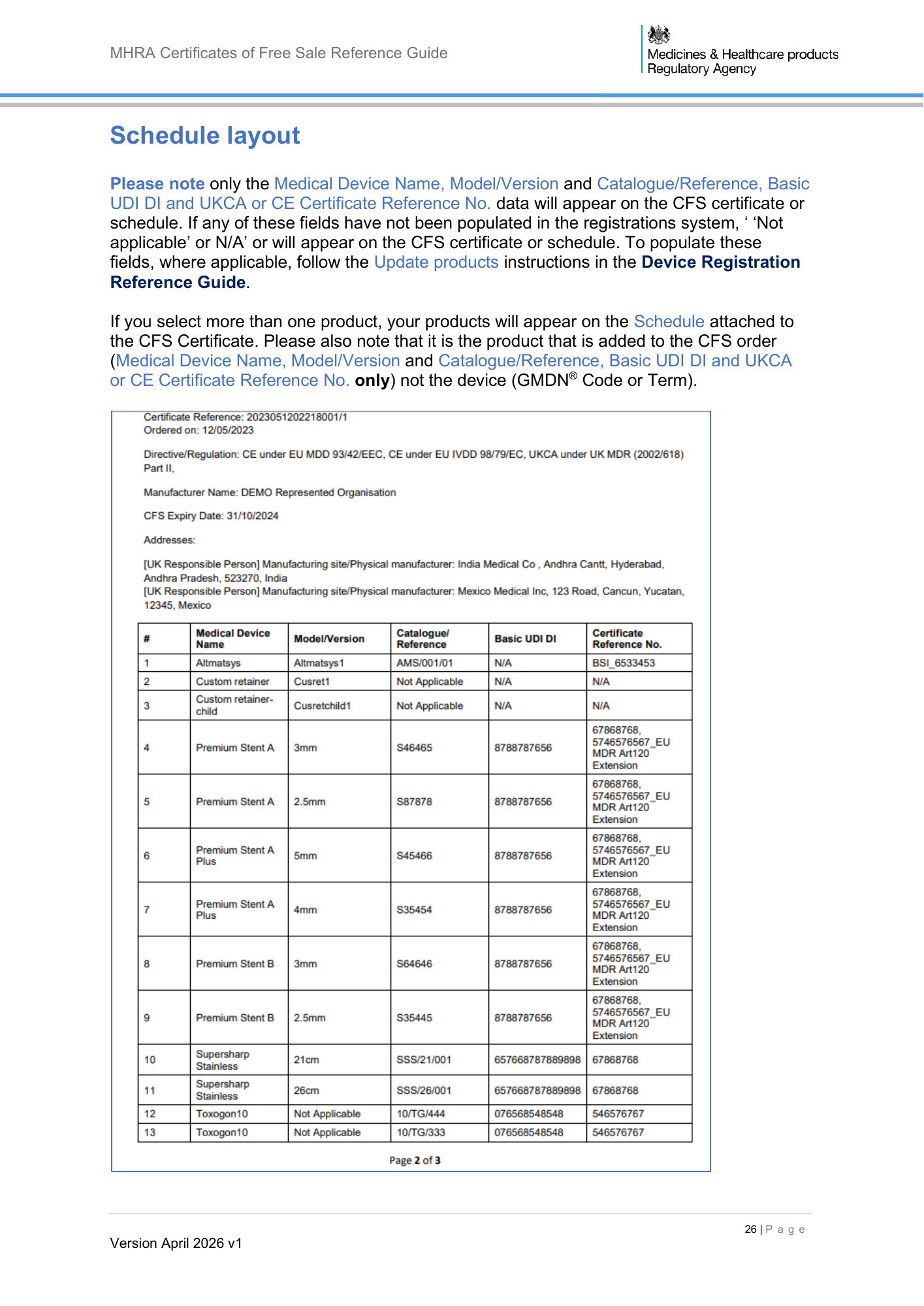
MHRA Certificates of Free Sale Reference Guide Schedule layout Please note only the Medical Device Name, Model/Version and Catalogue/Reference, Basic UDI DI and UKCA or CE Certificate Reference No. data will appear on the CFS certificate or schedule. If any of these fields have not been populated in the registrations system, ‘ ‘Not applicable’ or N/A’ or will appear on the CFS certificate or schedule. To populate these fields, where applicable, follow the Update products instructions in the Device Registration Reference Guide. If you select more than one product, your products will appear on the Schedule attached to the CFS Certificate. Please also note that it is the product that is added to the CFS order (Medical Device Name, Model/Version and Catalogue/Reference, Basic UDI DI and UKCA or CE Certificate Reference No. only) not the device (GMDN® Code or Term). 26 | P a g e Version April 2026 v1
MHRA Certificates of Free Sale Reference Guide Manage registered devices If products need to be added or removed from an existing registered device or Conformity Assessment documents certificates need to be uploaded, linked, or removed (unlinked) from existing registered devices this can be done using the Manage registered devices function. There is currently no fee to do this. Follow the instructions in the Updating Registrations section of the Device Registration Reference Guide to Manage registered devices. Update registered devices and products If products need to be updated, for example Catalogue/Reference data has changed or was not added at the time of registration, this can be done using the Update registered devices and products function. If Medical Device Name or Model/Version needs to be updated, you will need to remove the product and add it again. There is currently no fee to do this. If Basic UDI DI needs to be added follow the Update Device Details instructions in the Device Registration Reference Guide. If product data needs to be updated, follow the Update products instructions in the Device Registration Reference Guide. 27 | P a g e Version April 2026 v1
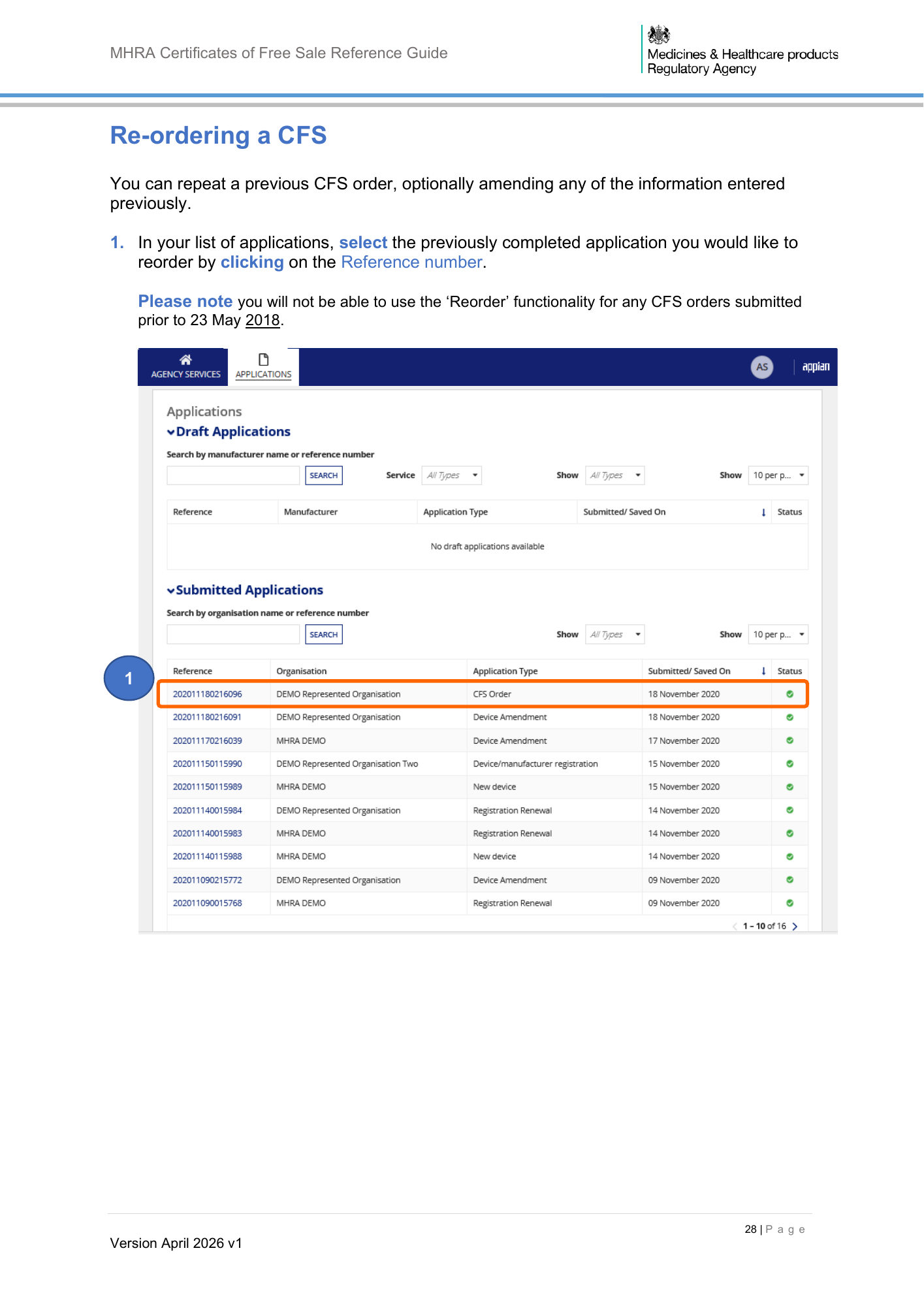
MHRA Certificates of Free Sale Reference Guide Re-ordering a CFS You can repeat a previous CFS order, optionally amending any of the information entered previously. 1. In your list of applications, select the previously completed application you would like to reorder by clicking on the Reference number. Please note you will not be able to use the ‘Reorder’ functionality for any CFS orders submitted prior to 23 May 2018. 1 28 | P a g e Version April 2026 v1
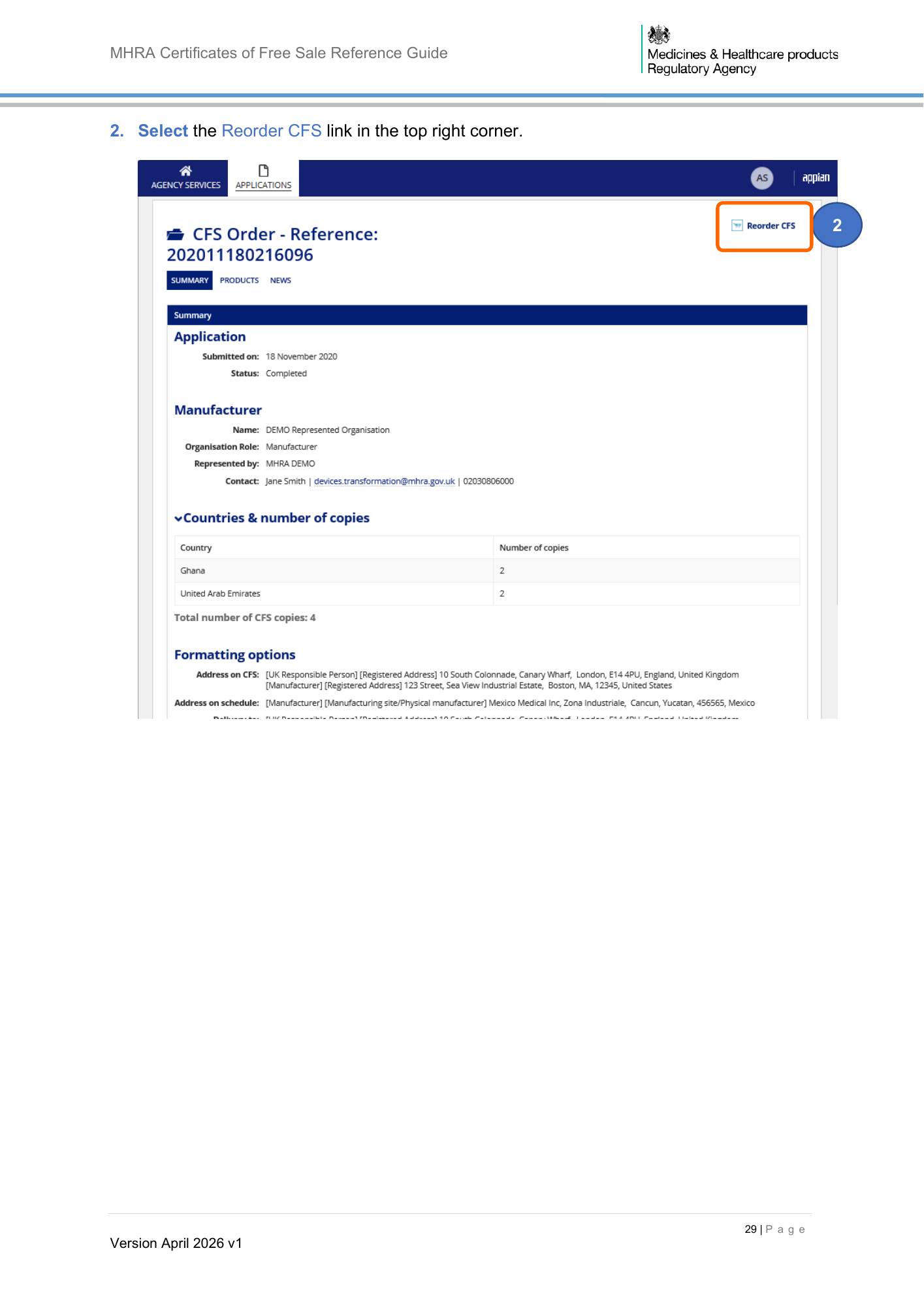
MHRA Certificates of Free Sale Reference Guide 2. Select the Reorder CFS link in the top right corner. 2 29 | P a g e Version April 2026 v1
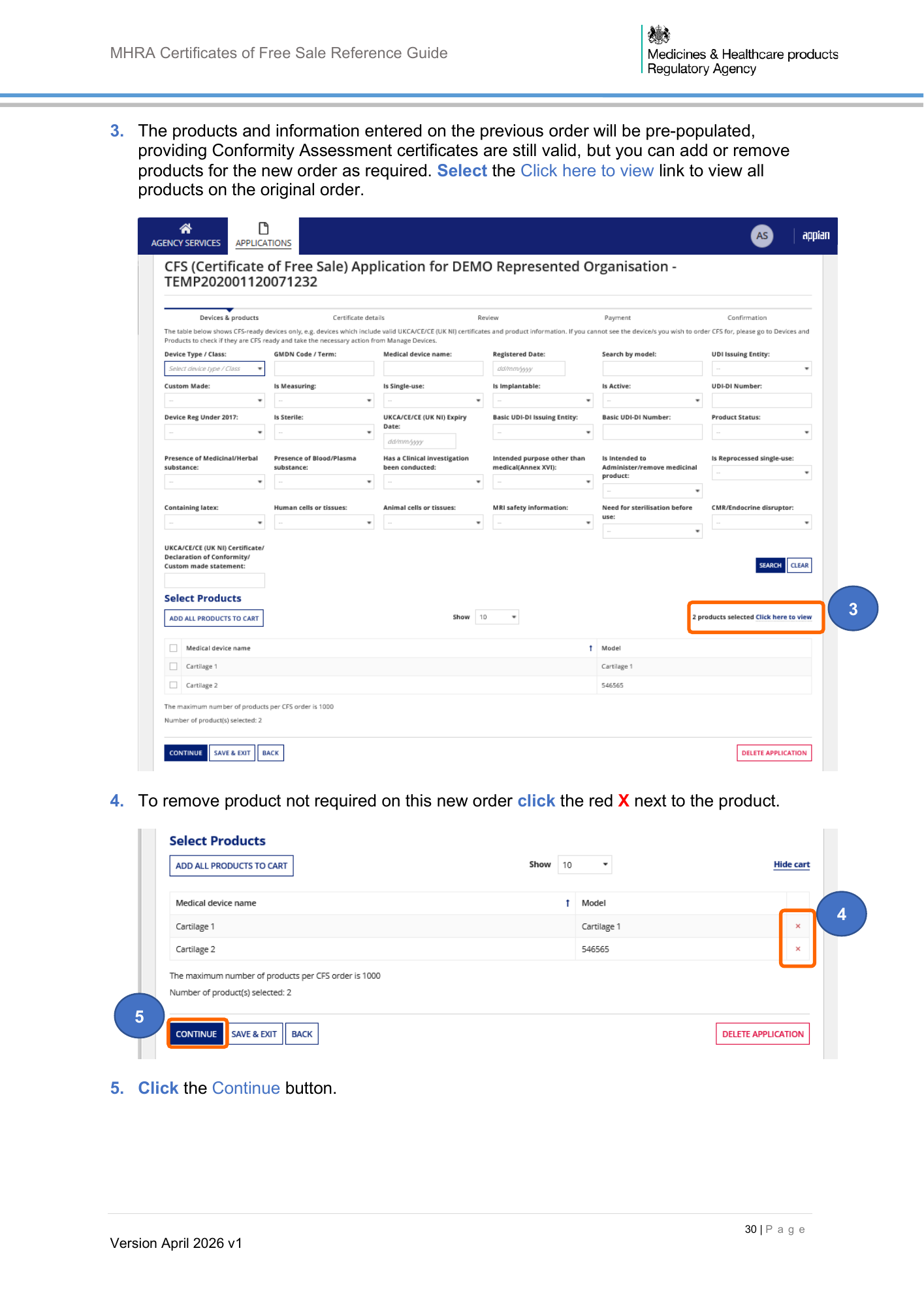
MHRA Certificates of Free Sale Reference Guide 3. The products and information entered on the previous order will be pre-populated, providing Conformity Assessment certificates are still valid, but you can add or remove products for the new order as required. Select the Click here to view link to view all products on the original order. 3 4. To remove product not required on this new order click the red X next to the product. 4 5 5. Click the Continue button. 30 | P a g e Version April 2026 v1
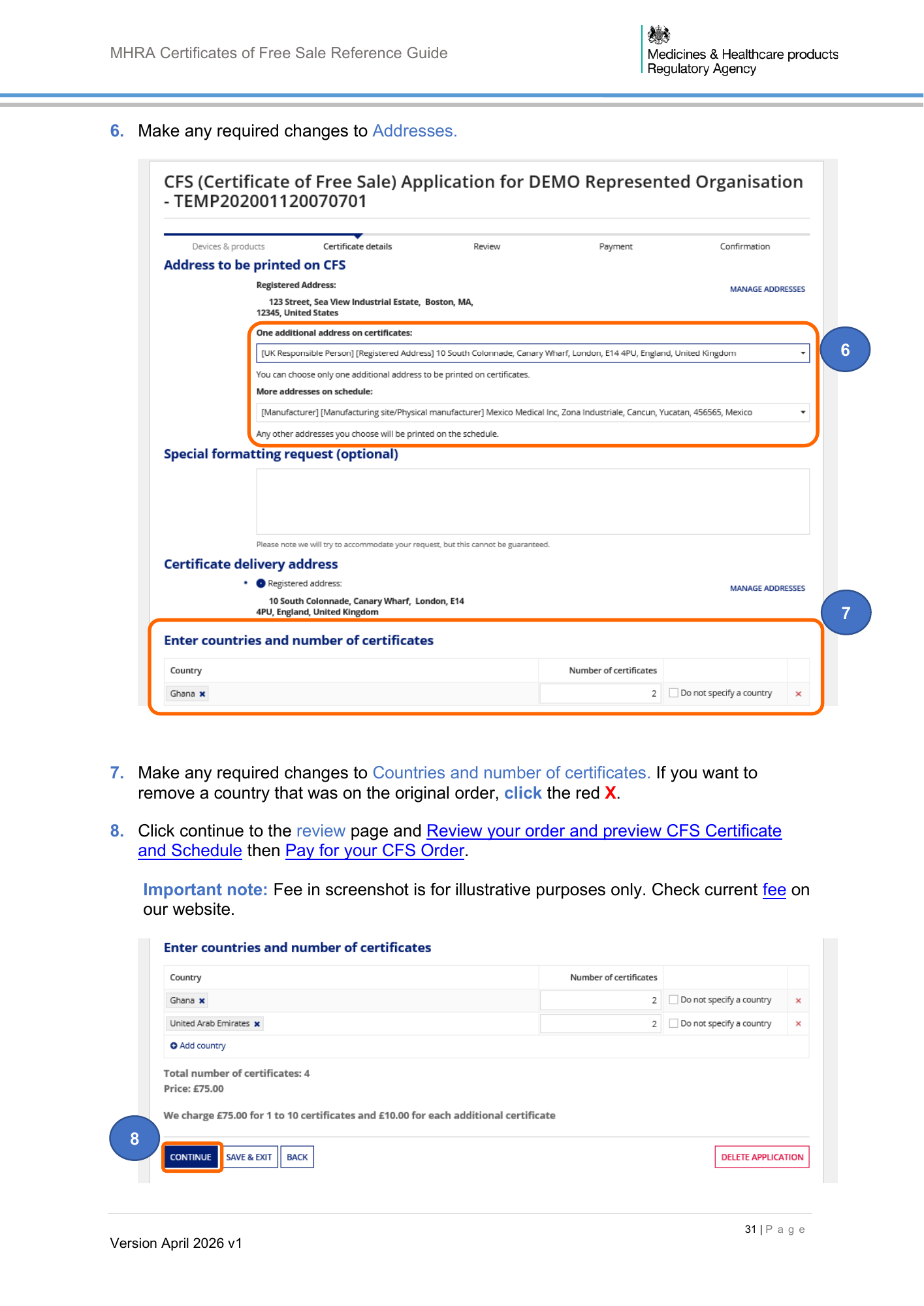
MHRA Certificates of Free Sale Reference Guide 6. Make any required changes to Addresses. 6 7 7. Make any required changes to Countries and number of certificates. If you want to remove a country that was on the original order, click the red X. 8. Click continue to the review page and Review your order and preview CFS Certificate and Schedule then Pay for your CFS Order. Important note: Fee in screenshot is for illustrative purposes only. Check current fee on our website. 8 31 | P a g e Version April 2026 v1
MHRA Certificates of Free Sale Reference Guide Save and exit: resume applications When completing an application, you can save, exit and return to completing the application from where you left off. This option is not available on all screens. Please follow the instructions in the Device Registration Reference Guide. Adding a New Manufacturer (for UKRP in UK and AR in NI) Follow the instructions in the Updating Registrations section of the Device Registration Reference Guide for Adding a Manufacturer. The current statutory fee will be payable. https://www.gov.uk/guidance/register-medical-devices-to-place-on-the-market#reference- guides 32 | P a g e Version April 2026 v1
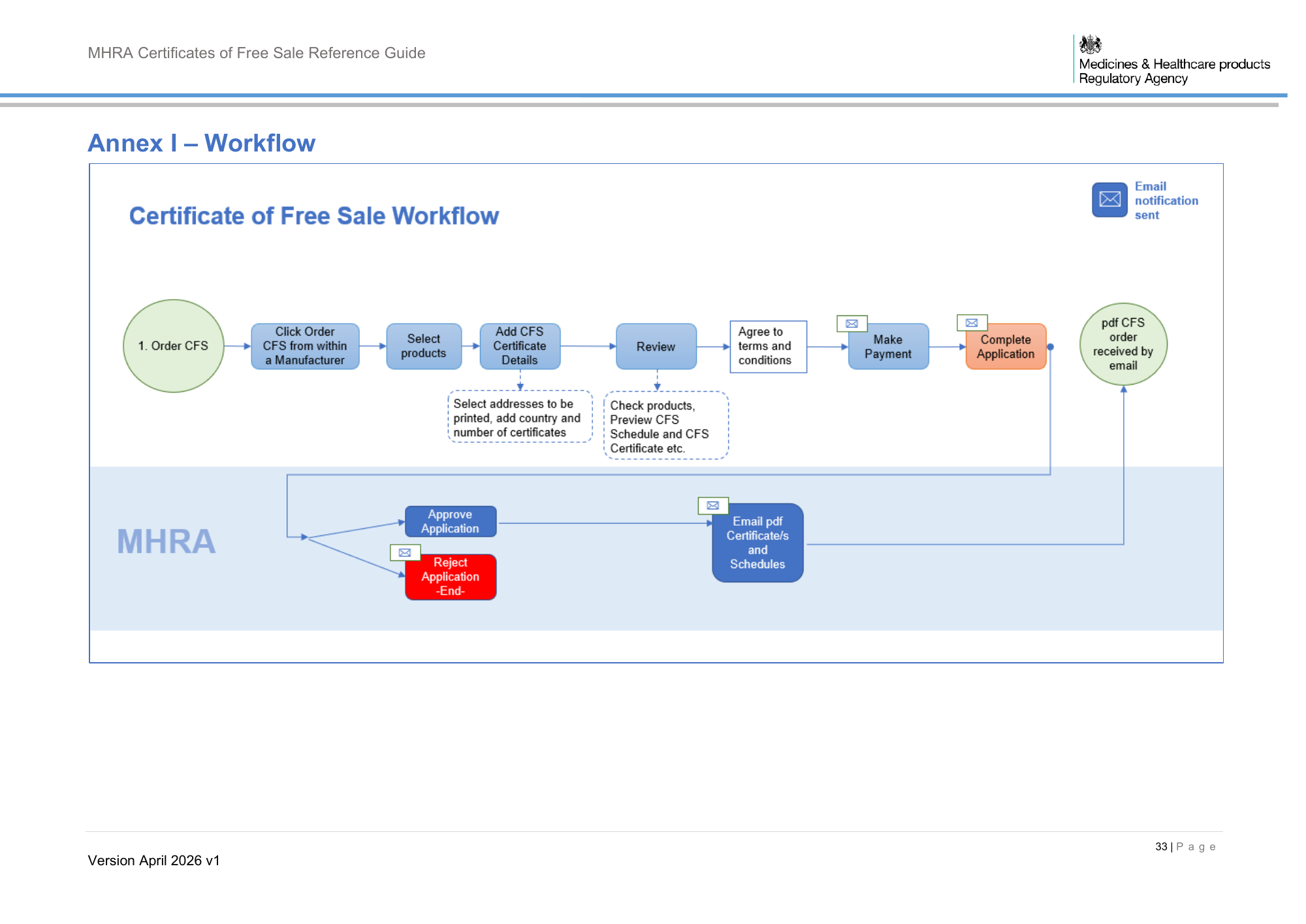
MHRA Certificates of Free Sale Reference Guide Annex I – Workflow 33 | P a g e Version April 2026 v1